Skip to content
RECHTIGO
All features for lawyers
Team and staff

Lawyer team, staff and partners

Colleagues work on shared case files with a team power of attorney; staff only work in case files you release to them. Time tracking shows who worked on which case file and for how long. You set up partner lawyers and partner experts in one place.

rechtigo.de/anwalt/team
Screenshot from Rechtigo, view for lawyers: Lawyer team, staff and partners
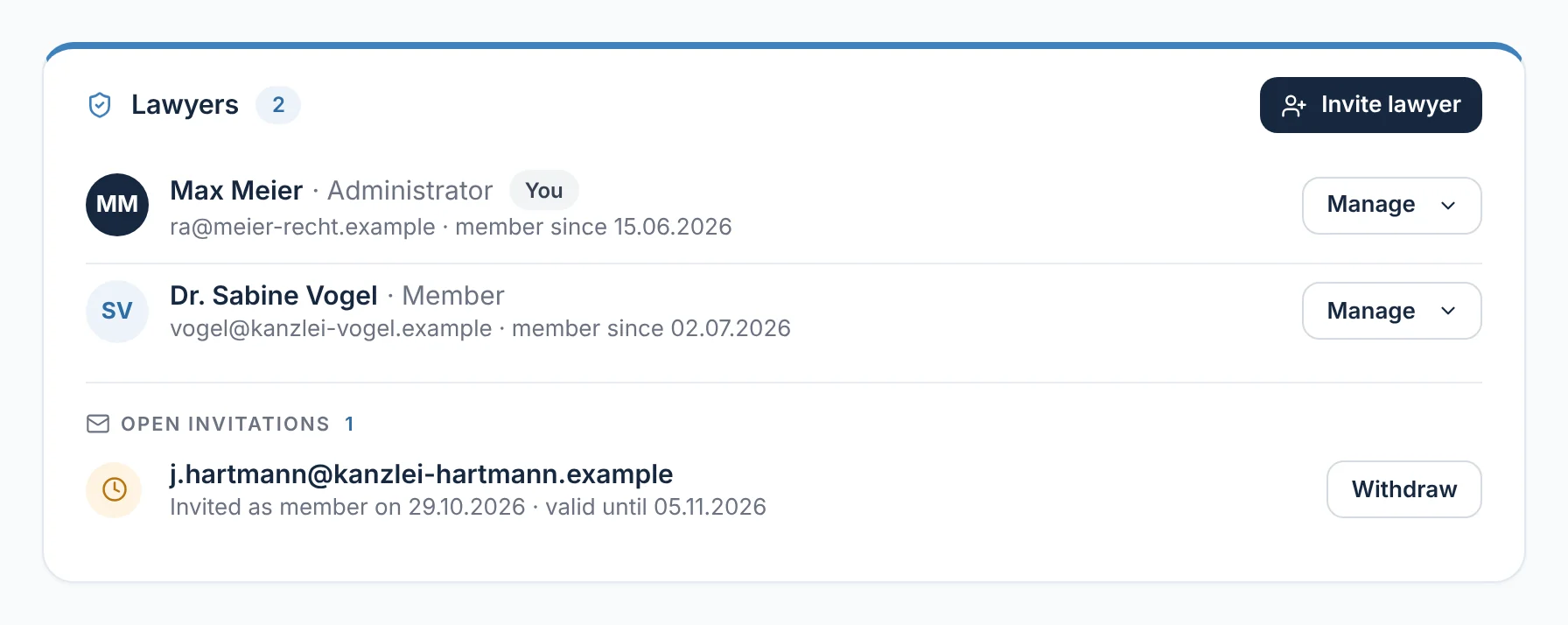
In the picture: View for lawyers: ‘Lawyers’ in your team – lawyer Max Meier as administrator, lawyer Dr Sabine Vogel as member, with one pending invitation below.

Lawyer team

Your colleagues only see a case file with a team power of attorney and the client’s consent.

Staff

Read, send messages, request documents – only in case files you release.

Time per case file

Timer in the case file, reports per person, per case file and per day.

Partners

Partner lawyers for unanswered requests, partner experts for accident mandates.

Lawyer team

Shared case files – only with the client’s consent

Under ‘Practice → Lawyer team’ you set up your team and invite colleagues. When you request the power of attorney for the team, it names every member. The team can only see the case file once your client expressly consents when signing – after that, your client sees in their case file who is working on it.

  • The case file and deadlines stay with the responsible lawyer
  • The conflict check includes the case files of all members
From everyday practice

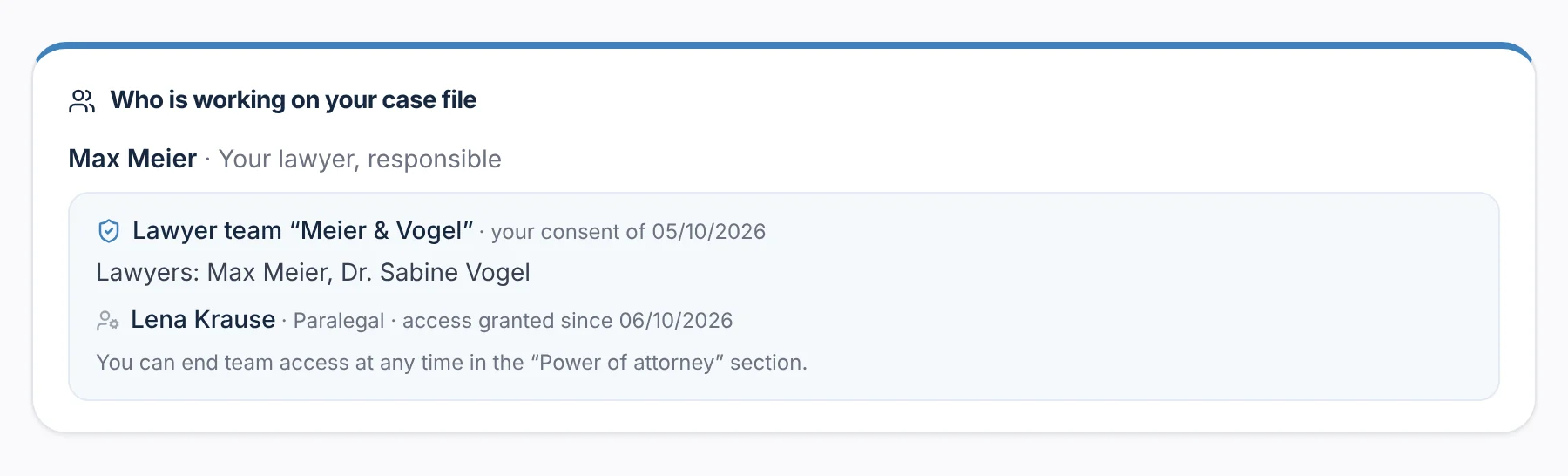
Client Thomas Hoffmann consented on 5 October 2026. His case file shows lawyer Max Meier as responsible, the lawyer team ‘Meier & Vogel’ and staff member Lena Krause, released since 6 October 2026.
Request a power of attorney for your team
rechtigo.de/fall
Screenshot from Rechtigo, view for clients: Shared case files – only with the client’s consent
In the picture: View for clients: ‘Who is working on your case file’ in client Thomas Hoffmann’s case file – lawyer Max Meier, the lawyer team ‘Meier & Vogel’ and staff member Lena Krause.
Staff

Invite staff – no lawyer account needed

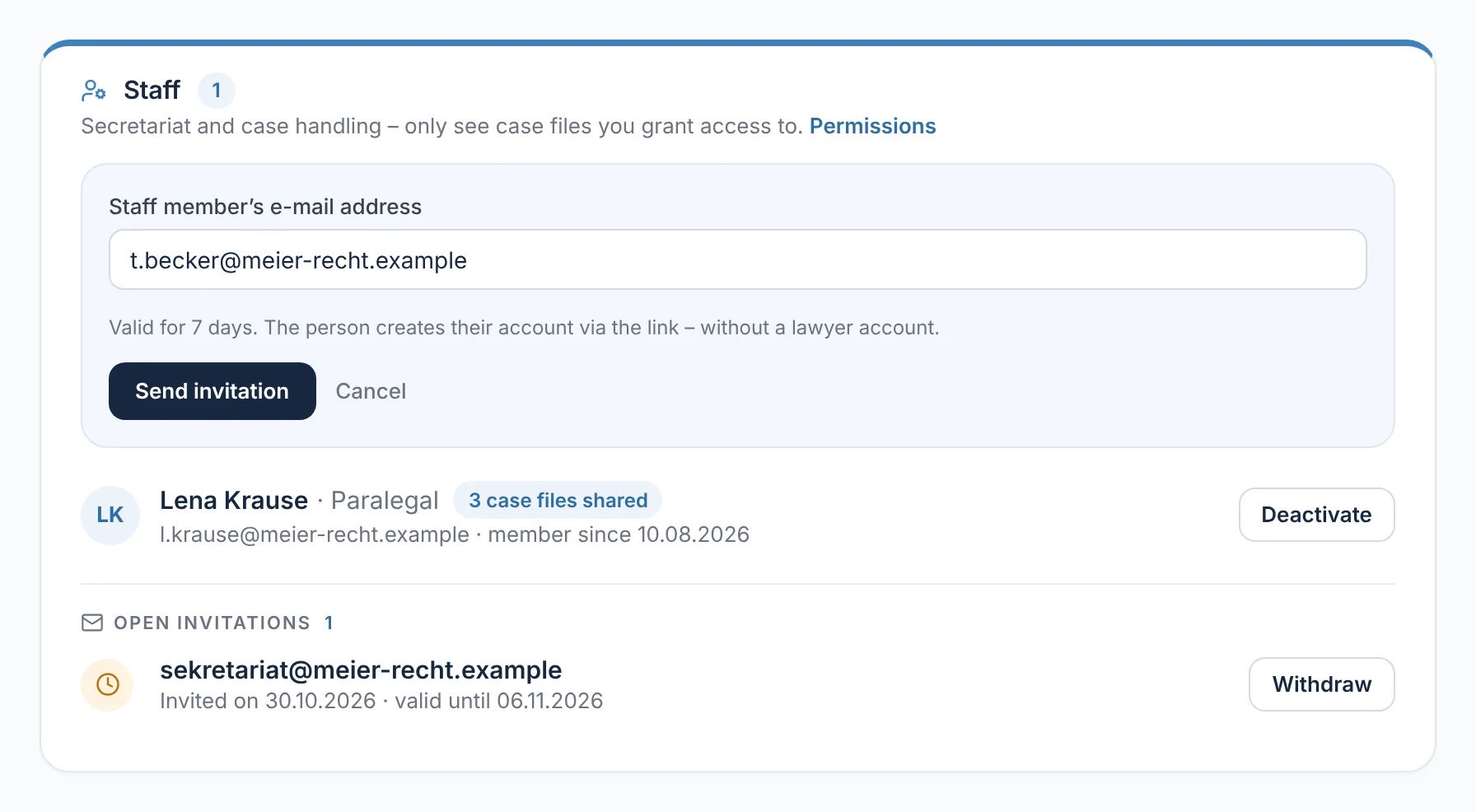
Secretaries and caseworkers don’t need a lawyer account. With ‘Invite staff member’ you just enter the e-mail address; the person creates their account via the link, with their role, such as ‘paralegal’. The invitation is valid for 7 days. The list shows how many case files are released to each person, plus the pending invitations.

  • Deactivating ends the account and all releases at once
From everyday practice

Staff member Lena Krause has been on board since 10 August 2026, and three case files are released to her. An invitation for the secretary is open until 6 November 2026; lawyer Max Meier can withdraw it at any time.

rechtigo.de/anwalt/team
Screenshot from Rechtigo, view for lawyers: Invite staff – no lawyer account needed
In the picture: View for lawyers: the ‘Staff’ card – at the top the invitation by e-mail address, below it staff member Lena Krause with three released case files.
Permissions

What staff can do – and what they can’t

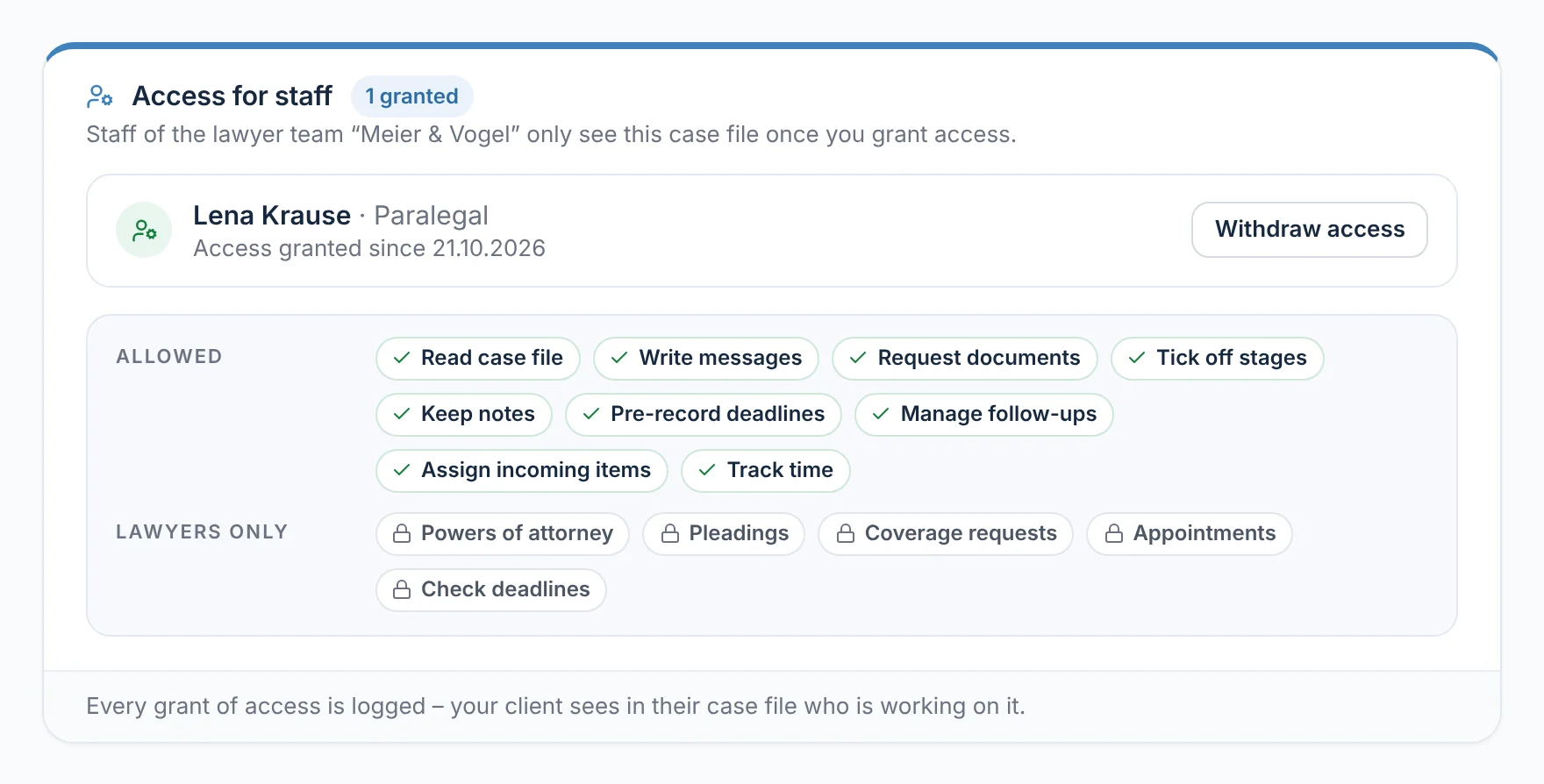
In released case files, staff can read, write messages, request documents, tick off stages, keep notes, note deadlines, manage follow-ups, assign incoming items and log their time. Powers of attorney, pleadings, coverage requests, appointments and checking deadlines stay with the lawyers. A release requires the client’s consent to team access; every release is logged.

  • Each release applies per case file and can be revoked at any time
From everyday practice

Staff member Lena Krause has had access to this case file since 21 October 2026. She requests documents and notes deadlines; pleadings and checking the deadlines stay with lawyer Max Meier.

rechtigo.de/anwalt/akte
Screenshot from Rechtigo, view for lawyers: What staff can do – and what they can’t
In the picture: View for lawyers: ‘Access for staff’ in a case file – staff member Lena Krause has been released; below, what she can do and what only lawyers can do.
Staff efficiency

Working time per person, case file and day

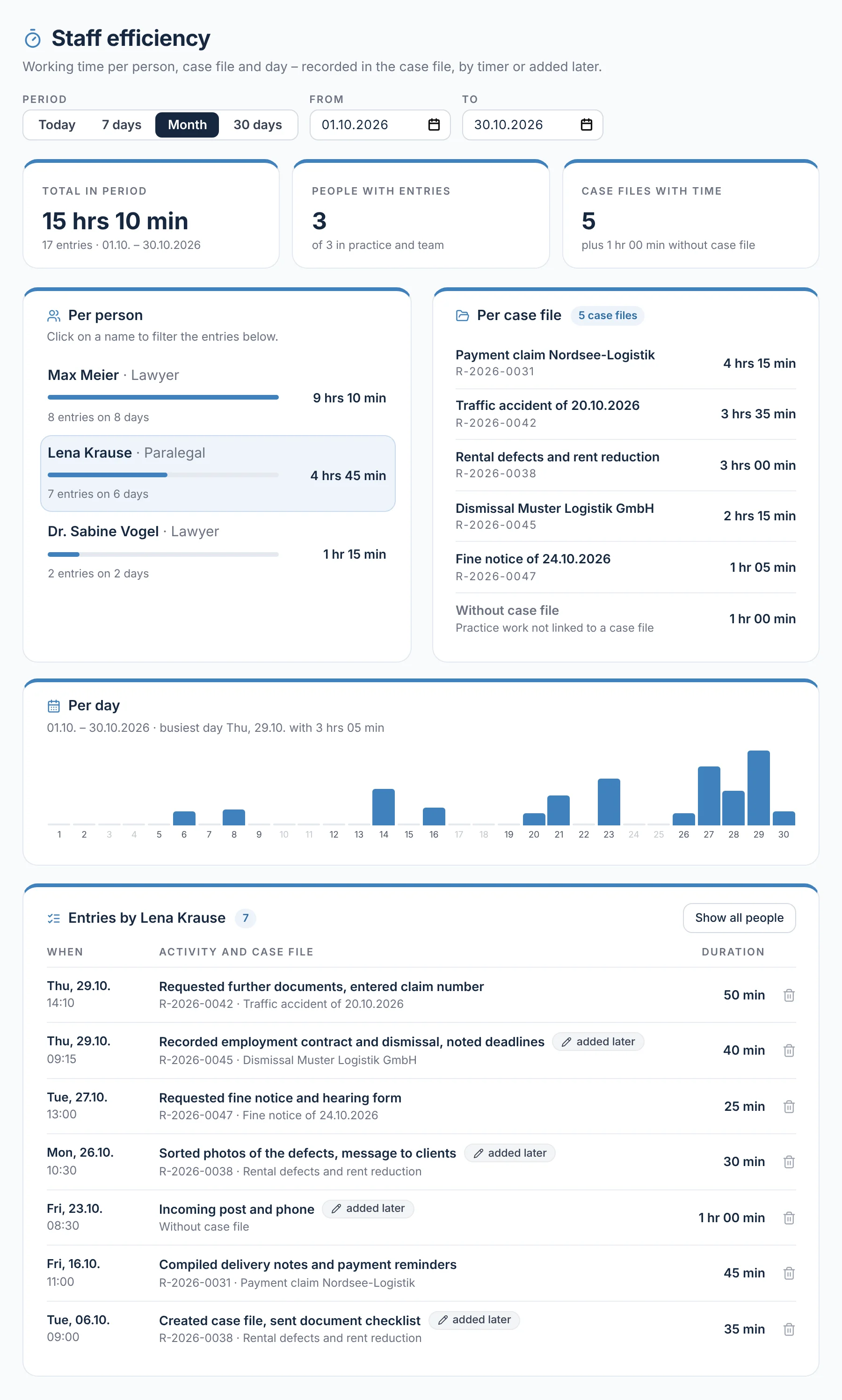
Every case file has a timer with ‘Start’ and ‘Stop’; anything you forgot you can add afterwards. Under ‘Practice → Staff efficiency’ you see the times for yourself, your colleagues and your staff: totals per person, per case file and per day, plus every single entry. You choose the period freely.

  • Times added afterwards remain identifiable
From everyday practice

Before the monthly review, lawyer Max Meier sees: staff member Lena Krause logged 4 hrs 45 min in seven entries in October. One click on her name shows each one.

rechtigo.de/anwalt/zeiten
Screenshot from Rechtigo, view for lawyers: Working time per person, case file and day
In the picture: View for lawyers: ‘Staff efficiency’ in October 2026 – totals per person, per case file and per day, with staff member Lena Krause’s entries below.
Partner lawyers

Partner lawyers for unanswered requests

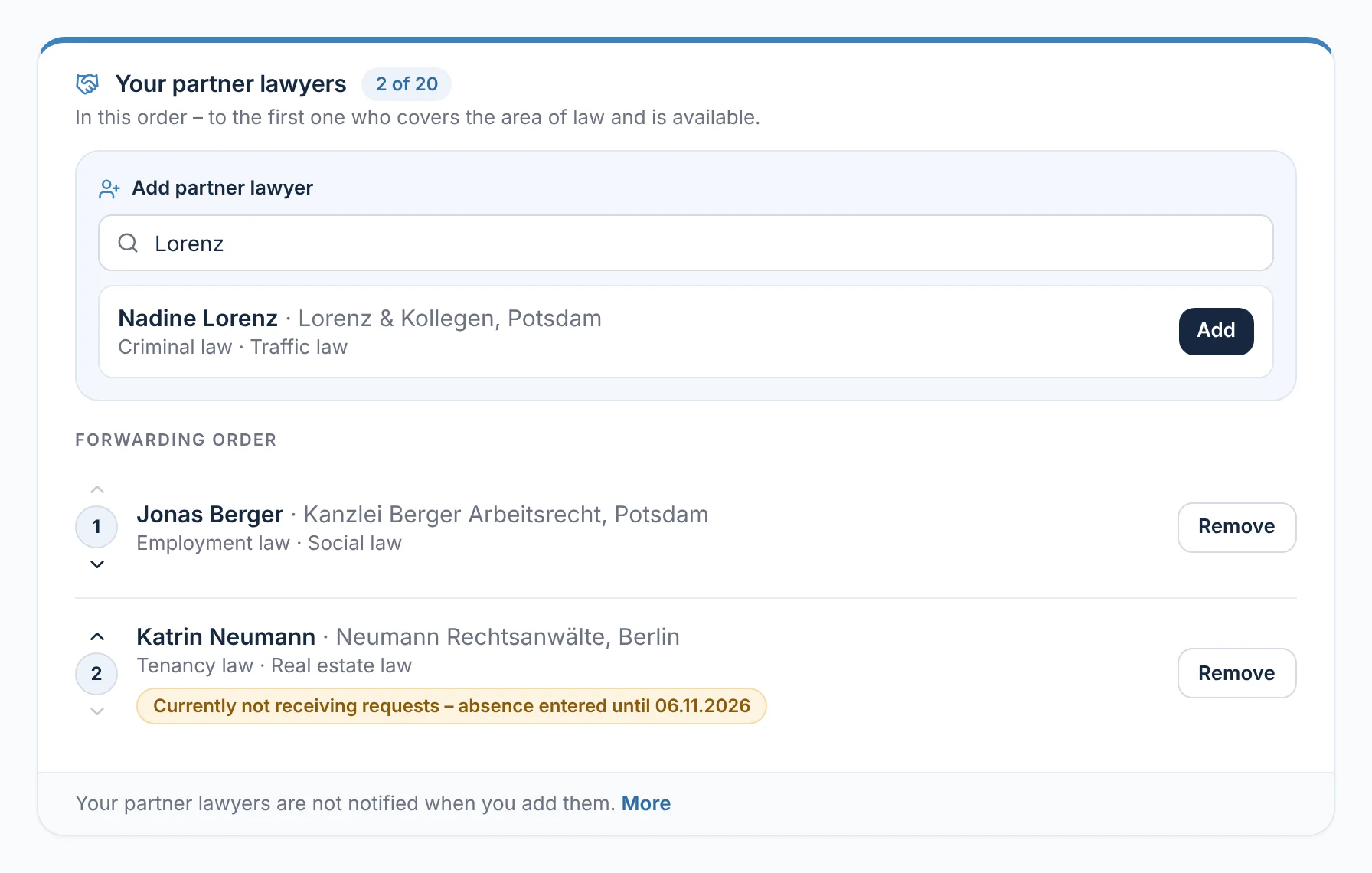
If your client has agreed to forwarding and their request goes unanswered, it goes to your partner lawyers – in your order, to the first one who covers one of your areas of law and is available. You search among the verified lawyers on Rechtigo and see who is currently not receiving requests, for example because of an absence. A request is forwarded no more than once; no fees are paid.

  • Your partner lawyers are not notified
From everyday practice

In lawyer Max Meier’s list, partner lawyer Jonas Berger for employment law is in first place. The partner lawyer in second place receives no requests until 6 November 2026 because she has entered an absence.

rechtigo.de/anwalt/profil/partner
Screenshot from Rechtigo, view for lawyers: Partner lawyers for unanswered requests
In the picture: View for lawyers: ‘Your partner lawyers’ – the search at the top, below it the forwarding order with partner lawyer Jonas Berger in first place.
Partner experts

Invite partner experts – their accident clients find their way to you

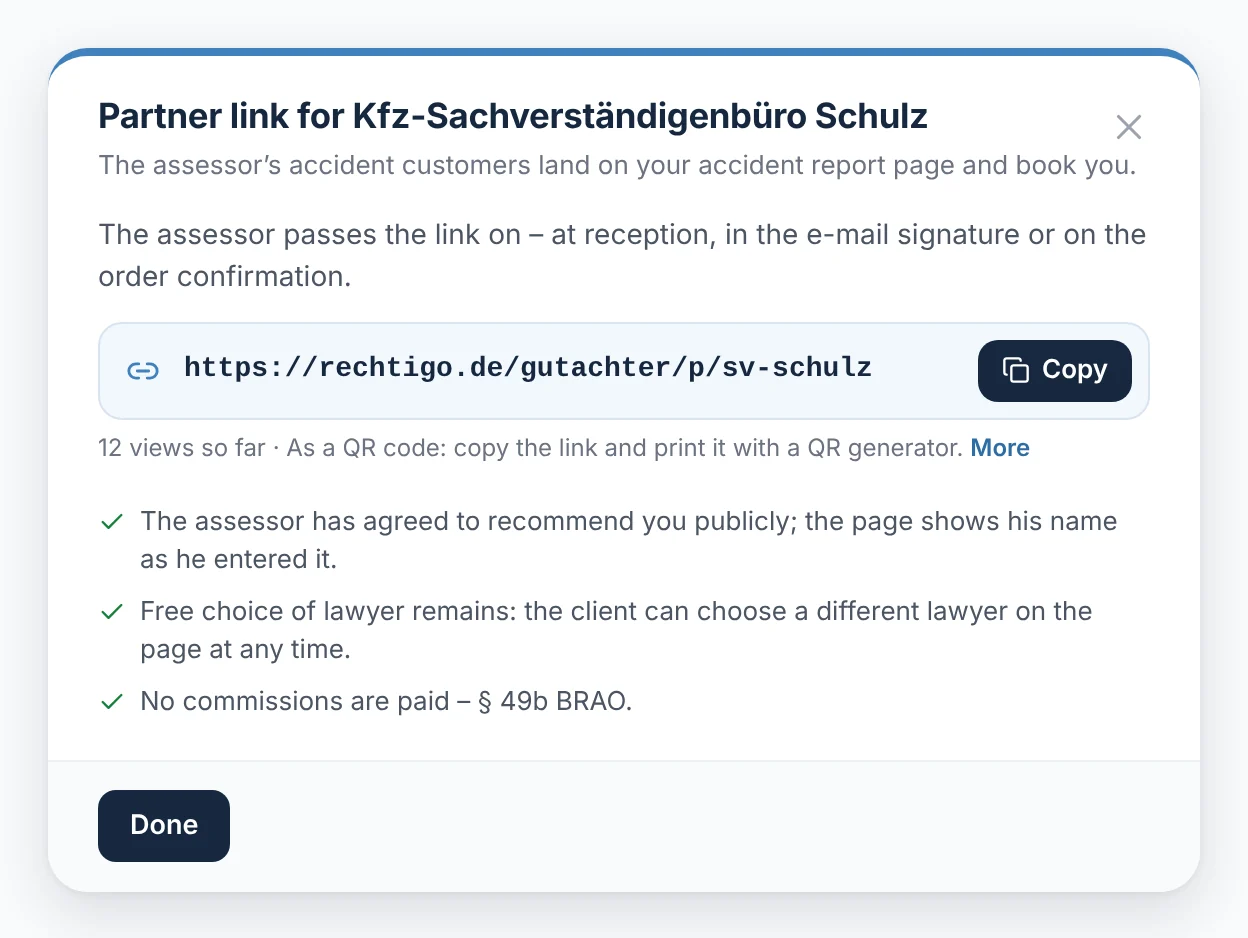
For accident mandates you can add up to ten experts. After your invitation, the expert enters their photo, catchment area and qualifications themselves, without their own account; you approve their profile. Once they have agreed to recommend you publicly, you generate their partner link: their accident clients land on your accident report form and book you.

  • Your client instructs the expert themselves – from your list or one of their own choosing
  • No commissions, free choice of lawyer (§ 49b BRAO)
From everyday practice

Partner expert Kfz-Sachverständigenbüro Schulz filled in its profile itself, and lawyer Max Meier approved it. The office prints the partner link as a QR code on its order confirmation – Rechtigo shows 12 views so far.

More on Case file from an incoming expert report
rechtigo.de/anwalt/profil/gutachter
Screenshot from Rechtigo, view for lawyers: Invite partner experts – their accident clients find their way to you
In the picture: View for lawyers: the partner link for partner expert Kfz-Sachverständigenbüro Schulz – the link to copy, the views so far and the three conditions.
More

Also included

Invite colleagues

Invitation as member or administrator, valid for 7 days; every change is logged.

Team case files

Shared case files appear in the case file overview under ‘Team case files’.

Deadlines in the team

With team access, colleagues work in the case file’s deadlines and incoming items – in the responsible lawyer’s deadline register.

Questions

Frequently asked questions

Your question isn't here? Write to us at support@rechtigo.de.

Can a colleague cover for me while I’m on holiday?

In shared case files, yes: with team access, colleagues answer messages, request documents and work on letters. Only the responsible lawyer can request or revoke a power of attorney.

Does Rechtigo check my partner experts?

No. The expert enters their details themselves; by approving them, you state that you work with this expert.

Can my secretary help out if I work on my own?

Yes. Set up a team for this under ‘Practice → Lawyer team’ – even on your own – and invite staff. You can release case files whose client has agreed to team access.

Does the power of attorney also cover colleagues who join the team later?

No. A team power of attorney only authorises those who were in the team when it was requested and are named in it – later members do not see these case files.

What happens if a colleague leaves the team?

Then team access ends in both directions: the colleague no longer sees your shared case files, and her own stay with her – without access for your team and your staff.

Founding programme

Join the waitlist now

Rechtigo costs from €99 a month, €0 per mandate; the first 50 lawyers per city start in the Founding programme with three months free.

Rechtigo launches on 15 January 2027 – we will let you know as soon as registration opens.