Skip to content
RECHTIGO
All features for lawyers
Legal expenses insurance and coverage request

The coverage request is already prepared

Your client brings their legal expenses insurance details, and the draft coverage request is created from the case data. After your click, it goes to the insurer by e-mail with a PDF. If no reply comes, you send a reminder with one click – and your client only learns of the confirmation.

rechtigo.de/anwalt/akte
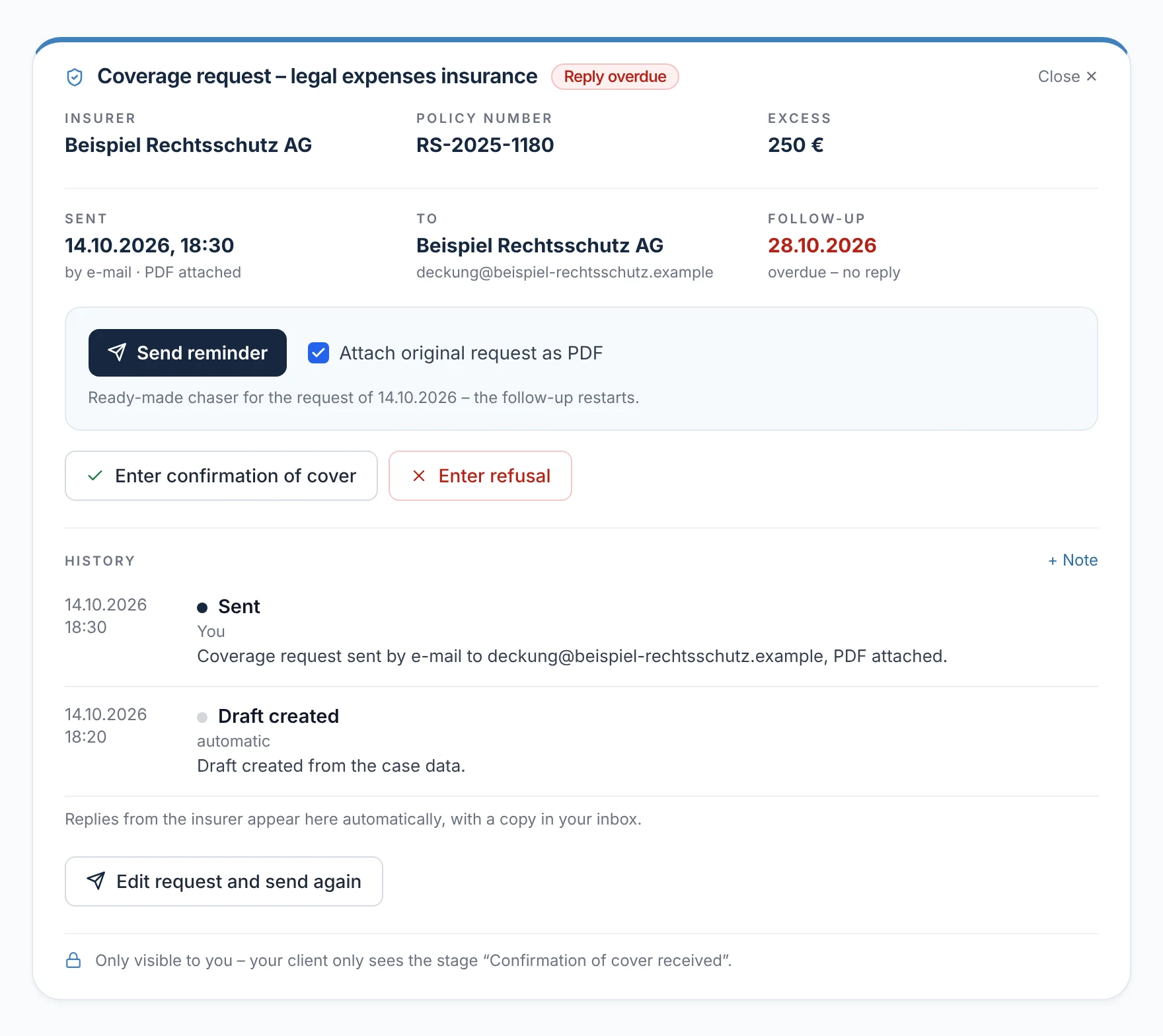
Screenshot from Rechtigo, view for lawyers: The coverage request is already prepared
Pictured: View for lawyers: the coverage request of the clients, the Hoffmann family – sent by e-mail with a PDF on 14.10.2026, ‘overdue’ since 28.10.; below it ‘Send reminder’ and the history.

Data from the client

Insurer and policy number are in the case file from their profile.

Draft from the case file

Subject and text are created from the case data – you only add what's missing.

Sent with a PDF

By e-mail to the insurer – only after your second click on the checked address.

Follow-up

If there is no reply after 14 days, the request appears in the deadline register and the daily list – the reminder is sent with one click.

Legal expenses insurance details

Your client brings the insurance details

Your client chooses their insurer from a list or photographs the policy; they confirm insurer, number and excess in their profile. When creating the case, they answer ‘Do you have legal expenses insurance?’. The case file shows both in the ‘Legal expenses insurance coverage request’ card. If they don't match, Rechtigo says so: ‘None according to profile – but insured according to case details, please clarify’.

  • For business clients, the case file reminds you to ask about the company's legal expenses insurance
From everyday practice

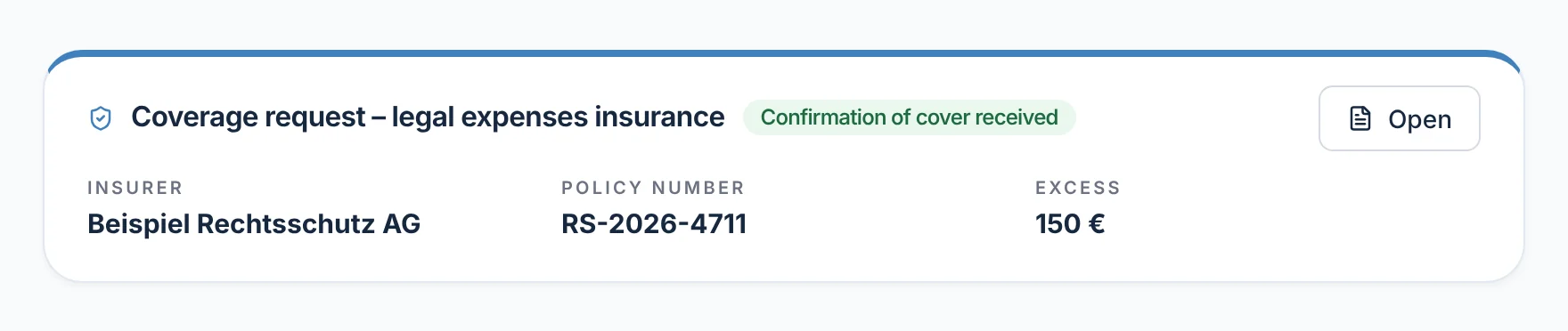
Your client answered ‘Yes’ when creating the case and entered Beispiel Rechtsschutz AG in their profile with policy number and excess. Lawyer Max Meier doesn't need to ask; next to the card's title it now says ‘Confirmation received’.
rechtigo.de/anwalt/akte
Screenshot from Rechtigo, view for lawyers: Your client brings the insurance details
Pictured: View for lawyers: the ‘Legal expenses insurance coverage request’ card in a case file – insurer, policy number and excess from the client's profile, next to the title the status ‘Confirmation received’.
Draft and sending

The request is created from the case data – sent only after your check

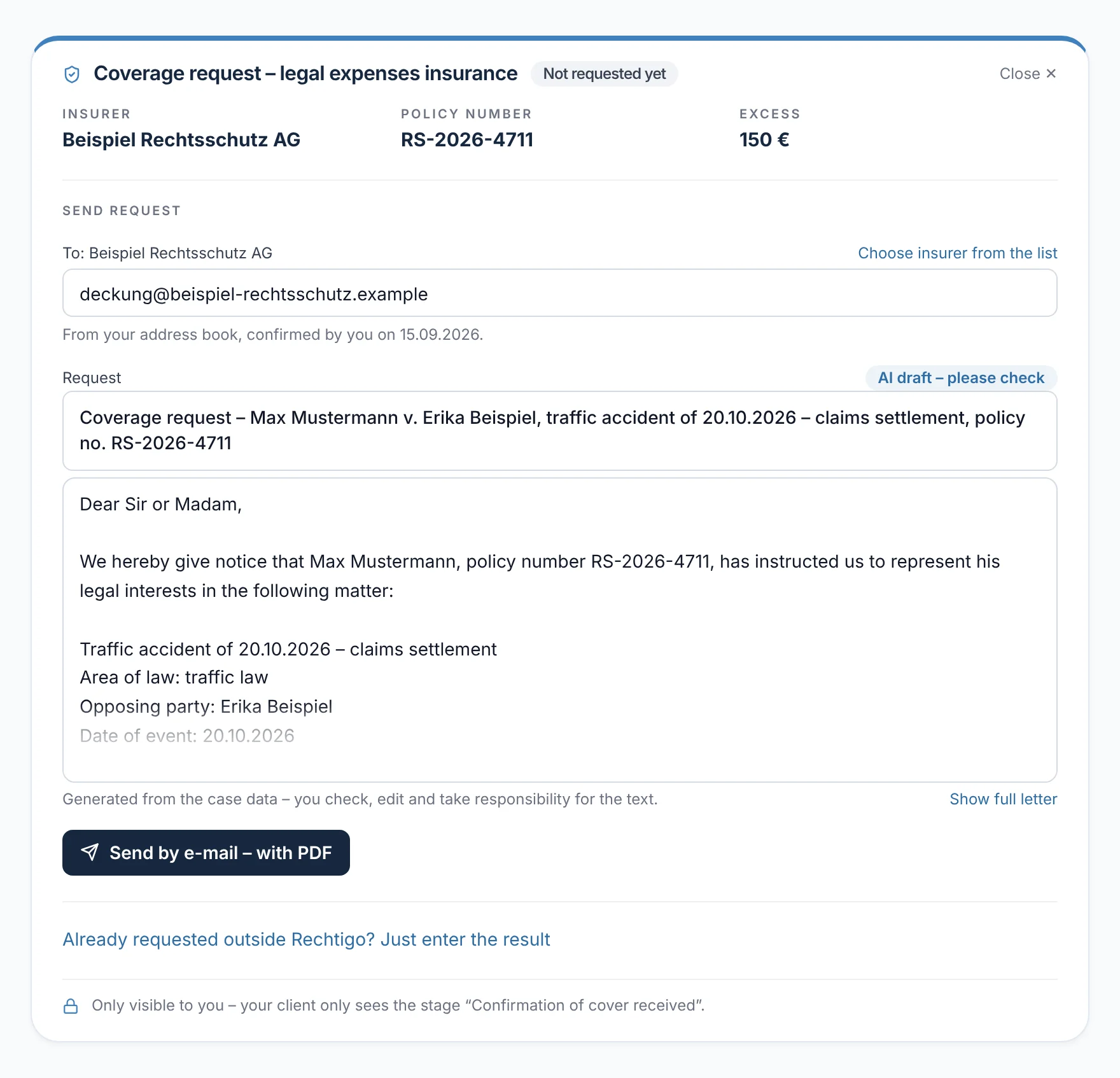
When you open the coverage request in the case file, the draft is ready: the recipient from your address book or the list of insurers, subject and request text from the case data. Open points appear in the text as ‘[please complete]’. ‘Send by e-mail – with PDF’ first asks: ‘Is the address correct?’ – only the second click sends.

  • Sending only after an appointment or power of attorney
  • Sending starts the follow-up after 14 days
From everyday practice

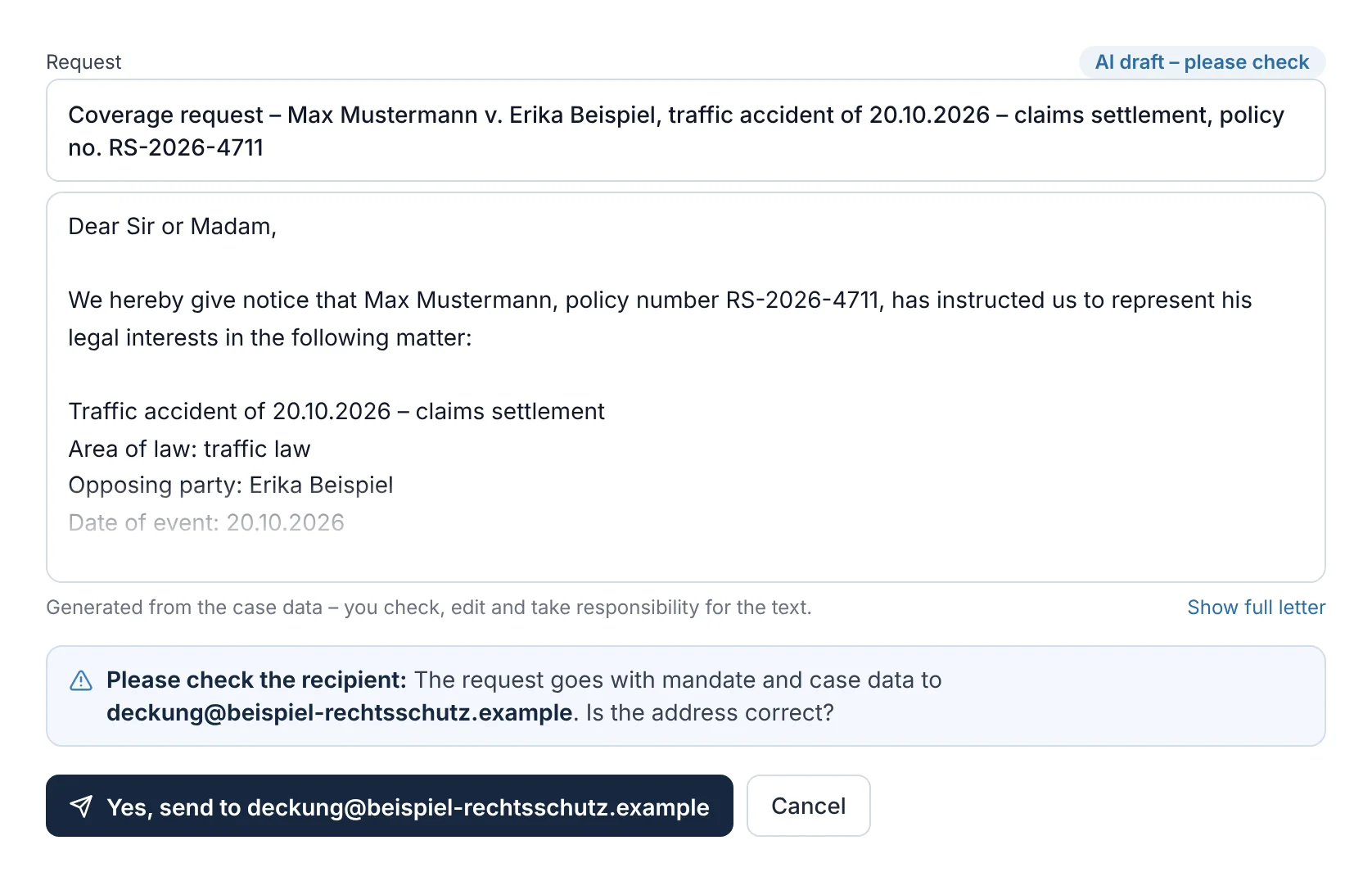
For client Max Mustermann, the recipient is Beispiel Rechtsschutz AG – from the address book, confirmed on 15.09.2026. The subject names the other party to the accident, Erika Beispiel, the road traffic accident of 20.10.2026 and the policy number.

The draft

rechtigo.de/anwalt/akte
Screenshot from Rechtigo, view for lawyers: The request is created from the case data – sent only after your check – The draft
Pictured: View for lawyers: the coverage request in client Max Mustermann's case file – recipient from your address book, subject and text from the case data, marked as an AI draft.

Before sending

rechtigo.de/anwalt/akte
Screenshot from Rechtigo, view for lawyers: The request is created from the case data – sent only after your check – Before sending
Pictured: View for lawyers: the same draft after clicking ‘Send by e-mail – with PDF’ – the question ‘Is the address correct?’; only ‘Yes, send to …’ sends the request.
What the AI does

Which parts of the request come from the AI

The draft is put together from the case data in the case file. Only the short summary of the case from case creation and the suggestion of how an insurer's reply reads come from the AI.

From the case filePolicy number, opposing party and date of the event come from the case data, not from the AI.
You reviewYou edit the text and are responsible for it; open points stay marked.
You sendNothing is sent until you click and check the address.
Outcome

Confirmation or refusal – you enter it

The insurer's reply finds its case file automatically and appears in the history – with a suggestion such as ‘reads like a confirmation’. The suggestion decides nothing: you enter the outcome with ‘Accept as confirmation’ or ‘Accept as refusal’. Before a confirmation, Rechtigo asks you to confirm, because it reaches your client immediately.

  • A phone call or query from the insurer? Record it in the history with ‘+ Note’
From everyday practice

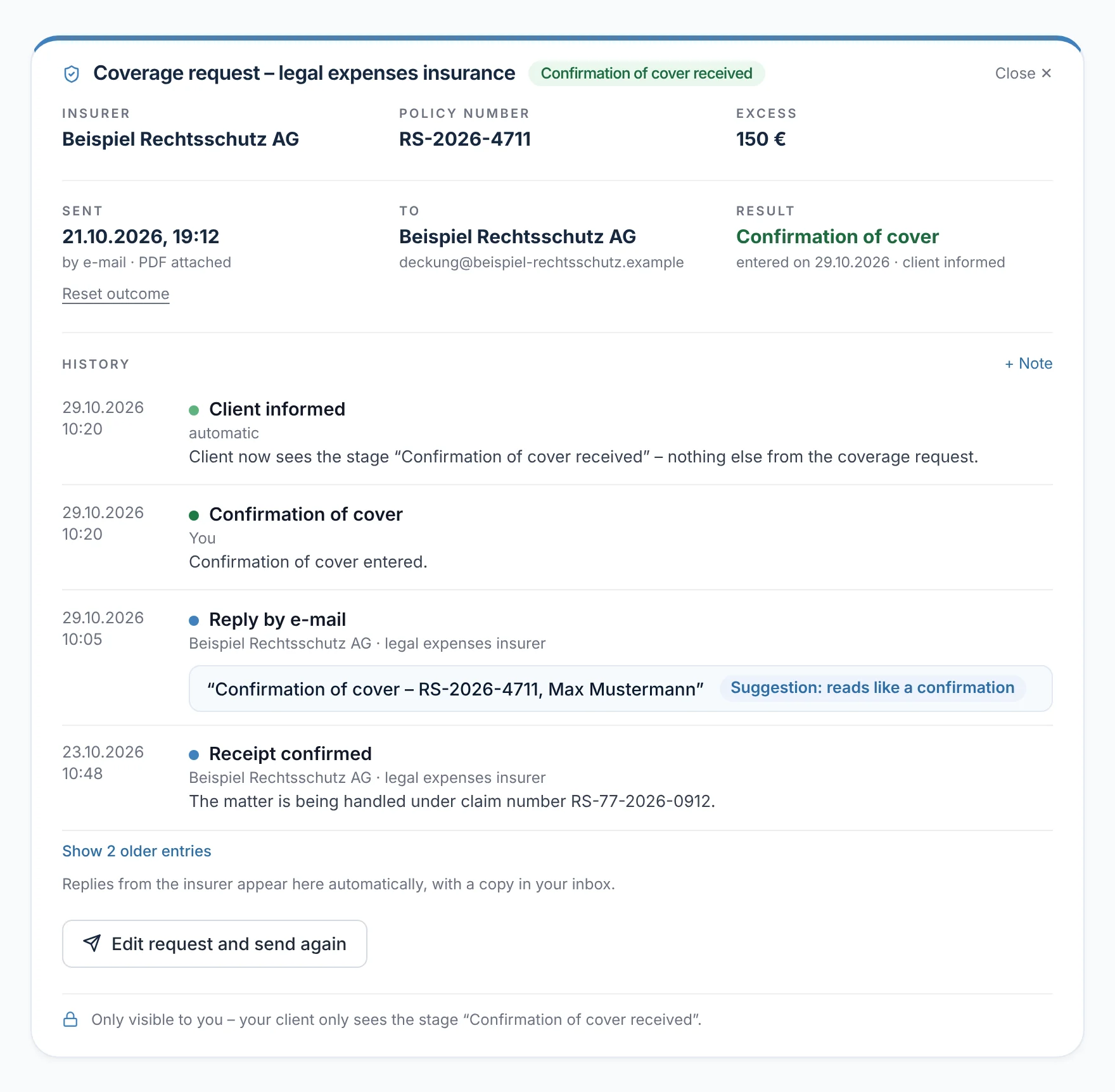
On 29.10.2026 at 10:05, Beispiel Rechtsschutz AG replies. Lawyer Max Meier accepts the confirmation at 10:20 – at the same moment his client sees the stage ‘Confirmation of cover received’.

rechtigo.de/anwalt/akte
Screenshot from Rechtigo, view for lawyers: Confirmation or refusal – you enter it
Pictured: View for lawyers: the coverage request after the confirmation – the outcome in green, in the history the insurer's reply with the suggestion ‘reads like a confirmation’ and ‘Client informed’.
More

Also included

History as a timeline

Draft, sending, acknowledgement of receipt, reply and confirmation – each step with date and role.

Ready-made follow-up

‘Send reminder’ asks for a reply within ten days, with the request as a PDF if you wish – after that, the follow-up starts again.

Send again

If details have changed, you edit the request and send it again.

PDF only

‘Download PDF only’ opens the request as a letter – for printing or saving, without sending.

Client view

How your client experiences it

Your client sees neither the draft nor the history nor your e-mails. Only when you enter the confirmation does ‘Confirmation of cover received’ appear in their case file – with a message and an e-mail.

  • Rechtigo does not show them a refusal – you discuss that yourself
  • Queries and reminders remain your responsibility
rechtigo.de/fall
Screenshot from Rechtigo, view for clients: Note ‘Confirmation of cover received’ in the client's case file
Pictured: View for clients: your client's case file – the note ‘Confirmation of cover received’; they learn nothing more from the request.
Questions

Frequently asked questions

Your question isn't here? Write to us at support@rechtigo.de.

What if the insurer replies by post?

Forward the scan to your Rechtigo address and confirm it in the case file as ‘Legal expenses insurance / cover’. It then appears in the history of the coverage request; you enter the outcome as usual.

Does the request have to go through Rechtigo?

No. If you have already made a request outside Rechtigo, you only enter the outcome. Your client learns of a confirmation just as with a request via Rechtigo.

Does the whole case description go to the insurer?

No. The draft names your client with their policy number, the case, the opposing party and the date of the event, and at most five bullet points from the short summary on the facts. You decide in the text what goes out.

Does Rechtigo send the power of attorney with the request?

No. The draft gives a lawyer's assurance of authorisation and states that the power of attorney will be provided on request.

How does Rechtigo know the insurers' addresses?

From a list that contains only addresses verified on the insurer's website, each with a verification date. If one is missing, you enter it from the policy and, if you wish, save it in your address book.

Founding programme

Join the waitlist now

Rechtigo costs from €99 a month, €0 per mandate; the first 50 lawyers per city start in the Founding programme with three months free.

Rechtigo launches on 15 January 2027 – we will let you know as soon as registration opens.