Skip to content
RECHTIGO
All features for lawyers
Tools for clients

How cases reach you

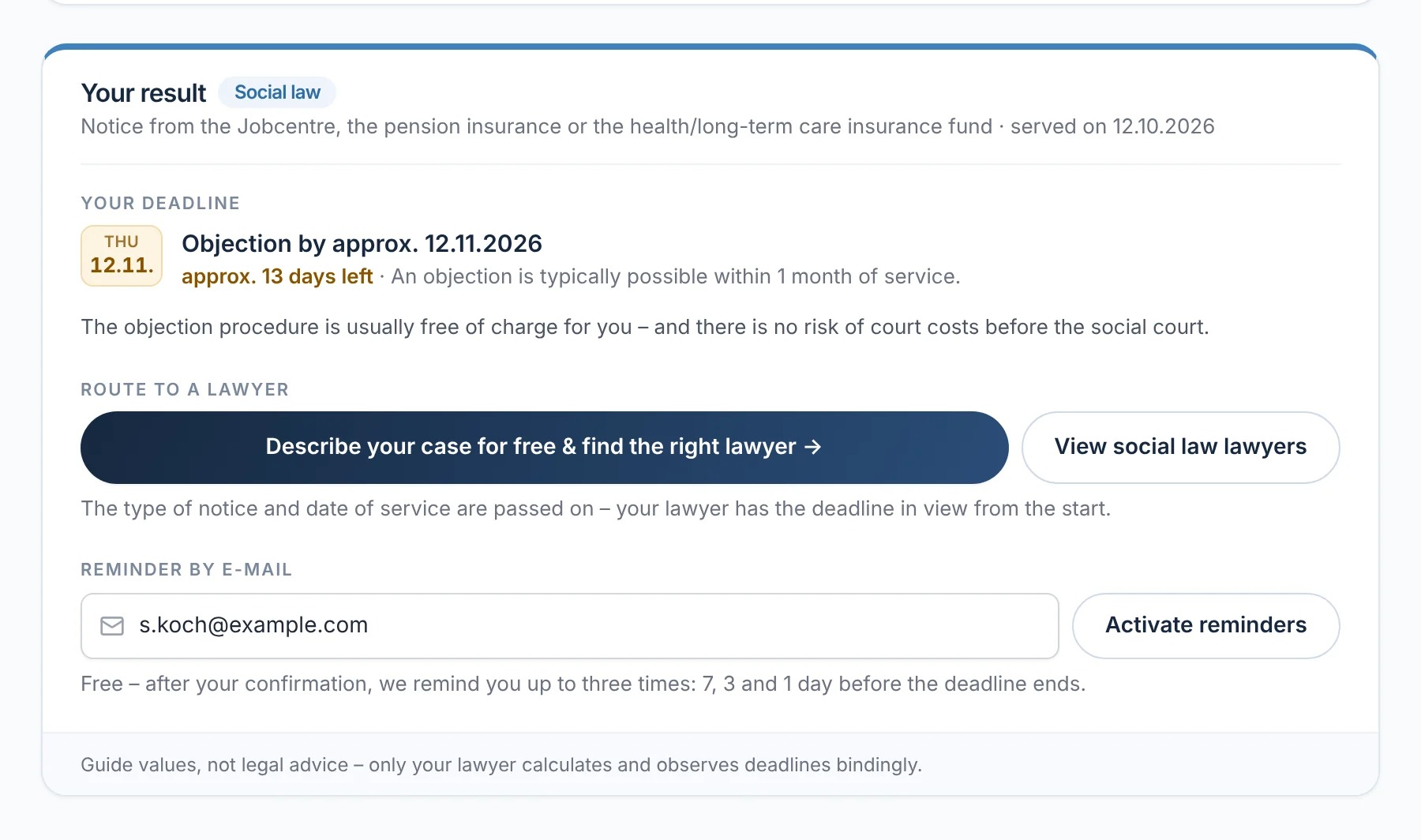
On rechtigo.de, clients check their situation themselves – an official notice, a notice of dismissal, an accident. Rechtigo shows the typical deadline and leads them to a suitable lawyer. The case reaches you with a description, details and deadline.

rechtigo.de/bescheid
Screenshot from Rechtigo, client view: How cases reach you
In the picture: Client view: the notice check after a social law decision served on 12 October 2026 – the typical deadline for the objection, below it the way to a lawyer and the reminder by e-mail.
Process

From the tool to a case with you

  1. Step 1Client

    Check the situation

    On rechtigo.de, your client checks their official notice, their notice of dismissal or a letter they cannot make sense of.

    The typical deadline as a guide

    What it looks like
  2. Step 2Client

    Describe your case

    Next comes the case description; the type of case and the data from the tool are already filled in.

    Description with details and deadline

    Appointments and case requests
  3. Step 3Rechtigo

    Suggest a lawyer

    Rechtigo suggests suitable lawyers, each with a reason. Your client books an appointment or sends a request.

    Appointment or case request with you

    Visibility
  4. Step 4You

    Take on the mandate

    You see the description, the details and the deadline as stated by the client – and check them yourself.

    The case file starts with all the details

    Appointments and case requests
Dismissal check

Received notice of dismissal? Two deadlines at a glance

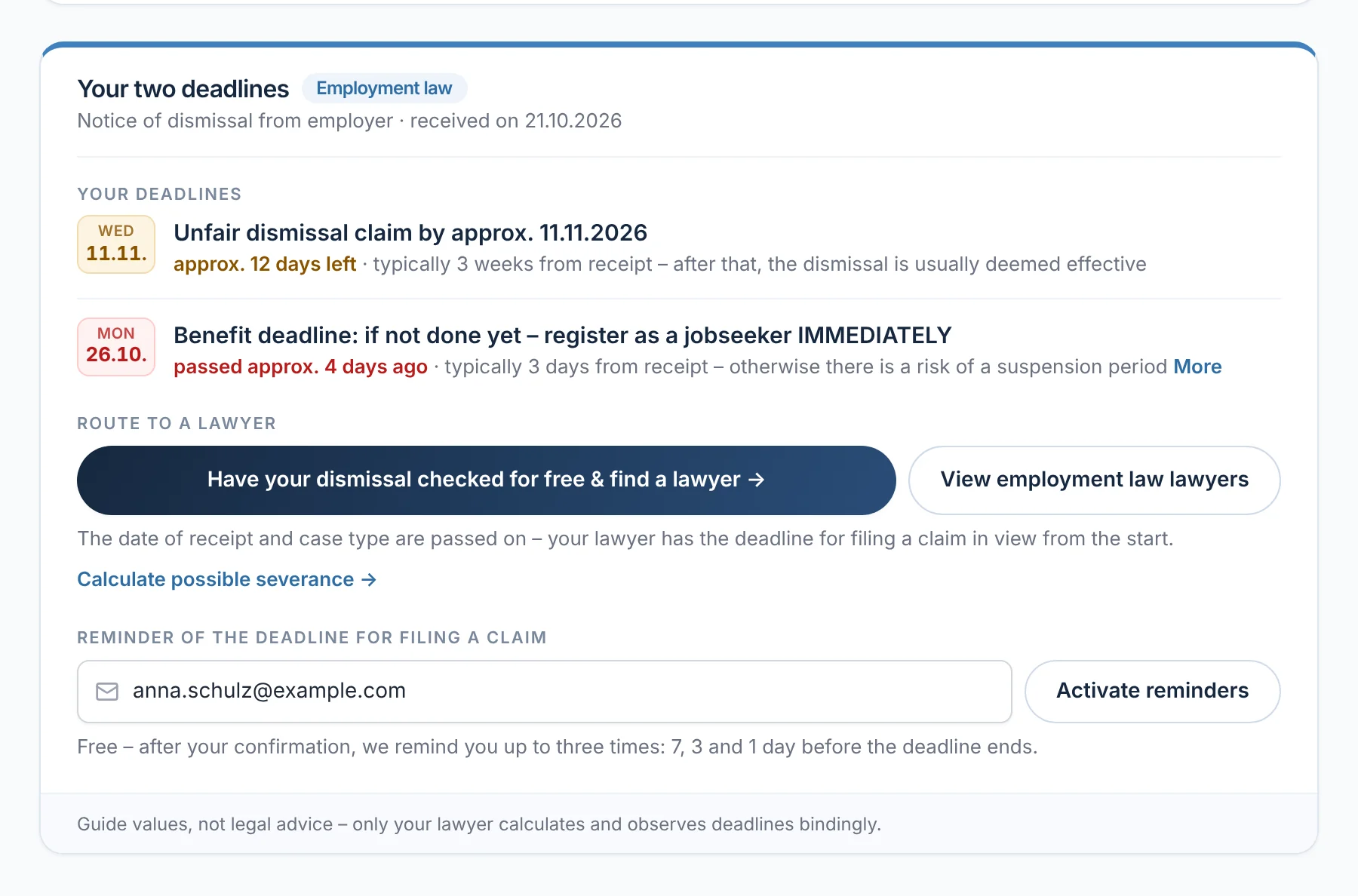
After a dismissal, your client enters the date the notice was received. The dismissal check shows two deadlines: the unfair dismissal claim, typically three weeks from receipt, and registering as a jobseeker. For a termination agreement, it warns of a benefit suspension period. The date of receipt and case type go into the case description – the deadline for the claim is in view from the start.

From everyday practice

Client Anna Schulz received her notice of dismissal on 21 October 2026. The check gives the deadline for the claim as approx. 11 November 2026; the date of receipt and case type go into her case description.
rechtigo.de/kuendigung
Screenshot from Rechtigo, client view: Received notice of dismissal? Two deadlines at a glance
In the picture: Client view: the dismissal check of client Anna Schulz – the deadline for the claim by approx. 11/11/2026 and registering as a jobseeker, below it the way to a lawyer.
Report an accident

Accident reported – organised in the case file

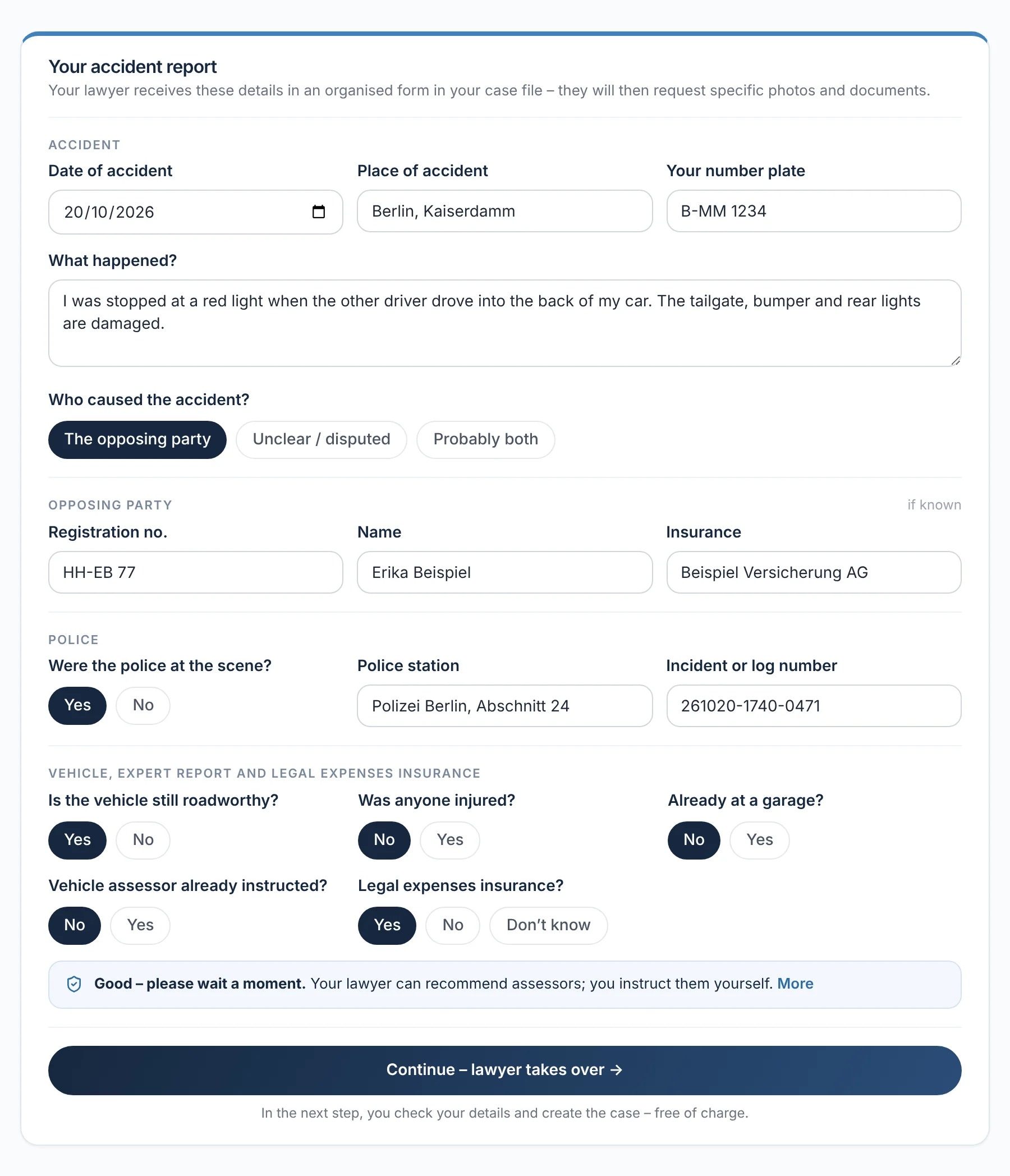
Under ‘Report an accident’, your client enters, in a few minutes, the date and place of the accident, what happened, number plates, the opposing party with their insurer, and the police. You receive the details neatly organised in their case file; you then request photos and documents with your checklist. If you wish, you take on the mandate without a consultation appointment.

  • Your client instructs the vehicle assessor themselves – from your list of partner experts if they wish
From everyday practice

Client Max Mustermann reports his rear-end collision of 20 October 2026 on Kaiserdamm: the other driver is Erika Beispiel, insured with Beispiel Versicherung AG, and the police attended. The client has not yet instructed an assessor.

More on Case file from an incoming expert report
rechtigo.de/unfall
Screenshot from Rechtigo, client view: Accident reported – organised in the case file
In the picture: Client view: ‘Your accident report’ from client Max Mustermann – accident, opposing party and police; at the bottom the note that the client instructs the assessor themselves.
Letter scanner

One photo – and the letter is sorted

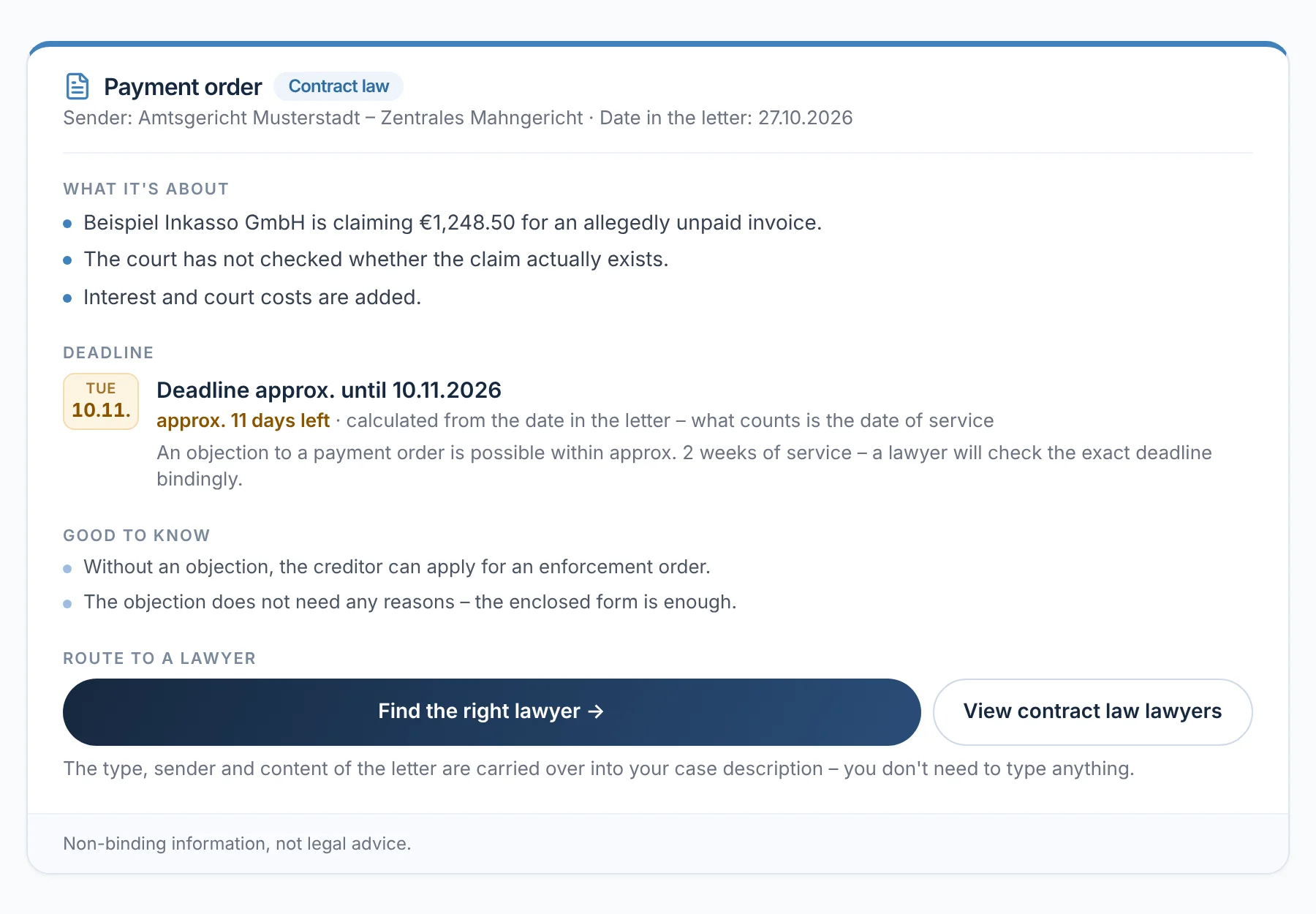
With the letter scanner, your client photographs a letter they cannot make sense of. The AI recognises the type, the sender and any deadline and explains in a few points what it is about – as general information, not legal advice. The photo is only analysed and not stored. Type, sender and content go into the case description.

From everyday practice

A client photographs a court payment order dated 27 October 2026. The letter scanner explains what the creditor is demanding, gives the deadline for the objection as approx. 10 November 2026 and leads to lawyers for contract law.

rechtigo.de/brief-scanner
Screenshot from Rechtigo, client view: One photo – and the letter is sorted
In the picture: Client view: the letter scanner's result – a court payment order explained in three points, with deadline and the way to a lawyer.
Fine objection

Fine notice: a complete case file with deadline notice

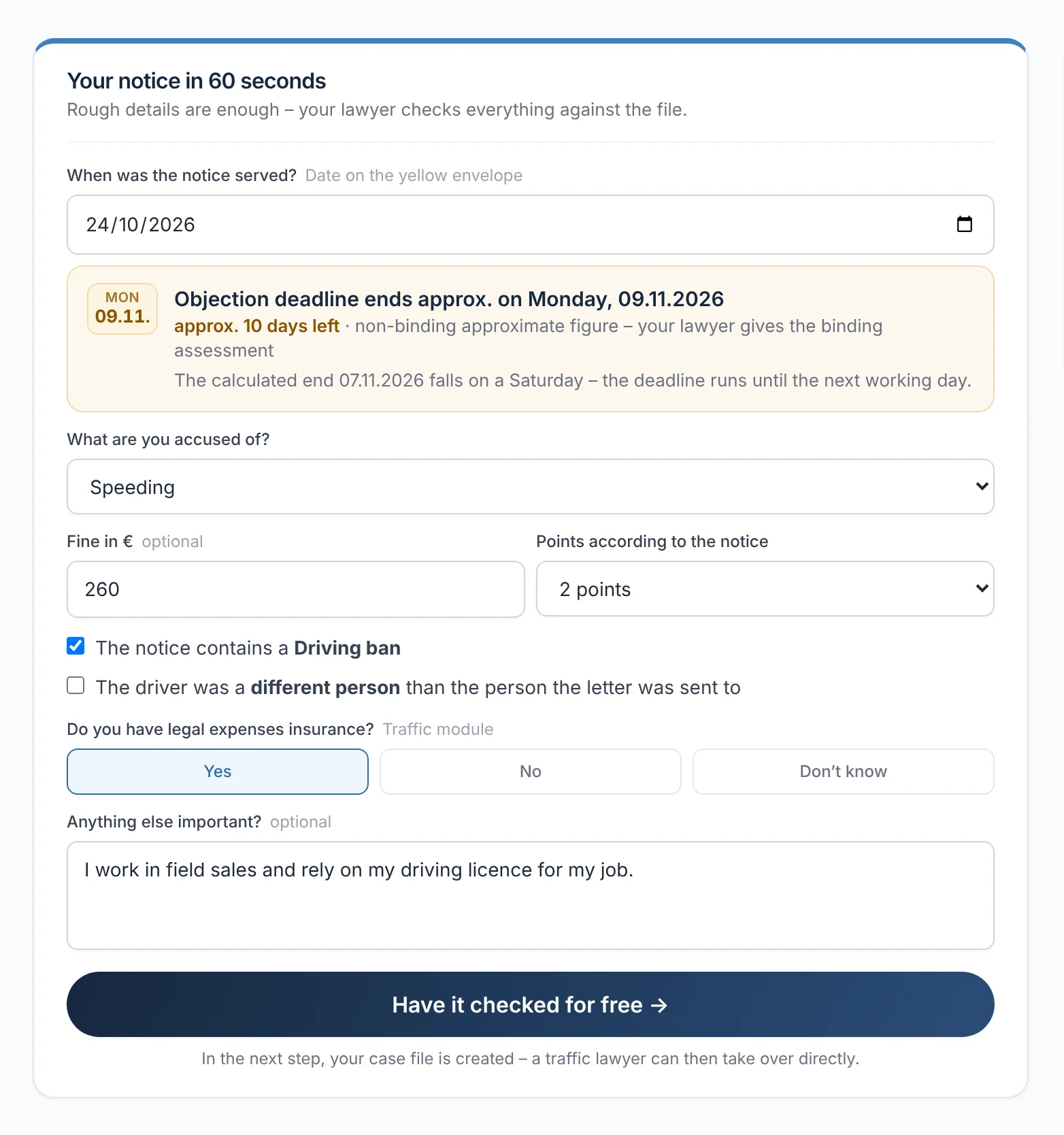
For a fine objection, your client enters the date of service, the alleged offence, the fine, penalty points and any driving ban, and sees the deadline for objecting. This produces a complete case file with a deadline notice and legal expenses insurance status. If you switch on ‘Accept fine objections’ in your profile, you also take on such cases without an appointment.

  • If the deadline end falls on a weekend, Rechtigo gives the next working day
  • If someone other than the registered keeper was driving, this appears in your case file under ‘Important’
From everyday practice

A client received their notice on 24 October 2026 – with a driving ban, and they depend on their driving licence for work. The deadline for objecting ends on approx. Monday, 9 November 2026.

rechtigo.de/produkte/bussgeld-einspruch
Screenshot from Rechtigo, client view: Fine notice: a complete case file with deadline notice
In the picture: Client view: the fine objection – date of service, the deadline for objecting by approx. 09/11/2026 and the key details of the notice.
Insurer won't pay

Rejection by the insurer – with a clear recommendation

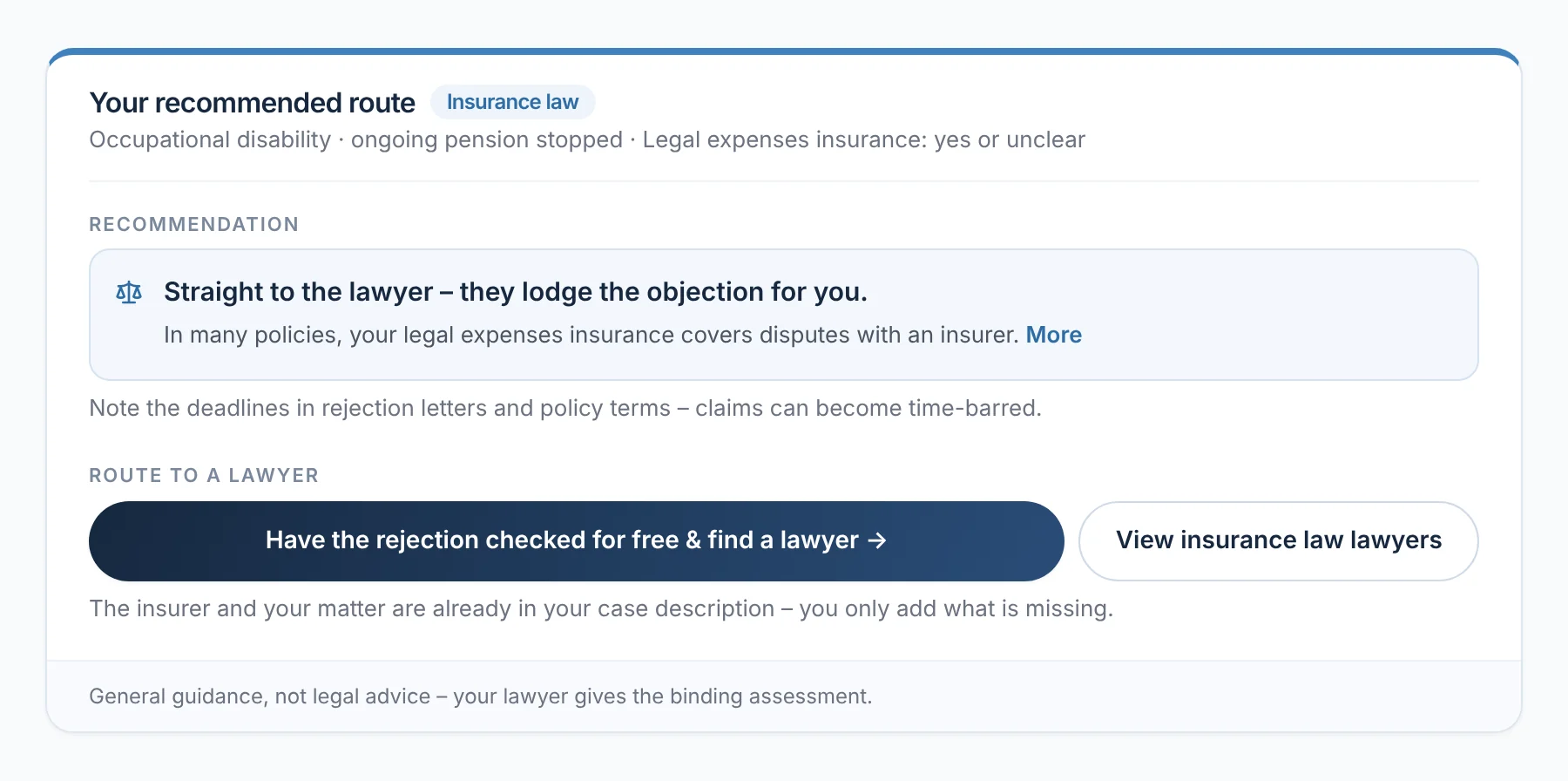
If an insurer rejects or reduces a claim, your client selects the insurance – such as occupational disability, health and accident, home contents or comprehensive motor insurance – and whether they have legal expenses insurance. With legal expenses insurance, the recommendation is: go straight to a lawyer, who lodges the objection. The insurance and the concern are then already in their case description.

rechtigo.de/versicherung-zahlt-nicht
Screenshot from Rechtigo, client view: Rejection by the insurer – with a clear recommendation
In the picture: Client view: ‘Insurer won't pay’ – after an occupational disability pension has been stopped, the recommendation: go straight to a lawyer.
Bereavement

Inheritance: the deadline for disclaiming comes first

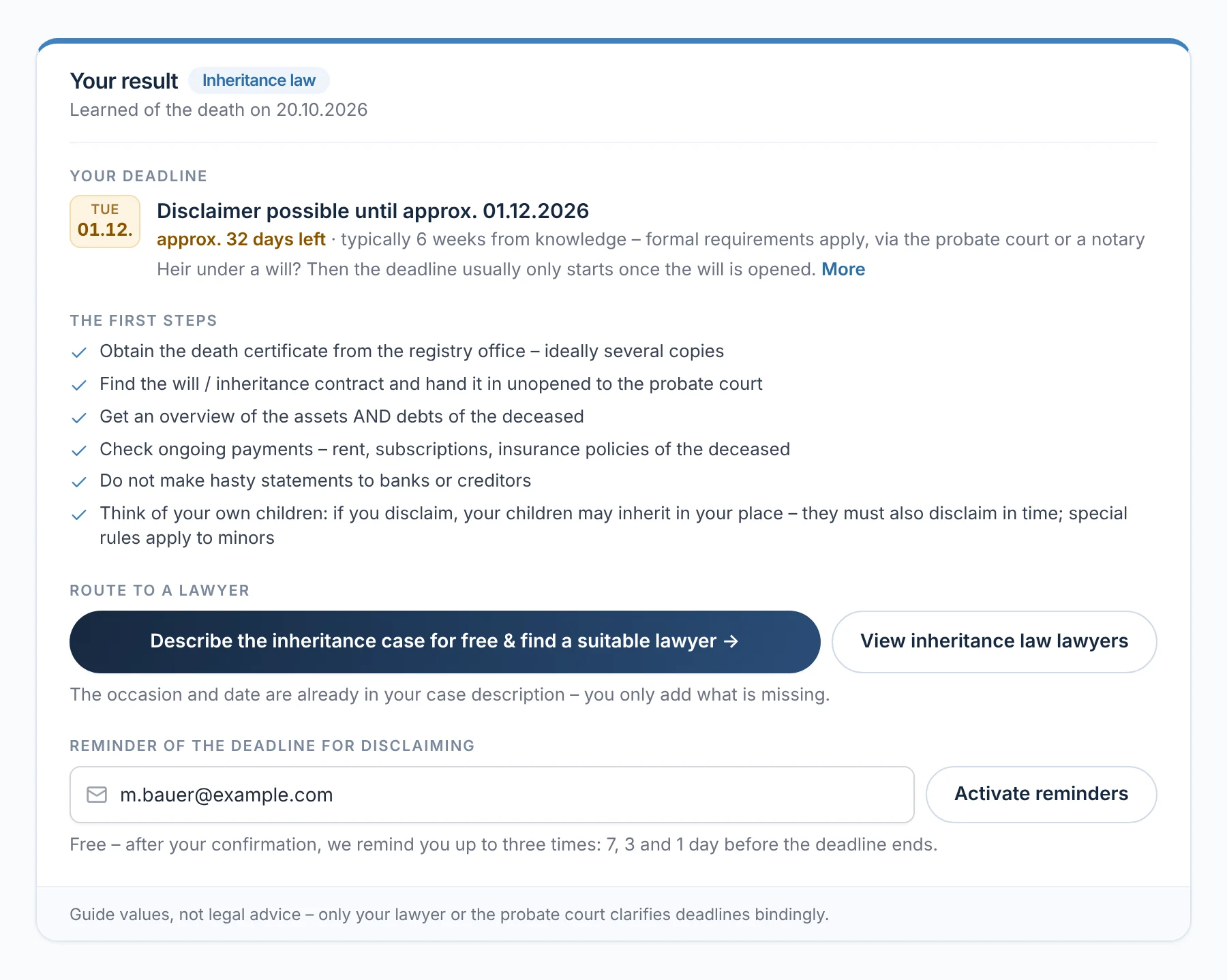
After a death, the bereavement check shows the deadline for disclaiming the inheritance – typically six weeks from becoming aware of it – and a list of first steps, from the death certificate to the question of whether one's own children also need to disclaim. The occasion and date then appear in the case description.

From everyday practice

A client learned of the inheritance on 20 October 2026. The check gives the deadline for disclaiming as approx. 1 December 2026 and advises against making hasty statements to banks or creditors.

rechtigo.de/todesfall
Screenshot from Rechtigo, client view: Inheritance: the deadline for disclaiming comes first
In the picture: Client view: the bereavement check – the deadline for disclaiming by approx. 01/12/2026, below it the first steps and the way to a lawyer.
Emergency service

In an emergency, on-call lawyers call back

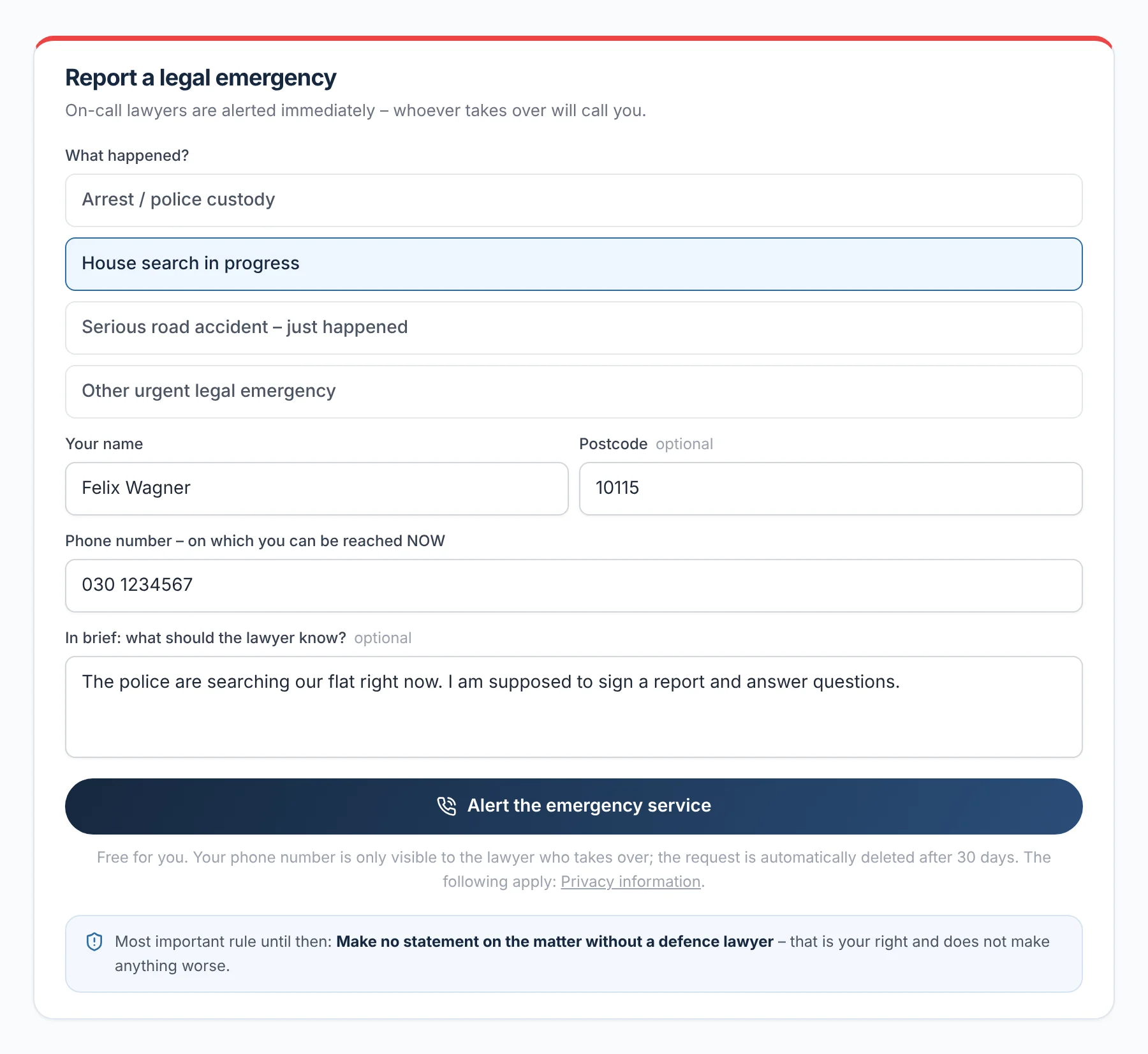
In an emergency – an arrest, a house search, a serious traffic accident – your client gets in touch via ‘Report a legal emergency’ with their name and a callback number. Rechtigo alerts the lawyers on emergency service standby by e-mail; whoever takes it on first receives the number and calls back. Open emergencies appear at the top of your requests page.

  • You switch ‘Emergency service standby’ on in your profile and off again at any time
  • Only the lawyer who takes it on sees the phone number
rechtigo.de/notfall
Screenshot from Rechtigo, client view: In an emergency, on-call lawyers call back
In the picture: Client view: ‘Report a legal emergency’ – what has happened, name and callback number; one click alerts the on-call lawyers.
For businesses and families

Business account and helper access

Companies manage all their legal cases in one place, relatives help your client – both on Rechtigo.

Business account

Business clients manage all cases in the business cockpit

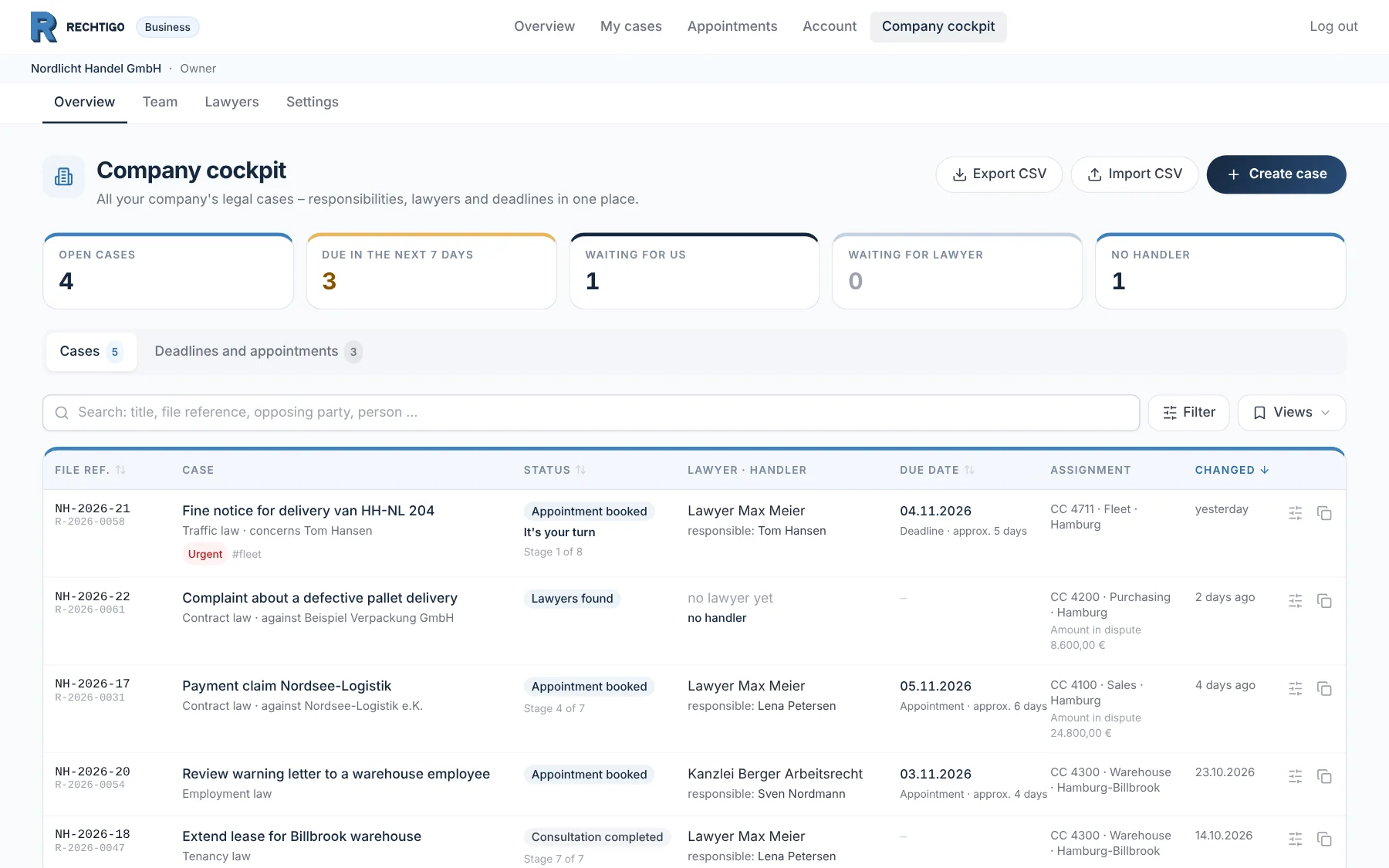
Companies manage their legal cases in the business cockpit – each case with status, lawyer, person responsible and next deadline or next appointment, by cost centre, department or location. The company creates new cases itself; regular lawyers are listed first for cases in their area of law.

  • Key figures such as ‘Deadline or appointment in 7 days’ filter the list with one click
  • In the business team: owner, admin, case handler and reader
  • Existing cases via spreadsheet, new cases from the company's own system if wished
From everyday practice

For the business client Nordlicht Handel GmbH, five cases are in the cockpit, from employment law to the lease for the warehouse. Three have a deadline or an appointment in the next seven days; one is waiting on the company itself.

rechtigo.de/firma
Screenshot from Rechtigo, client view: Business clients manage all cases in the business cockpit
In the picture: Client view: the business cockpit of the business client Nordlicht Handel GmbH – at the top the key figures, below them each case with status, lawyer, person responsible and the next deadline or next appointment.
Helper access

Relatives can help – but never sign

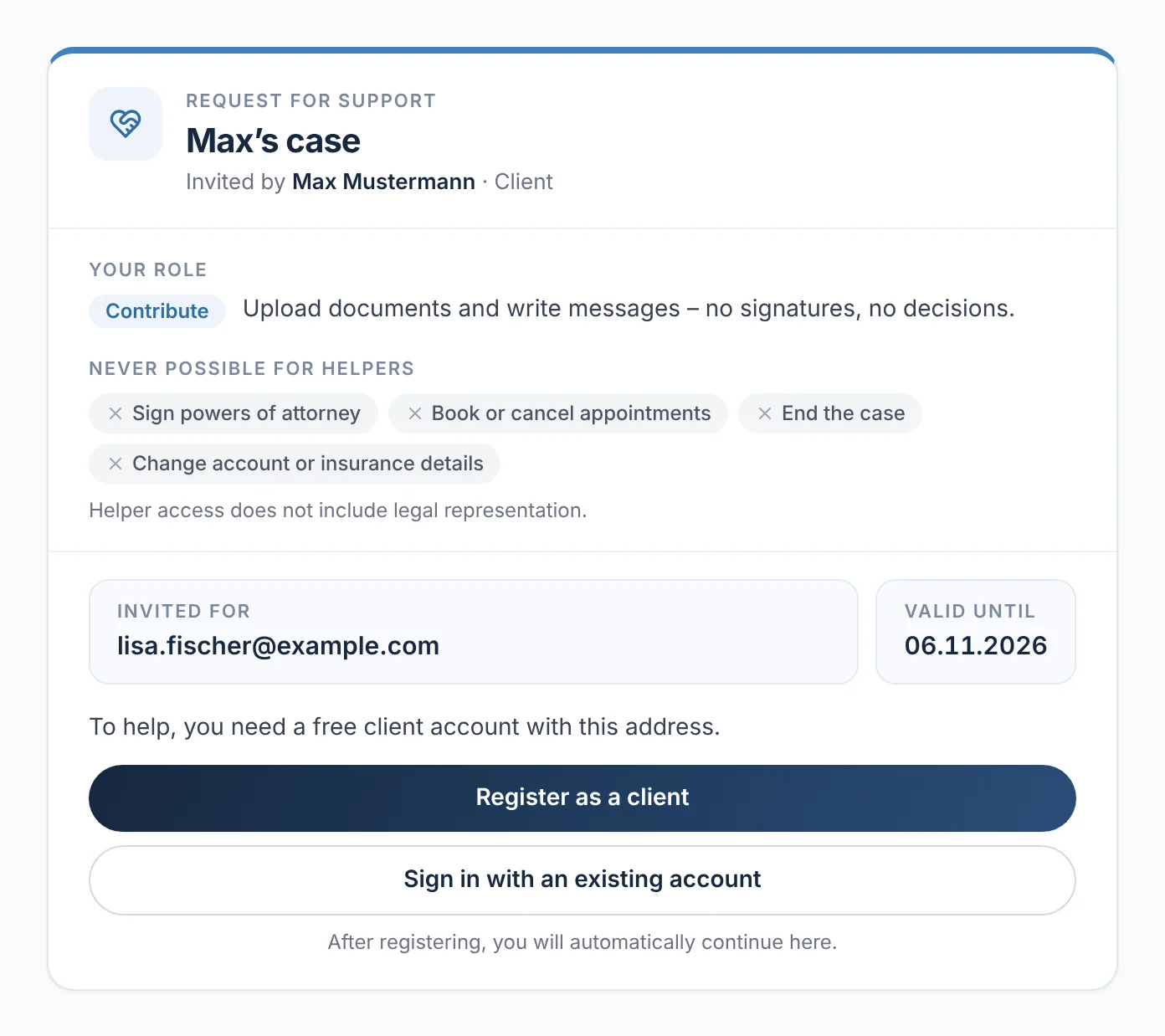
Your client can invite up to three helpers to their case, such as relatives. Helpers with ‘Contribute’ may upload and write messages; with ‘Read’ they can only read. They can never sign powers of attorney, book appointments or close the case. In your case file, every helper is listed among the parties, with their role.

  • The invitation is valid for seven days
  • Helper access does not involve any legal representation
From everyday practice

A client invites his helper to contribute. She sees her role and what helpers may never do; the invitation is valid until 6 November 2026. To help, she creates a client account with exactly this e-mail address.

rechtigo.de/helfer-einladung
Screenshot from Rechtigo, client view: Relatives can help – but never sign
In the picture: Client view: the invitation to helper access as the invited helper sees it – role ‘Contribute’, below it what helpers may never do.
More

Also for your clients

Case roadmap

After the description, your client sees a deadline traffic light, the typical cost range, legal expenses insurance and next steps – ‘your lawyer will check this definitively’.

In their own language

In the case assistant, your client can also write in English, Turkish, Arabic or Polish – you read the summary in German.

Calculators

Severance pay, lawyer's fees, fines, notice periods and maintenance – every calculator links to the case description.

Legal folder

Cases, documents, deadlines and contracts with their cancellation window – and you under ‘My lawyers’.

Medical malpractice

The way to a lawyer from day one – if wished, model letters for the patient file and the health insurer's expert report in advance.

Deadline watch

If they wish, Rechtigo reminds your client of their deadline by e-mail – 7, 3 and 1 day beforehand.

Questions

Frequently asked questions

Your question isn't here? Write to us at support@rechtigo.de.

Do the tools give legal advice?

No. They show general information and typical deadlines as a guide, always with ‘approx.’ or ‘typically’. It is the lawyer who checks and meets the deadline with binding effect.

What reaches me?

An appointment, a case request or a case file to take on without an appointment – with the case description, your client's details and the deadline end as stated by the client. Rechtigo recognises data such as the date of service in their description and the sender in the photo of the letter; your client confirms both.

When do I see my client's case?

Only once they create an account, book or send a request to you and consent to their data being passed on. Until then, whatever they enter in the checks stays in their browser; the photo in the letter scanner is only analysed and not stored.

How do I become a company's regular lawyer?

That is the company's decision: the owner or an admin adds you as a regular lawyer in their business account, per area of law and in a set order if they wish. You need an activated profile.

Can I tell whether a helper or my client is writing?

Yes. A helper's messages appear in the thread with their name and the label ‘Helper’, their uploads as ‘Document uploaded by helper’.

Founding programme

Join the waitlist now

Rechtigo costs from €99 a month, €0 per mandate; the first 50 lawyers per city start in the Founding programme with three months free.

Rechtigo launches on 15 January 2027 – we will let you know as soon as registration opens.