Skip to content
RECHTIGO
All features for lawyers
Mandate and power of attorney

Power of attorney and documents – digital, in the case file

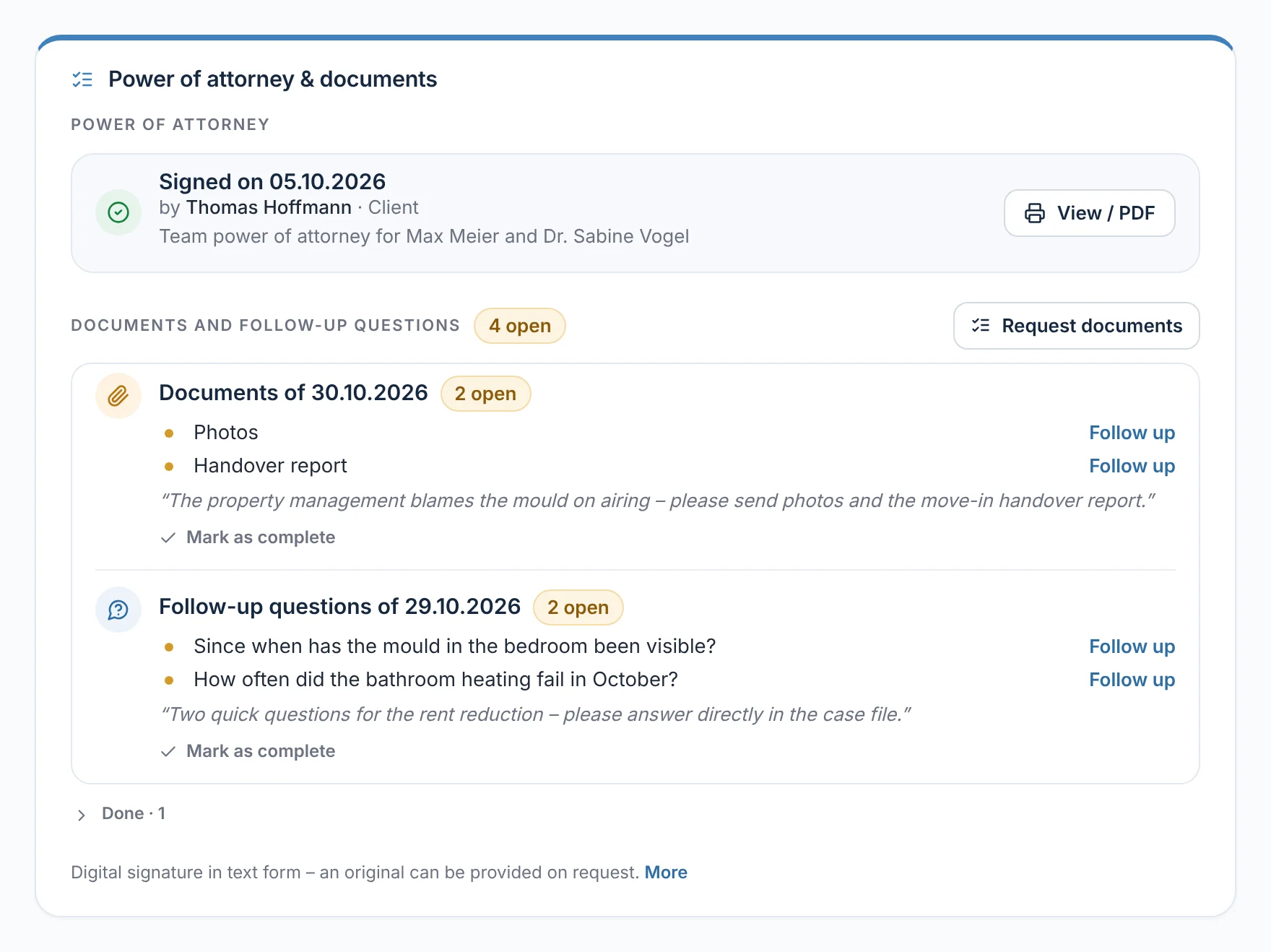
You request the power of attorney with one click, your client signs on screen and uploads the documents from your checklist. Every signature and every upload appears in your case file straight away.

rechtigo.de/anwalt/akte
Screenshot from Rechtigo, view for lawyers: Power of attorney and documents – digital, in the case file
Pictured: View for lawyers: ‘Power of attorney & documents’ in the case file of the clients, the Hoffmann family – at the top the power of attorney, signed by client Thomas Hoffmann; below it the outstanding documents and queries with ‘Follow up’.

Power of attorney with one click

Comprehensive or compact for accidents and fines – the case heading is pre-filled from the case.

Signature on screen

Your client signs with a mouse or finger after being able to read the full text.

Documents via checklist

The list for the area of law goes to your client as a task – you follow up on outstanding items with one click.

Power of attorney for your team

With your client's consent, your colleagues work on the case file with you.

Request power of attorney

Compact or comprehensive – requested with one click

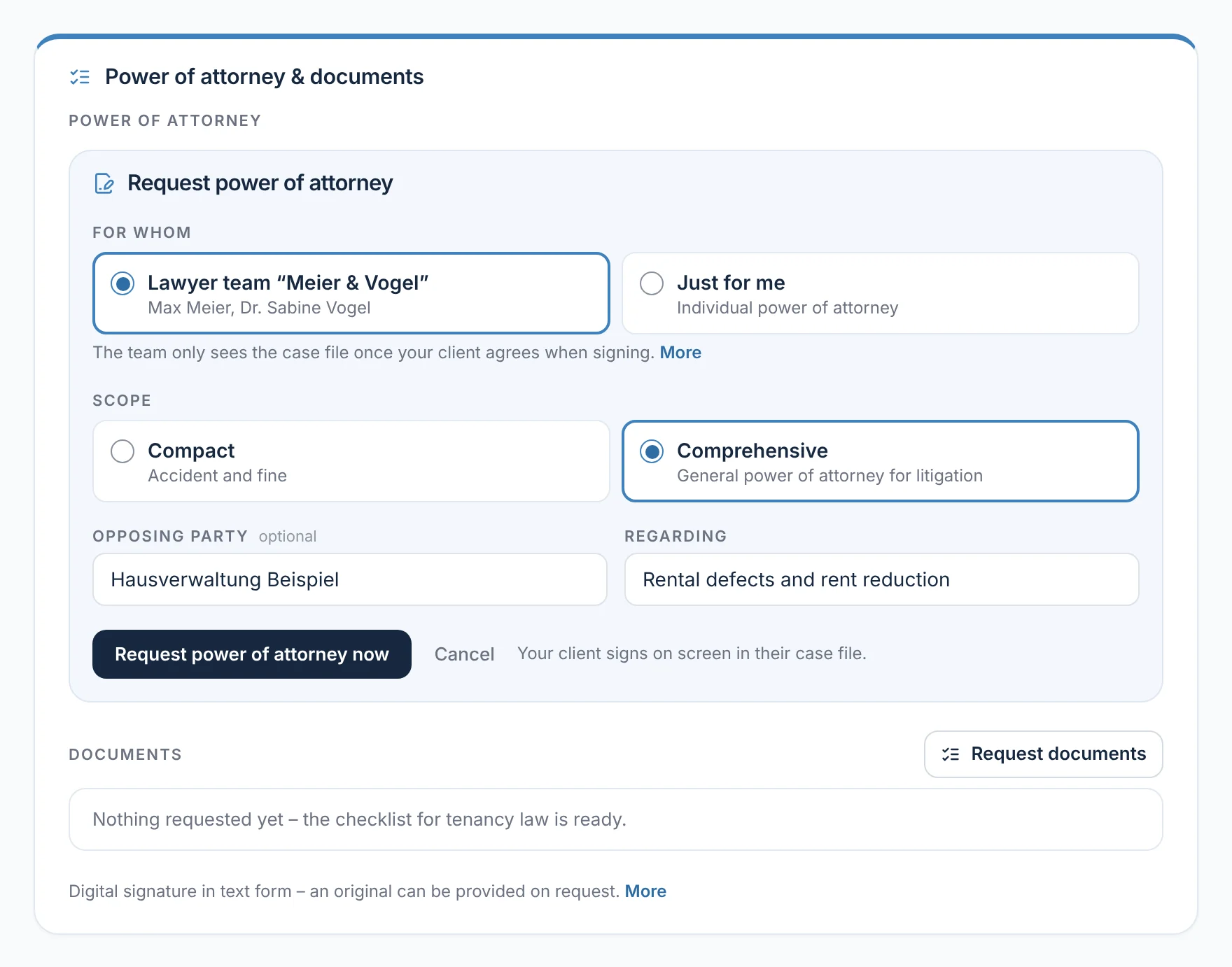
‘Request power of attorney’ opens a short form in the case file. Under ‘For whom’ you choose your lawyer team or ‘Only for me’, under ‘Scope’ ‘Compact’ for accidents and fines or ‘Comprehensive’ as a general power of attorney for litigation. Opposing party and ‘Re’ fill the case heading. ‘Request power of attorney now’ sends the request by e-mail and to the case file's messages.

  • ‘Re’ is pre-filled from the case title, the opposing party from your client's details
  • The responsible lawyer can make the request
From everyday practice

For the clients, the Hoffmann family, lawyer Max Meier chooses the lawyer team ‘Meier & Vogel’ and ‘Comprehensive’. The landlord, Hausverwaltung Beispiel, appears as the opposing party in the case heading, re ‘Rental defects and rent reduction’.
rechtigo.de/anwalt/akte
Screenshot from Rechtigo, view for lawyers: Compact or comprehensive – requested with one click
Pictured: View for lawyers: ‘Request power of attorney’ in the case file of the clients, the Hoffmann family – for the lawyer team ‘Meier & Vogel’, scope ‘Comprehensive’, opposing party and ‘Re’ already filled in.
Terms of engagement

Your terms – included with every power of attorney

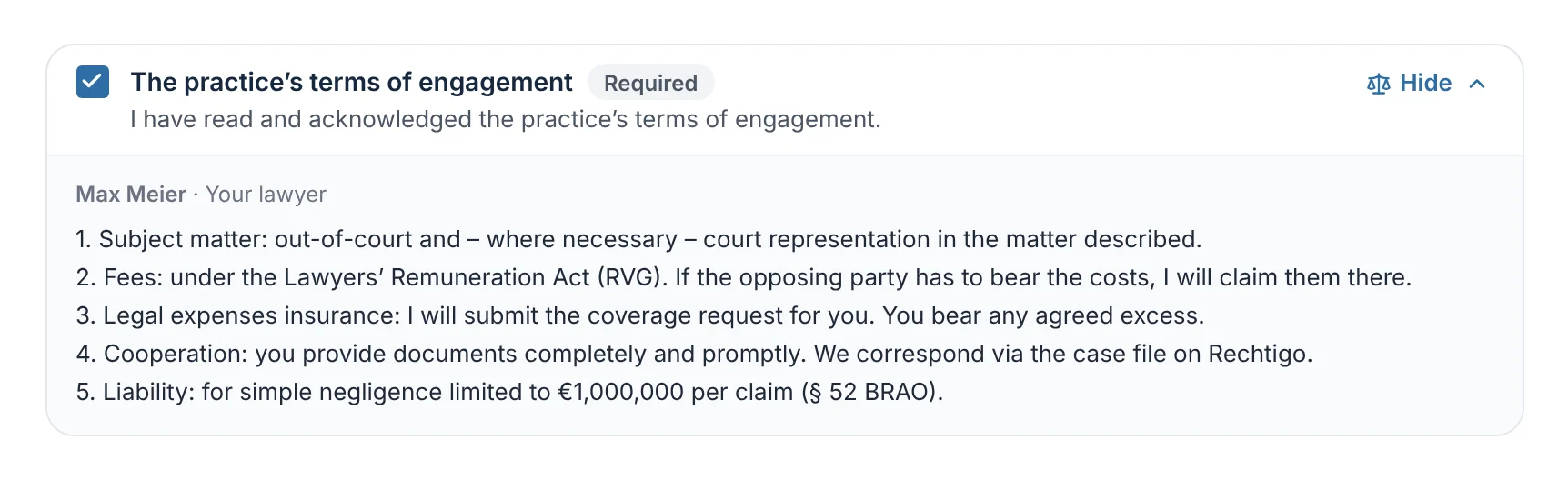
In your profile, under ‘Terms of engagement’, you store your terms or a fee agreement. The text appears in every power of attorney and is shown to your client before they sign. They expressly confirm that they have read it – without this tick, signing stays locked.

  • The confirmation is saved with a timestamp
  • You are responsible for the content
From everyday practice

Lawyer Max Meier stores five points: subject matter, fees, legal expenses insurance, cooperation and liability. Client Thomas Hoffmann expands them before signing and ticks the mandatory box – saved with date and time.

rechtigo.de/fall
Screenshot from Rechtigo, view for clients: Your terms – included with every power of attorney
Pictured: View for clients: the case file of the clients, the Hoffmann family, before signing – your terms of engagement expanded, in front of them the mandatory tick box.
Signature on screen

Your client signs with a mouse or finger

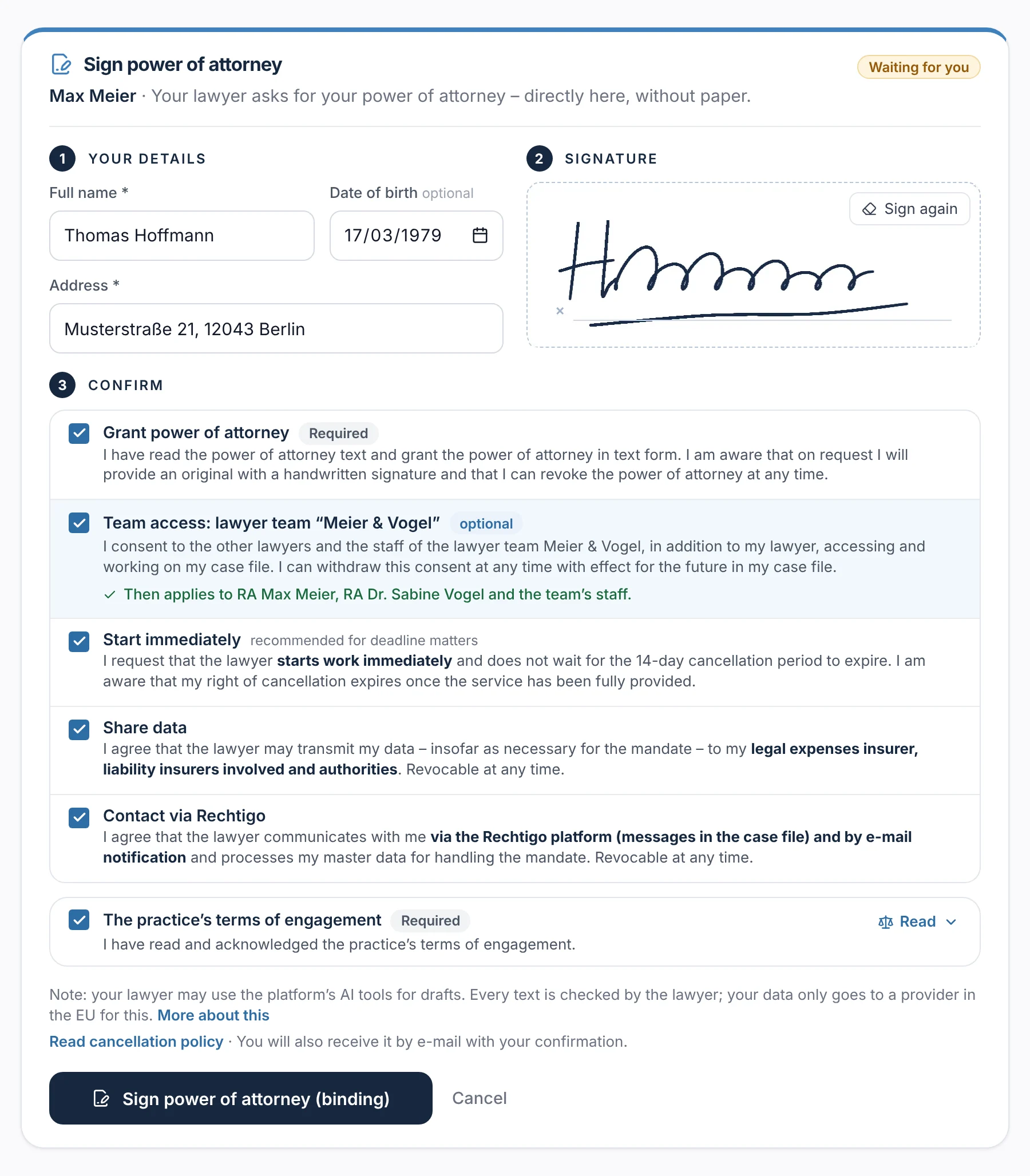
In their case file, your client sees ‘Sign power of attorney’ with the note ‘Waiting for you’. They can read the full power of attorney text and click ‘Sign now’. In three steps they enter their name and address, sign with a mouse or finger and confirm each item separately – access for your team as a voluntary, unticked box.

  • Without this consent, the power of attorney applies to you only
  • The cancellation notice is also sent by e-mail
From everyday practice

Client Thomas Hoffmann enters his name, date of birth and address, signs and consents to team access for the lawyer team ‘Meier & Vogel’. This then applies to lawyer Max Meier, lawyer Dr Sabine Vogel and the team's staff.

rechtigo.de/fall
Screenshot from Rechtigo, view for clients: Your client signs with a mouse or finger
Pictured: View for clients: ‘Sign power of attorney’ in client Thomas Hoffmann's case file – his details, the signature and below it each consent separately.
Power of attorney granted

Your client keeps track of their power of attorney

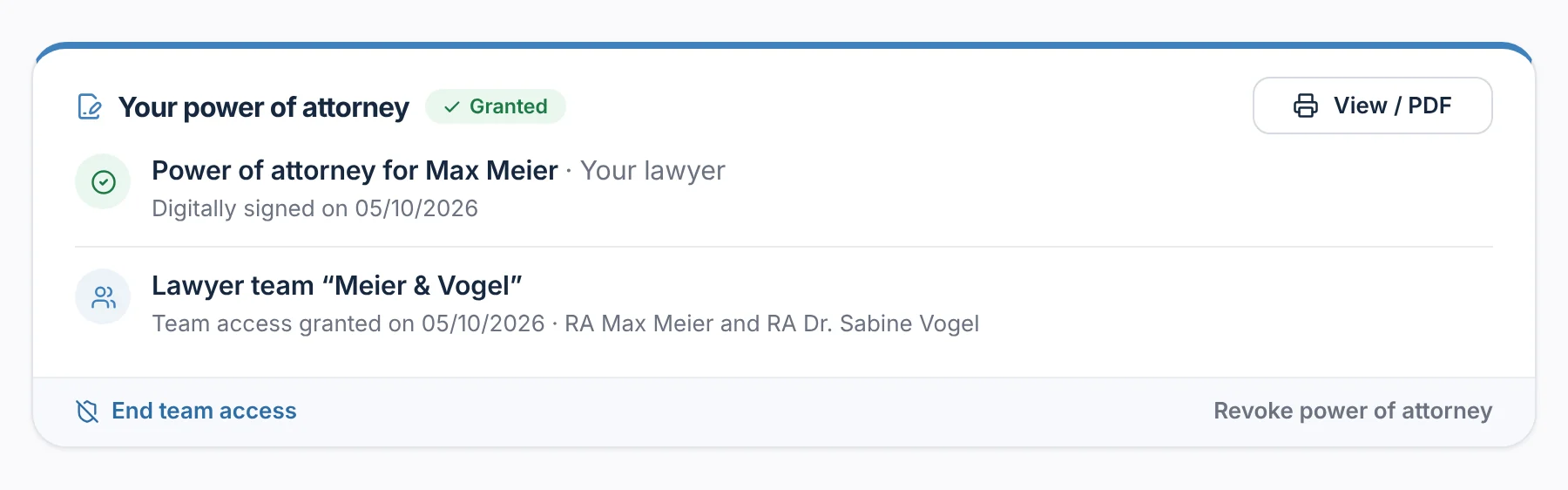
After signing, your client sees ‘Your power of attorney’ with ‘Granted’ and ‘View / PDF’, plus your lawyer team with the date of their consent. ‘End team access’ affects only your team; the power of attorney for you remains. If they revoke the power of attorney, you see it in red in the case file straight away, with ‘Request power of attorney again’.

  • In your case file: ‘Signed on …’ and the same print view as a PDF
  • Saved: timestamp, consents and a checksum of the text
From everyday practice

Client Thomas Hoffmann sees his power of attorney for lawyer Max Meier, digitally signed on 05.10.2026, and the team access for the lawyer team ‘Meier & Vogel’. If he ends it, only lawyer Max Meier works on the case file – the power of attorney remains.

rechtigo.de/fall
Screenshot from Rechtigo, view for clients: Your client keeps track of their power of attorney
Pictured: View for clients: ‘Your power of attorney’ in client Thomas Hoffmann's case file – granted on 05.10.2026, below it the team access with ‘End team access’.
Documents

A checklist for each area of law – with follow-up

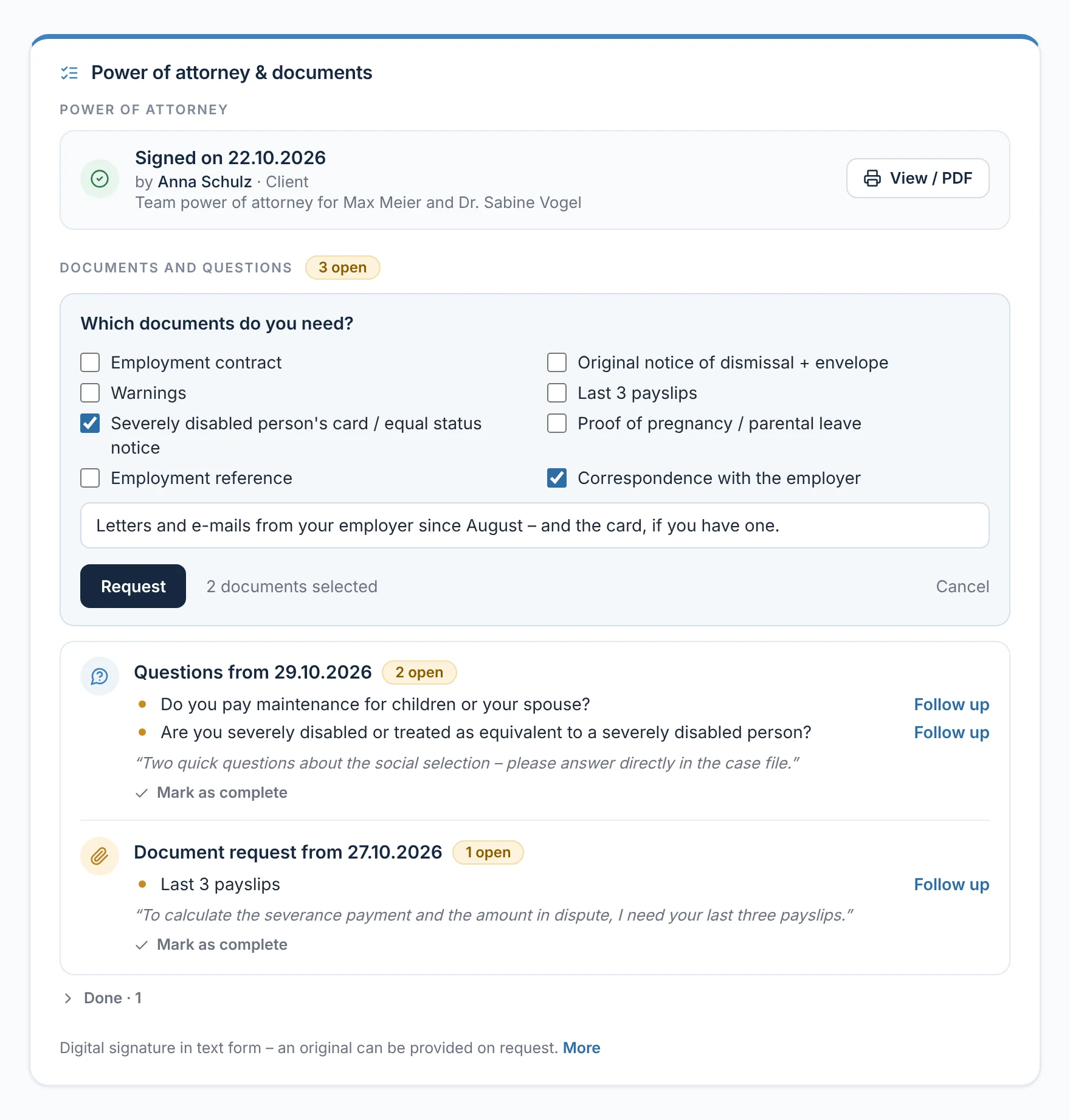
‘Request documents’ opens the list for the area of law – in employment law, for example, the employment contract, warnings and the latest payslips. You tick the items, add a message if you wish and click ‘Request’. Your client is informed by e-mail and sees the list as the first task in their case file. Next to outstanding items you see ‘Follow up’.

  • ‘Mark as complete’ if documents arrived another way
From everyday practice

For client Anna Schulz, lawyer Max Meier ticks ‘Severely disabled person's pass / equal status notice’ and ‘Correspondence with the employer’. An earlier request is still outstanding: the last three payslips – with ‘Follow up’ next to it.

rechtigo.de/anwalt/akte
Screenshot from Rechtigo, view for lawyers: A checklist for each area of law – with follow-up
Pictured: View for lawyers: ‘Power of attorney & documents’ in client Anna Schulz's case file – at the top the power of attorney, below it the employment law checklist with two documents ticked and the outstanding requests with ‘Follow up’.
Upload

Received – and your lawyer has been notified

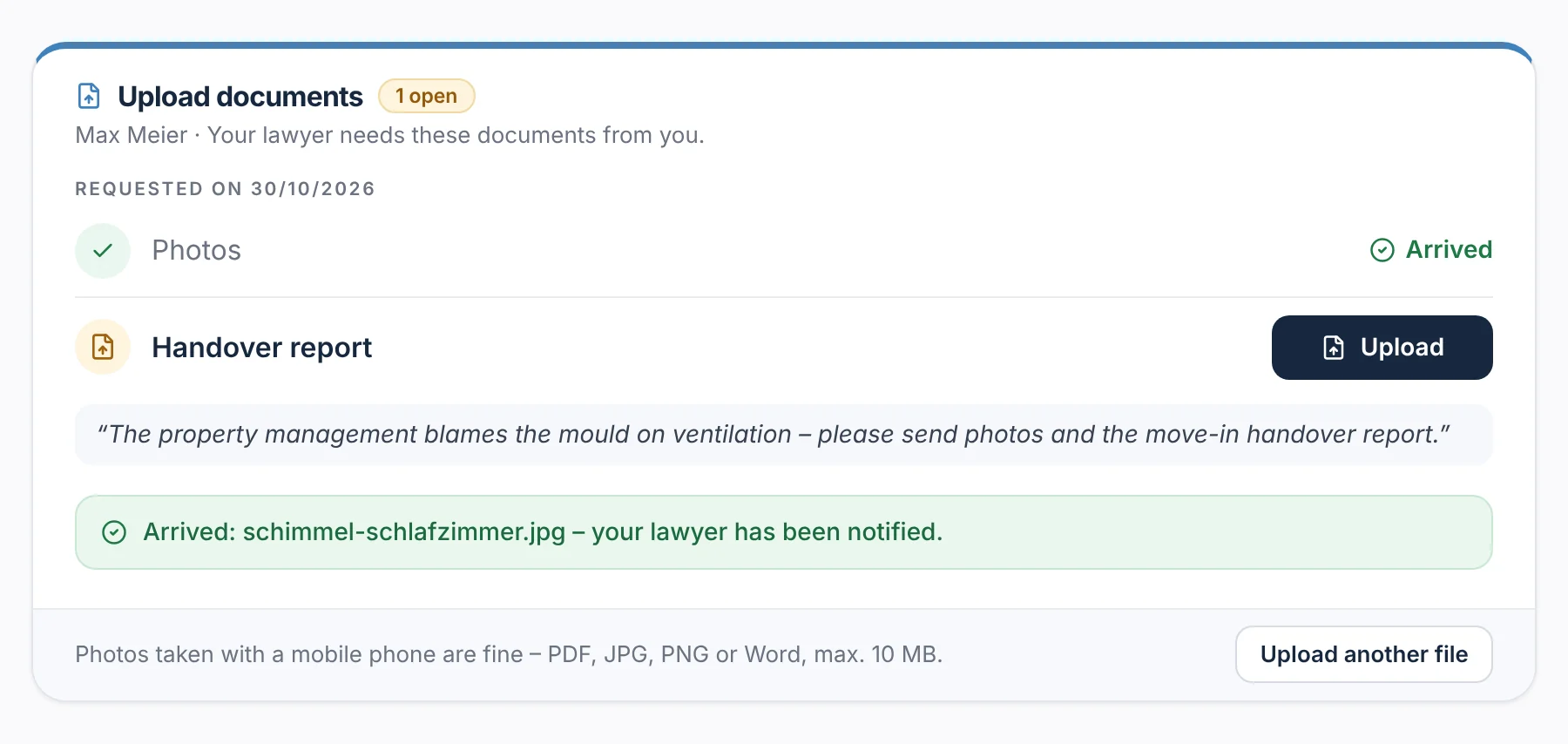
Your client sees which documents you need and uploads each item separately – photos from a phone are enough. A file only counts once it has been saved in full. Then they see ‘Received: … – your lawyer has been notified’, the item is ticked off in your case file and you receive an e-mail. Once all items are in, the case tracker sets ‘Documents complete’.

From everyday practice

Client Thomas Hoffmann uploads a photo of the mould in the bedroom and sees ‘Received: schimmel-schlafzimmer.jpg – your lawyer has been notified.’ The handover report from moving in is still outstanding.

rechtigo.de/fall
Screenshot from Rechtigo, view for clients: Received – and your lawyer has been notified
Pictured: View for clients: ‘Upload documents’ in client Thomas Hoffmann's case file – the photos have arrived, the handover report is still outstanding; at the bottom the green confirmation.
More

Also included

Reminder after 48 hours

If the power of attorney is still outstanding, Rechtigo reminds your client once automatically; after that, with one click.

Print view and PDF

The power of attorney with case heading, date and signature for an authority, court or insurer.

Company power of attorney

In the case heading ‘Company, represented by …’; the company's owners and administrators may sign.

Mandate autopilot

After every appointment booking, the power of attorney and checklist go out automatically.

Appointments and case requests
Client view

How your client experiences it

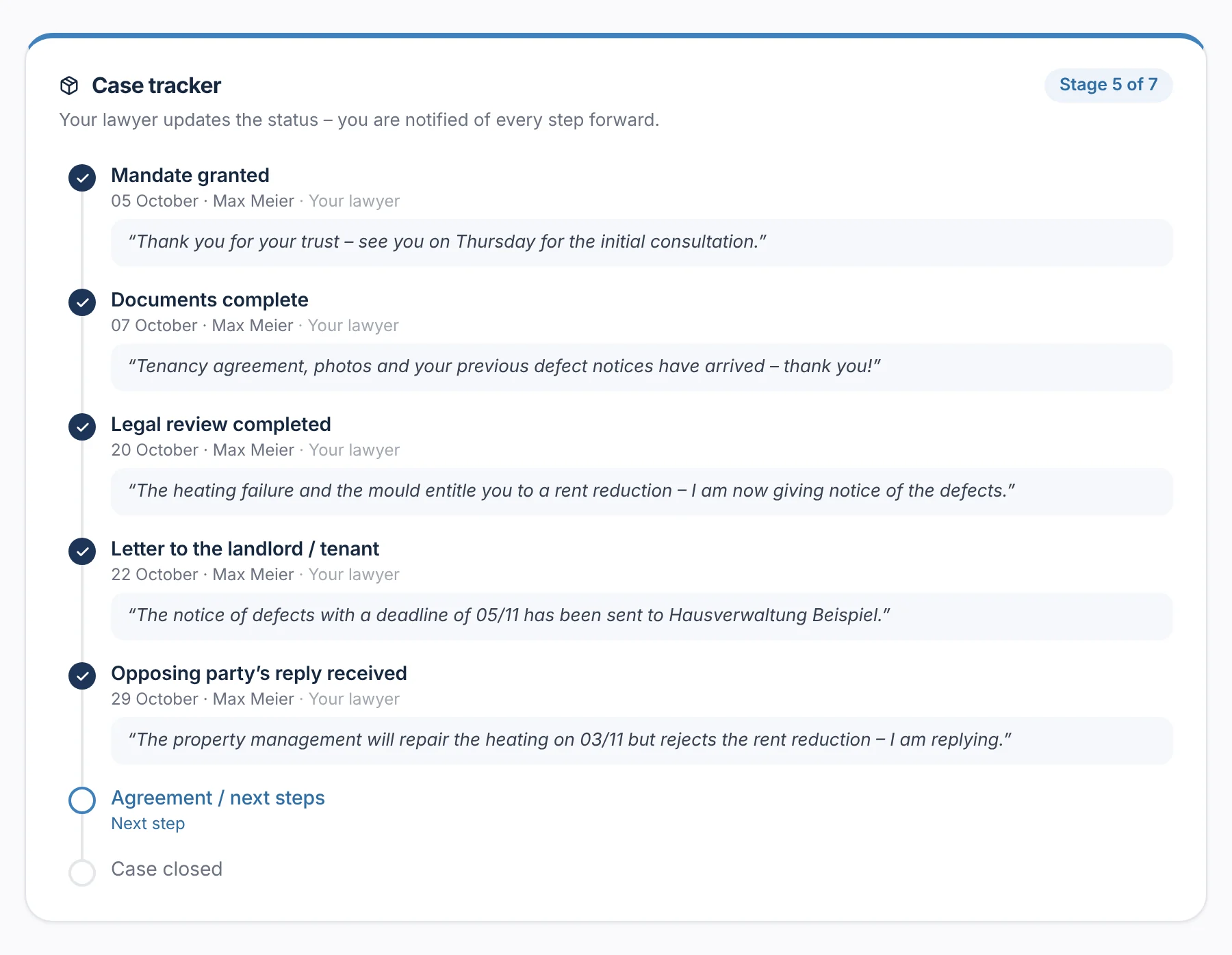
Whatever you request, your client finds in their case file under ‘What your lawyer needs from you’: first the power of attorney, then the documents. After that, the case tracker shows them which stage has been reached – each with a date and your short message.

  • Once everything is done, it says ‘All done – your lawyer is working on your case.’
rechtigo.de/fall
Screenshot from Rechtigo, view for clients: Case tracker in the client's case file with a date and message for each stage
Pictured: View for clients: the case tracker in client Thomas Hoffmann's case file – five of seven stages reached, each with a date and the message from lawyer Max Meier.
Questions

Frequently asked questions

Your question isn't here? Write to us at support@rechtigo.de.

Is a signature on screen enough?

The power of attorney is granted in text form; the text, signature image, consents and timestamp are saved. If an authority requires an original, your client provides it afterwards – the note is in the document.

Which e-mails does my client receive?

‘Power of attorney ready for signature’, ‘Your power of attorney has been granted’ with cancellation notice, ‘Documents needed’, ‘Your case has moved a step forward’ and ‘New message in your case file’. Message texts and your notes never appear in the e-mail, only in the case file.

Can I use my own power of attorney text?

No. Rechtigo uses a fixed text in two versions, compact or comprehensive; you adjust the opposing party and ‘Re’. You store your own provisions, such as a fee agreement, as terms of engagement.

Does a power of attorney apply to all my client's cases?

No, only to the case file in which you requested it – and there until it is revoked. For another case, you request a separate one in that case file.

Which files can my client upload?

PDF, photos as JPG or PNG, and DOC and DOCX files, up to 10 MB per file. Storage is encrypted; if needed, you can block uploads for each case file under ‘Internal & administration’.

Founding programme

Join the waitlist now

Rechtigo costs from €99 a month, €0 per mandate; the first 50 lawyers per city start in the Founding programme with three months free.

Rechtigo launches on 15 January 2027 – we will let you know as soon as registration opens.