Skip to content
RECHTIGO
All features for lawyers
Extras

Phone assistant, website chatbot and more

A phone assistant takes down enquiries when you can't; a chat on your website accepts requests. Both offer available appointments from your consultation hours and put every request in your cockpit – they don't give legal advice. If you wish, new case files go to your practice management software by e-mail.

rechtigo.de/anwalt/assistenten
Screenshot from Rechtigo, lawyer view: Phone assistant, website chatbot and more
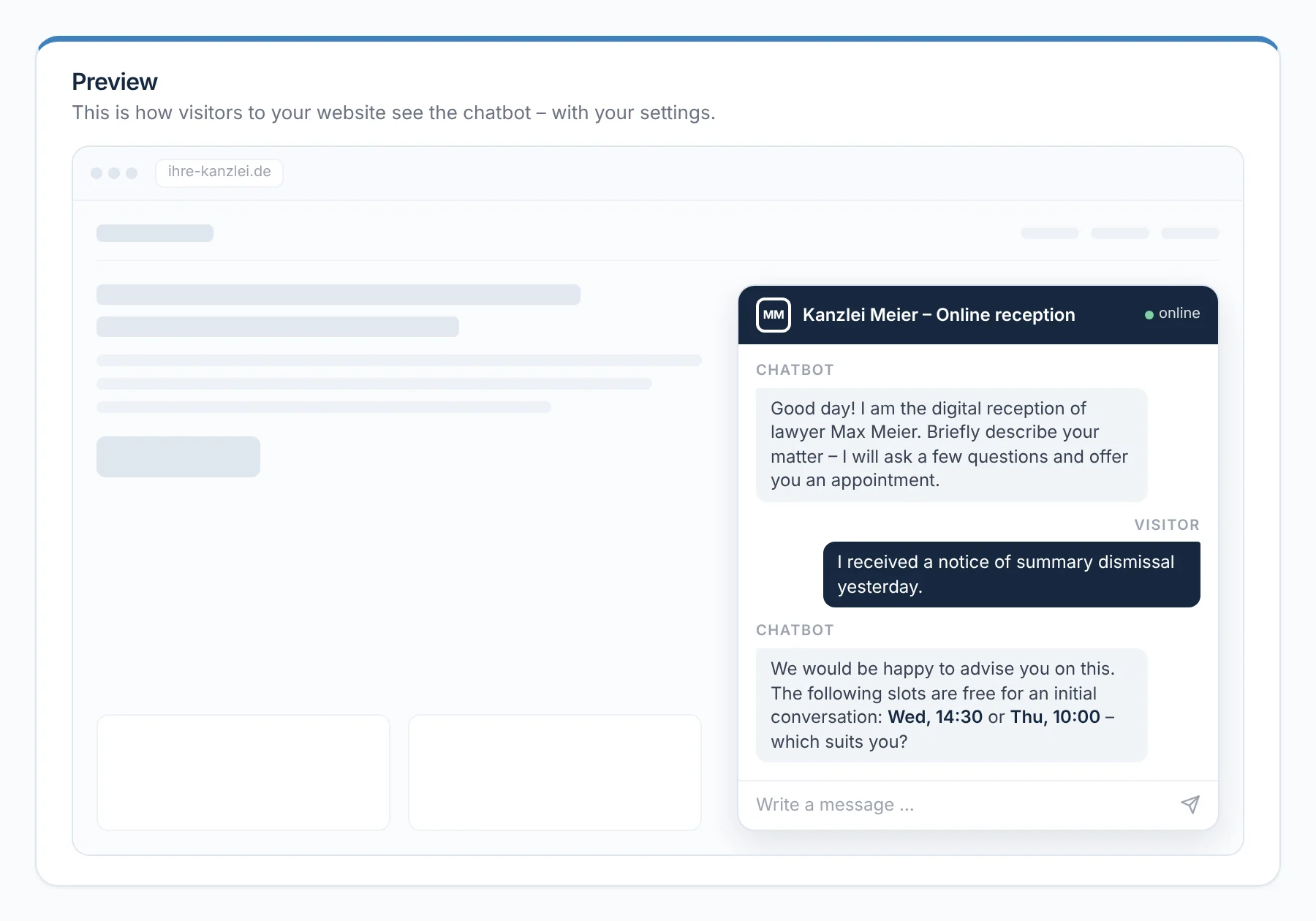
In the picture: Lawyer view: the preview of the website chatbot – this is how visitors to your website see the online reception: greeting, enquiry, two available appointments.

Phone assistant

Answers outside consultation hours and puts a callback request in your daily list.

Website chatbot

Takes down enquiries around the clock and offers available appointments.

Handover

Every accepted case file as a ready-made e-mail to your practice management software.

Help chat

Answers questions about using the platform with the right menu path.

Phone assistant

It answers when no one else can

Outside consultation hours or when the line is busy, the phone assistant takes over: it greets callers in your name, takes down their name, callback number and enquiry and offers available appointments based on your availability. Callback requests and booked appointments then appear in your daily list, together with their case file for existing clients. It doesn't give legal advice.

  • You see a booked appointment with time and format
From everyday practice

At 11:42, a call comes in from the clients, the Hoffmann family: the property management company has sent the service charge statement, and Thursday doesn't work. The daily list shows the request for a callback by 16:00, assigned to the case file Rental defects – with the ‘Call back’ button.

rechtigo.de/anwalt/assistenten
Screenshot from Rechtigo, lawyer view: It answers when no one else can
In the picture: Lawyer view: the preview of the phone assistant – this is how calls land in your daily list: two callback requests and one booked appointment.
Set-up

Activate it yourself, set up in minutes

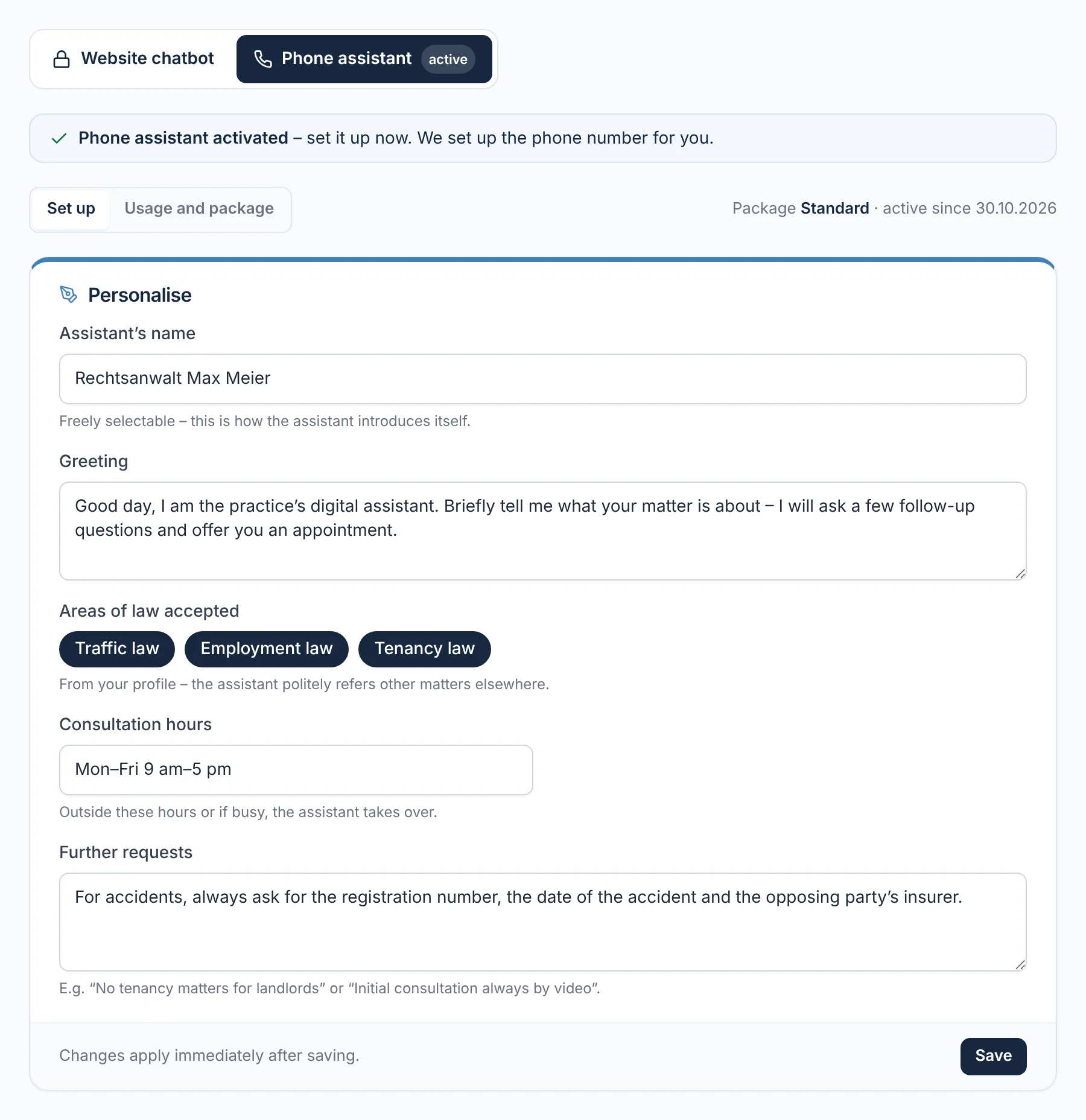
Under ‘Extras’, you activate the phone assistant and website chatbot yourself and set them up straight away: name of the assistant, greeting, areas of law, consultation hours and other preferences – for the chatbot also logo and colour, with a preview before saving. Rechtigo sets up the phone assistant's number for you. The conversation flow itself is fixed.

  • Changes take effect immediately after saving
From everyday practice

Lawyer Max Meier enters: ‘For accidents, always ask for the registration number, accident date and the opposing party's insurance.’ On the next call after a rear-end collision, these details are in the request.

rechtigo.de/anwalt/extras
Screenshot from Rechtigo, lawyer view: Activate it yourself, set up in minutes
In the picture: Lawyer view: the ‘Extras’ page after activating the phone assistant – name, greeting, areas of law, consultation hours and your other preferences.
Website chatbot

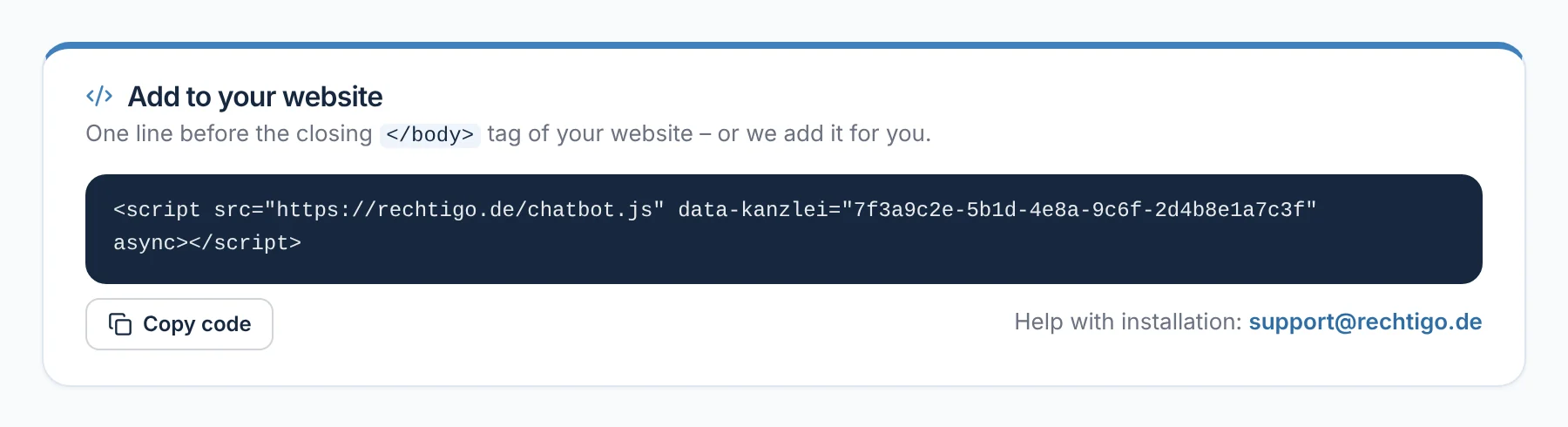
One line of code for your website

You add the website chatbot to your website with a single line of code. It is under ‘Add to your website’ and can be copied with ‘Copy code’. The chat then appears with the name, logo and greeting from your settings. If you wish, support will add it for you.

  • Help with installation via support@rechtigo.de
From everyday practice

Lawyer Max Meier has support add the line. Visitors to his website now see the online reception with his logo – just as the preview showed it.

rechtigo.de/anwalt/assistenten
Screenshot from Rechtigo, lawyer view: One line of code for your website
In the picture: Lawyer view: ‘Add to your website’ – the one line of code with ‘Copy code’, on the right the address for help with installation.
Usage

Every enquiry in the cockpit, usage at a glance

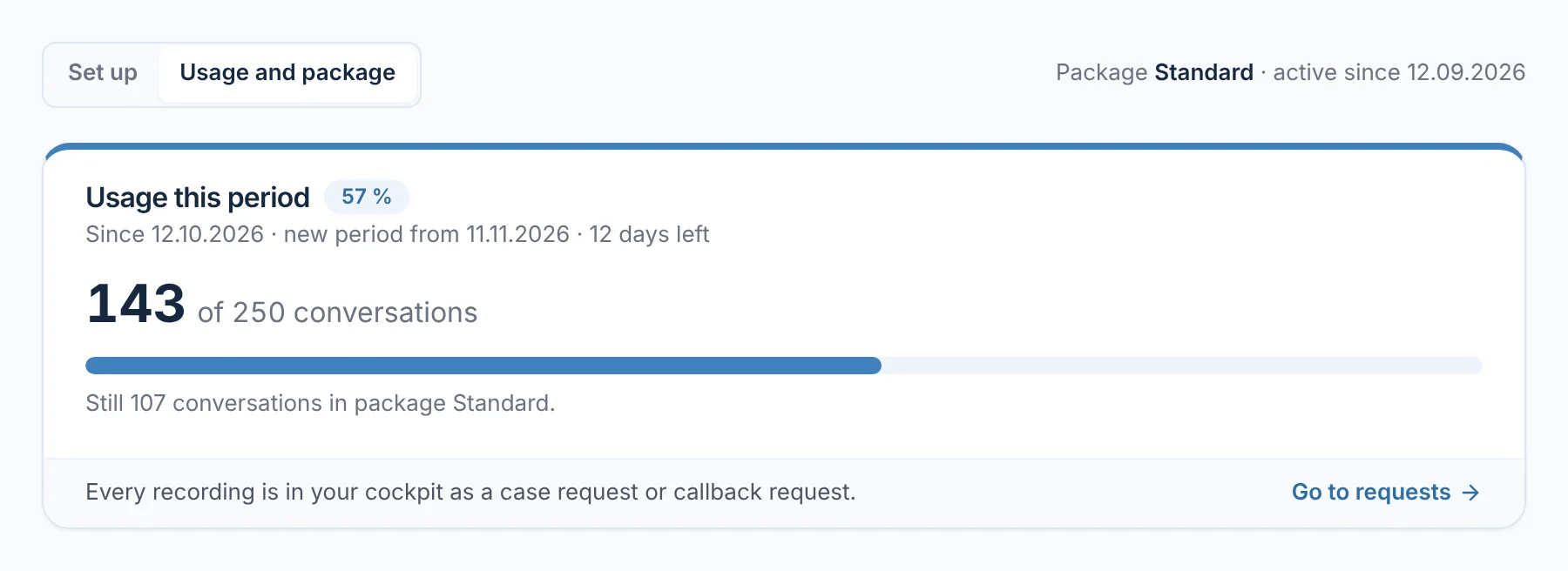
Whatever the phone assistant and website chatbot take down appears as a case request or callback request in your practice cockpit – each with its source. The assistant only offers appointments based on your availability. For the assistant, you see how many conversations of the current period have been used and when the next one begins.

  • ‘To the requests’ leads to all enquiries
From everyday practice

For lawyer Max Meier's website chatbot, the card shows usage since 12.10.2026; the next period begins on 11.11.2026. Every enquiry appears as a case request or callback request in his cockpit.

rechtigo.de/anwalt/assistenten
Screenshot from Rechtigo, lawyer view: Every enquiry in the cockpit, usage at a glance
In the picture: Lawyer view: ‘Usage and package’ for the website chatbot – the conversations used in the current period and when the next one begins.
Handover

New case files go to your practice management software

Under ‘Account → Connections’, you switch on the handover and enter the destination address. After that, every accepted case file arrives as a ready-made e-mail – automatically after the power of attorney has been signed, and additionally at the push of a button in the case file.

Case heading and partiesFollowing your case file creation template, plus the case description.
Power of attorney and documentsThe power of attorney as a PDF, the client's documents as attachments.
Any practice management softwareWorks with any practice management software that accepts e-mails; every handover is logged.
Help chat

Questions about using the platform, answered immediately

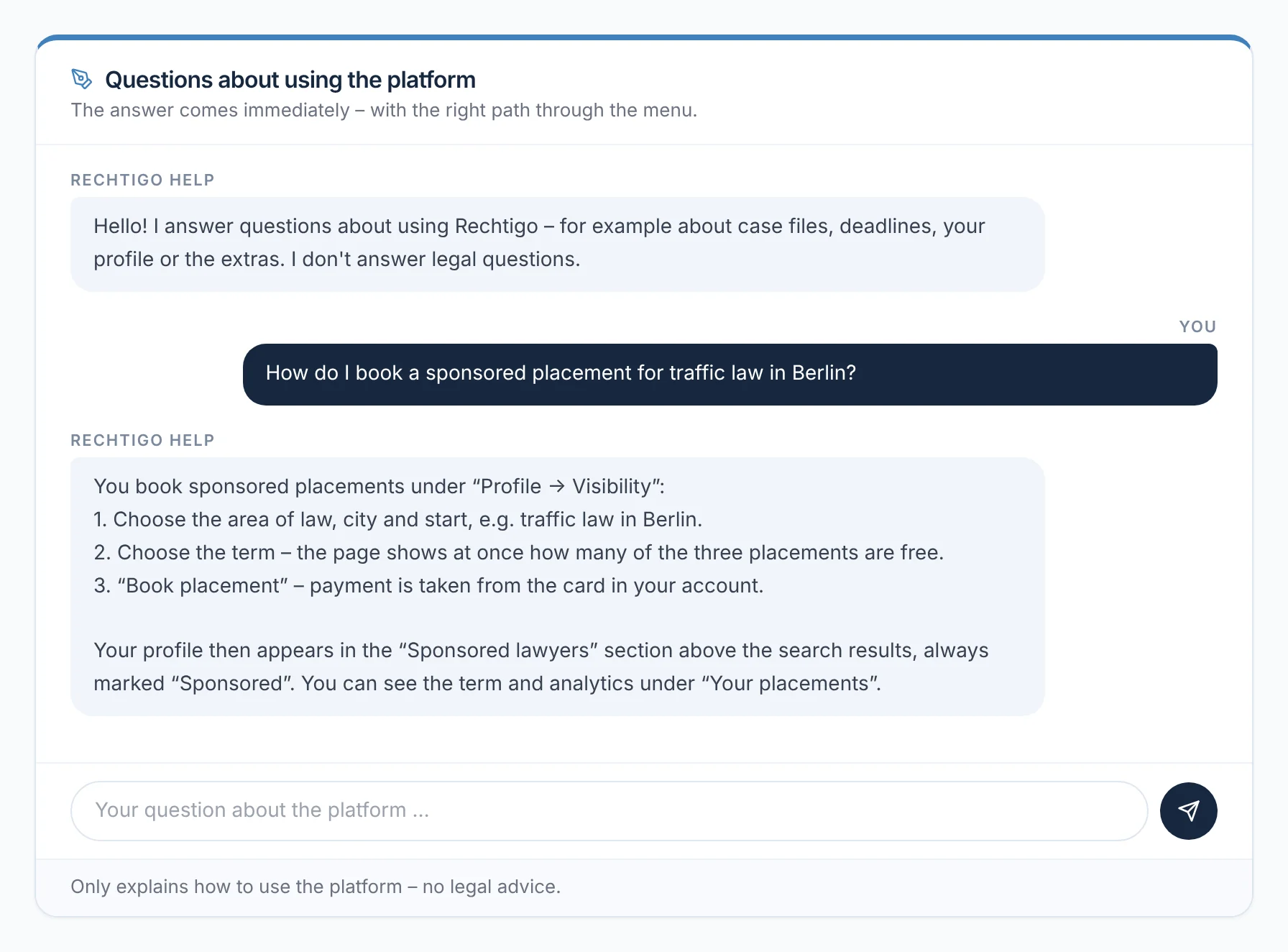
You reach the help chat via ‘Help & contact’. It explains how to use the platform with the right menu path and links to the help articles it is based on. It doesn't give legal advice. Alongside it are ‘Report a problem’ and ‘Send a request’ – the reply comes by e-mail.

From everyday practice

Lawyer Max Meier asks in the chat how to book a sponsored place for traffic law in Berlin and is given the path ‘Profile → Visibility’ with the individual steps.

rechtigo.de/hilfe
Screenshot from Rechtigo, lawyer view: Questions about using the platform, answered immediately
In the picture: Lawyer view: the help chat in your account – your question about the sponsored place and the answer with the path ‘Profile → Visibility’.
More

Also included

Your name, your logo

Name of the assistant, logo, colour and greeting – just as your clients should see them.

Monthly summary

On the first of the month, ‘Your Rechtigo month’: requests, appointments and new reviews from the previous month.

Rechtigo Assistant

Drafts from template and case file – you also have it activated under ‘Extras’.

Rechtigo Assistant
Client view

How your clients experience it

By phone or in the chat on your website, your clients reach an assistant acting in your name. It asks the important follow-up questions and offers an available appointment; they hear the assessment of their case from you.

  • Enquiries outside your areas of law are politely referred elsewhere
  • Available around the clock – weekends included
Questions

Frequently asked questions

Your question isn't here? Write to us at support@rechtigo.de.

Can I cancel an assistant again?

Yes, at any time in your account. The cancellation takes effect at the end of the current period; until then the assistant keeps running.

And without practice management software?

Then you leave out the handover and run your case files entirely in Rechtigo – with deadlines, post, documents and messages.

Can I test the handover beforehand?

Yes. Under ‘Account → Connections’, ‘Send test handover’ sends an e-mail with sample data and a test document to your destination address – so you can see whether it arrives in your practice management software.

Do messages and incoming items also go to the practice management software?

No. What is handed over is what you need to create the case file; messages and incoming items stay in Rechtigo – the handover e-mail links to the case file there.

What happens if a handover fails?

Rechtigo automatically tries again and shows the status in the case file. If it doesn't work, the reason is shown there; with ‘Hand over again’ you send the case file once more.

Founding programme

Join the waitlist now

Rechtigo costs from €99 a month, €0 per mandate; the first 50 lawyers per city start in the Founding programme with three months free.

Rechtigo launches on 15 January 2027 – we will let you know as soon as registration opens.