Skip to content
RECHTIGO
All features for lawyers
Visibility

How clients find you

Clients describe their case, Rechtigo assigns the area of law and suggests suitable lawyers – each with transparent reasons. The ranking comes from your profile, reviews from real appointments and your available appointments, never from money.

rechtigo.de/anwalt/profil
Screenshot from Rechtigo, view for lawyers: How clients find you
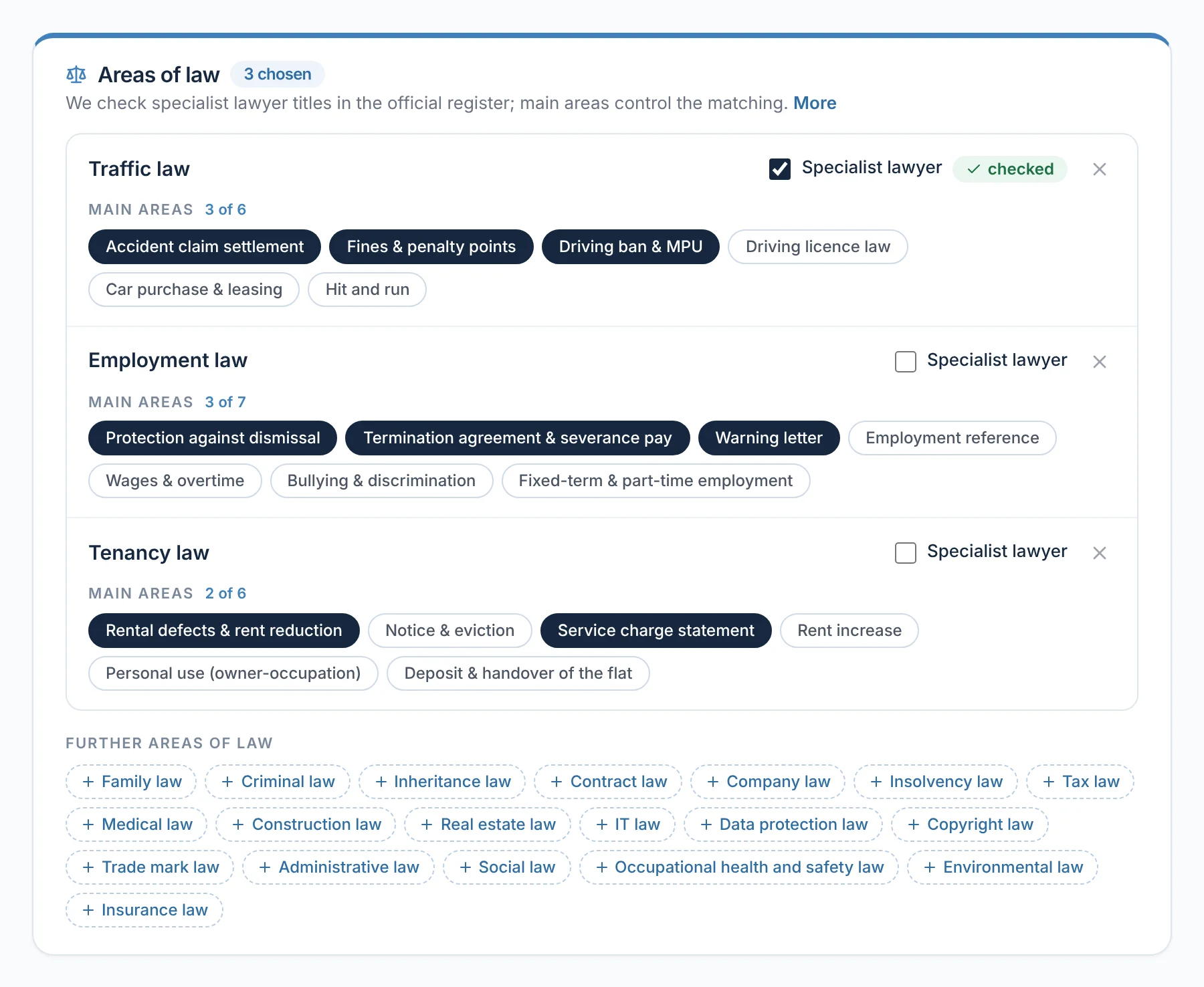
Pictured: View for lawyers: the ‘Areas of law’ card in your profile – traffic law with a verified specialist lawyer title, plus employment law and tenancy law, each with the chosen specialisms.

Verified profile

Activation via your beA, specialist lawyer title verified in the official lawyer register.

Suggestions with reasons

Under ‘Why this lawyer?’ your client sees why you are a good fit.

Genuine reviews

Only after an attended appointment – checked before publication.

Guides

Your articles with an author box – reviewed before they appear.

Suggestions

The ranking cannot be bought

After the case description, Rechtigo suggests lawyers who practise in the area of law, are verified and actually have time – an available appointment or open case requests. Every suggestion carries the reason ‘Why this lawyer?’. A subscription gives no advantage here, and there are no paid placements here.

Professional fitSpecialist lawyer title, specialisms and your profile text matched against the description.
Reviews from real appointmentsOnly clients who have attended an appointment with you.
Measured response timeRechtigo measures how quickly you answer case requests – it cannot be entered manually.
beA verification

Activated via your beA

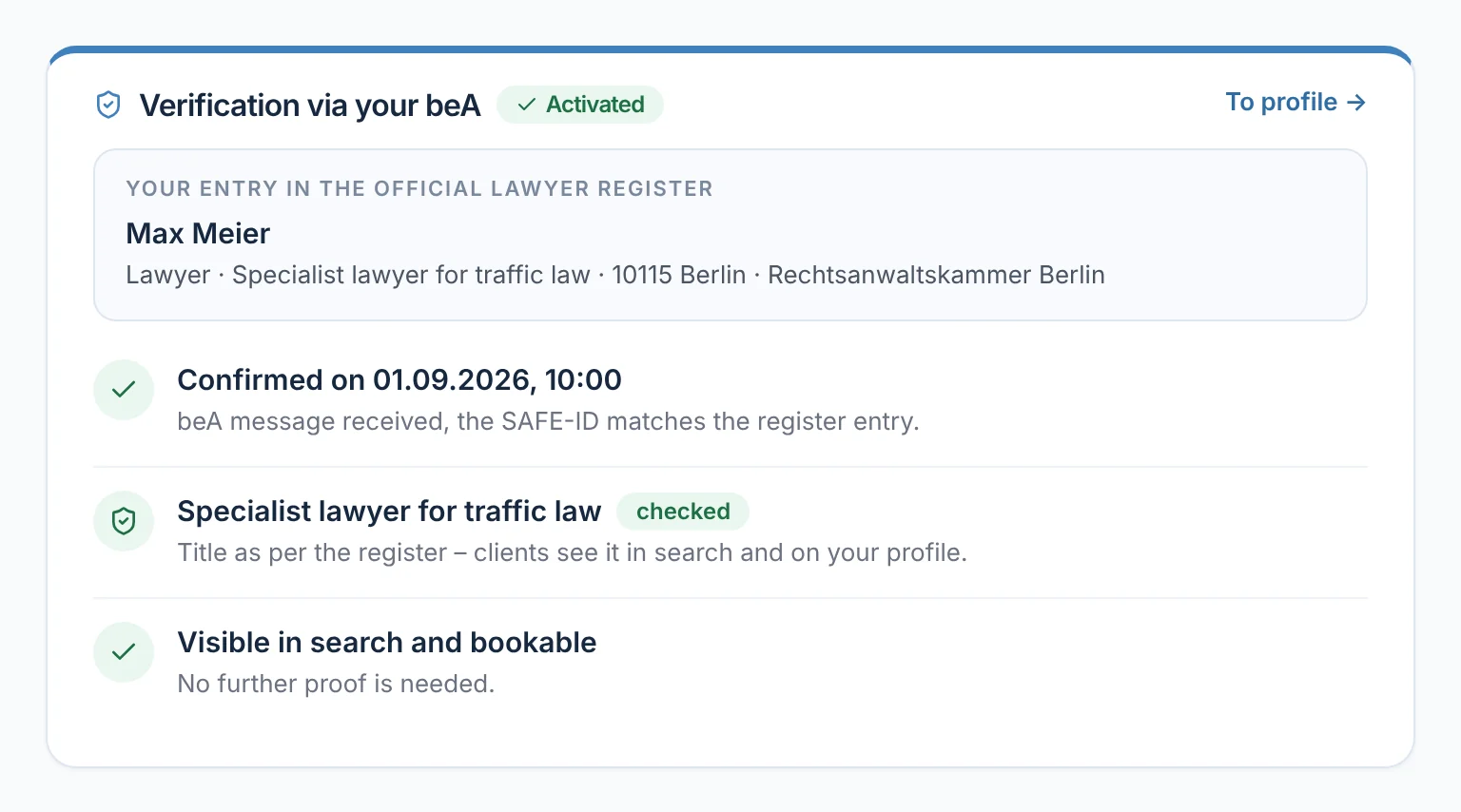
Your profile only becomes visible once you have proven your admission: you send a code from Rechtigo via beA, and Rechtigo matches the sender against your entry in the official lawyer register. Rechtigo only shows a specialist lawyer title once it is listed there. After that you are visible in the search and can be booked – no further proof is needed.

  • Clients see the verified title in the search and on your profile
From everyday practice

For lawyer Max Meier, the proof was confirmed on 01.09.2026 at 10:00. ‘Specialist lawyer for traffic law’ is verified according to the register; his profile appears in the search and can be booked.
rechtigo.de/anwalt/profil/nachweis
Screenshot from Rechtigo, view for lawyers: Activated via your beA
Pictured: View for lawyers: ‘Proof via your beA’ – ‘Activated’, your entry in the official lawyer register and the verified specialist lawyer title.
Lawyer search

The search shows only verified lawyers

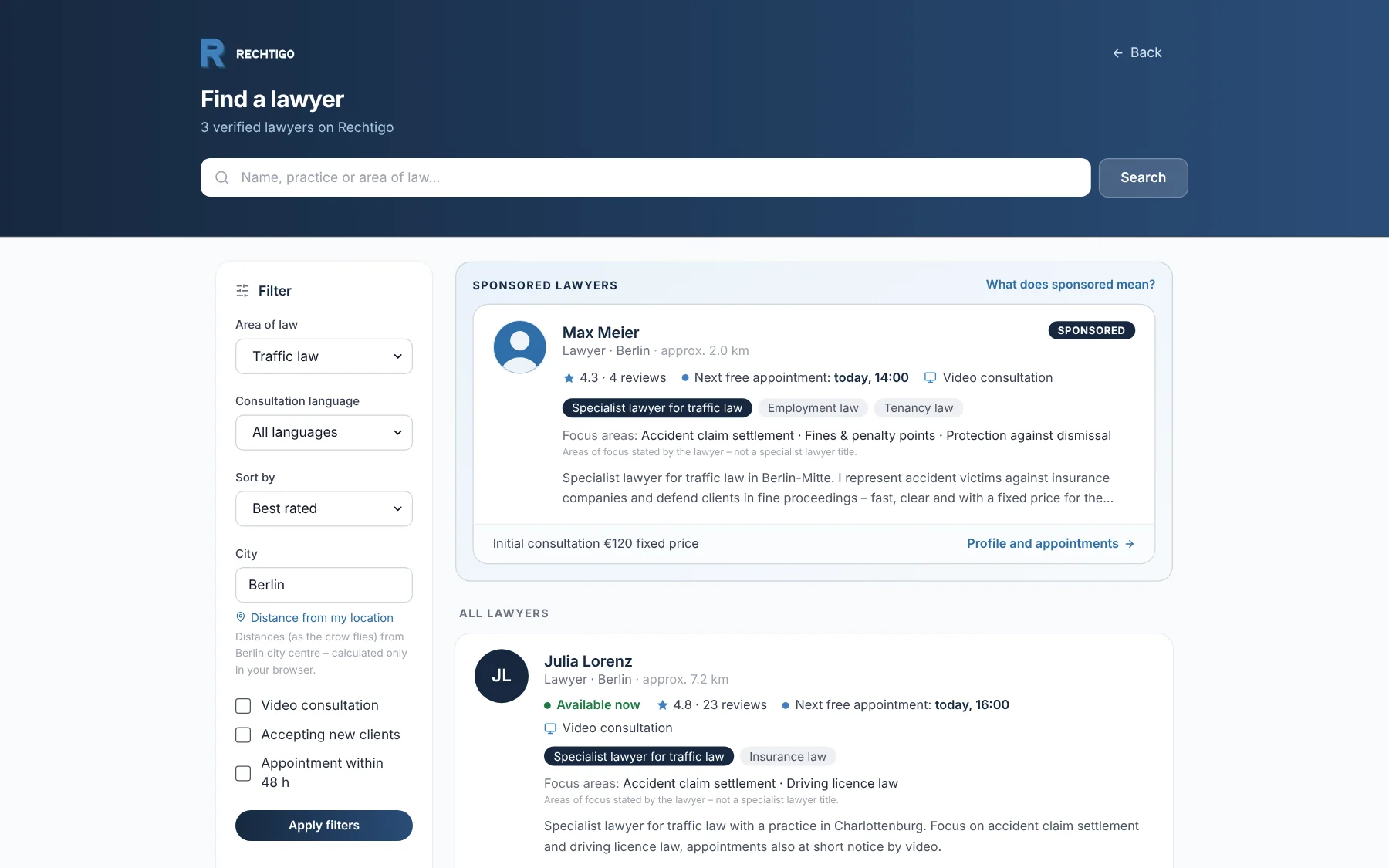
In the public lawyer search, clients filter by area of law, language, city, video consultation and ‘Appointment within 48 h’. Each card shows reviews, the next available appointment, specialist lawyer titles and specialisms. Sponsored placements appear in a separate, labelled section above the list – with the link ‘What does sponsored mean?’.

  • The card shows who is ‘Available now’
From everyday practice

Anyone searching for traffic law in Berlin sees lawyer Max Meier in the ‘Sponsored lawyers’ section – with reviews, next available appointment today at 14:00 and video consultation. Below follows the ‘All lawyers’ list.

rechtigo.de/anwaelte
Screenshot from Rechtigo, view for clients: The search shows only verified lawyers
Pictured: View for clients: the public lawyer search for traffic law in Berlin – at the top the labelled ‘Sponsored lawyers’ section, below it ‘All lawyers’.
Sponsored placements

Labelled – and only in the lawyer search

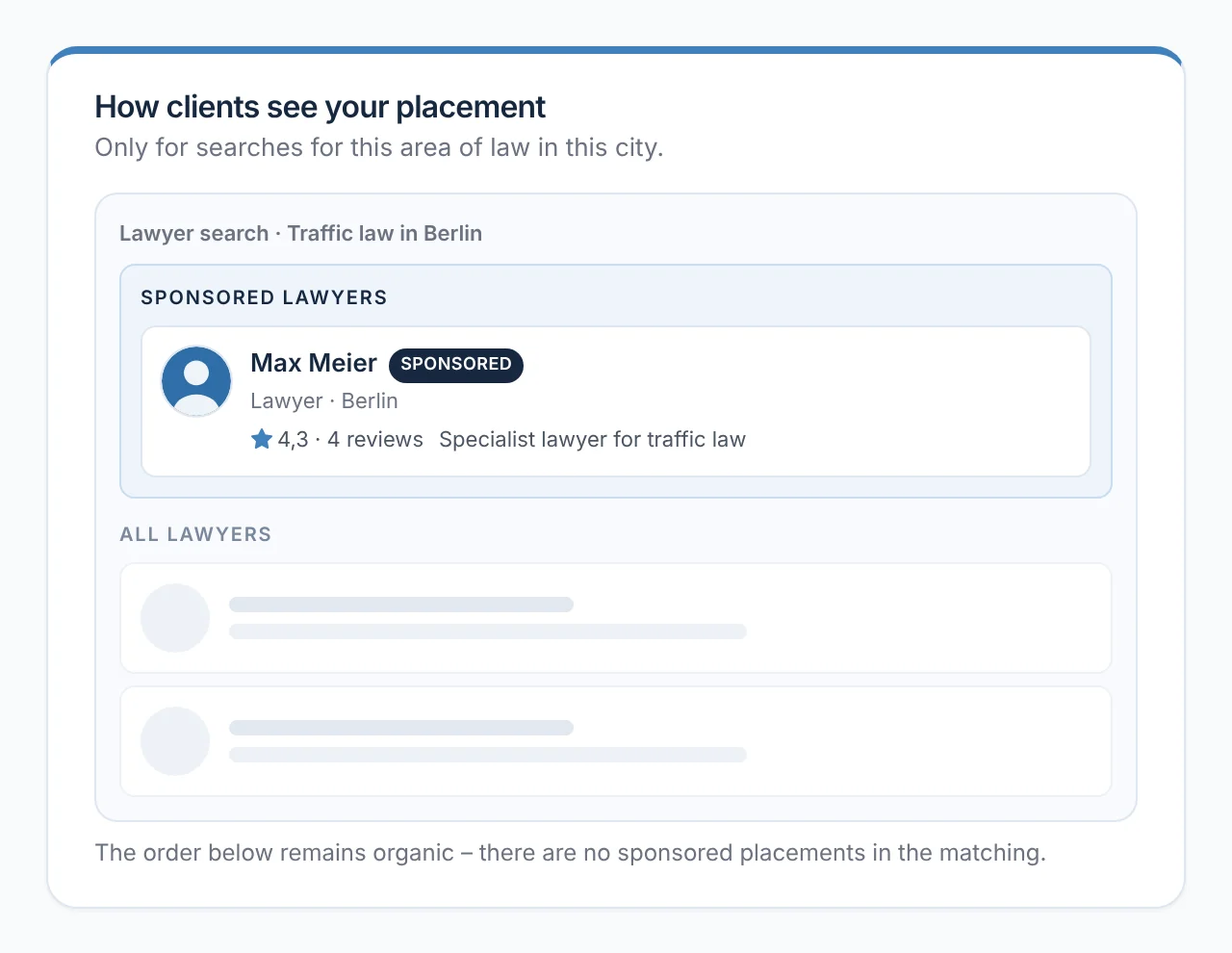
Under ‘Profile → Visibility’ you book a sponsored placement for one area of law in one city; there are at most three per area of law and city. It appears only in matching searches, in the ‘Sponsored lawyers’ section, and is always labelled ‘Sponsored’. The list below it and the suggestions after the case description remain unaffected.

  • The preview shows in advance how clients see your placement
From everyday practice

Lawyer Max Meier has a placement for traffic law in Berlin. The preview shows him with reviews and ‘Specialist lawyer for traffic law’ in the ‘Sponsored lawyers’ section – below it, the ranking stays as it is.

rechtigo.de/anwalt/sichtbarkeit
Screenshot from Rechtigo, view for lawyers: Labelled – and only in the lawyer search
Pictured: View for lawyers: the preview under ‘Visibility’ – this is how clients see your placement in the ‘Sponsored lawyers’ section; the list below stays as it is.
Analytics

Impressions and clicks per placement

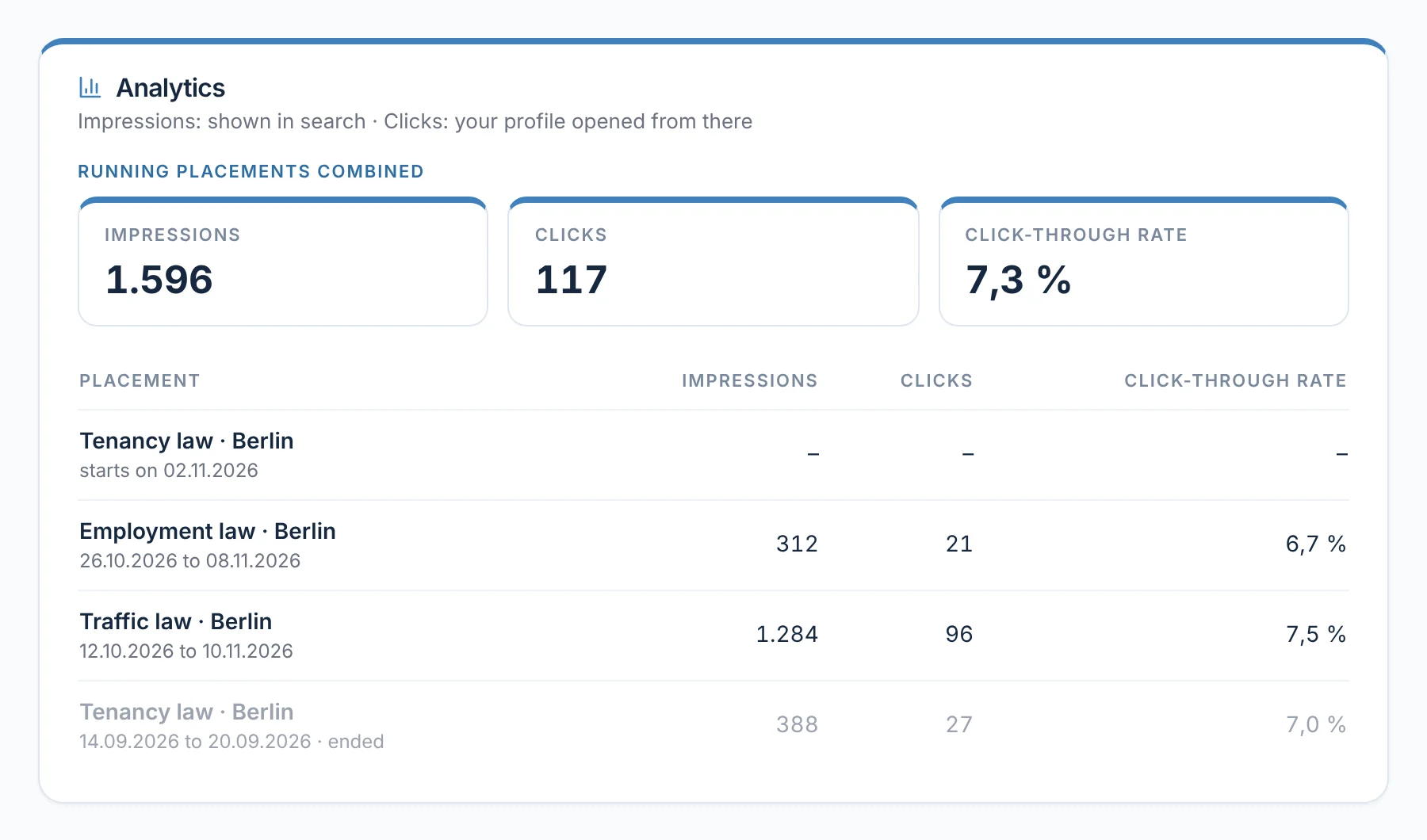
For your active placements, the analytics show how often your profile was shown in the search and how often clients opened it from there – in total and per placement, with duration and click-through rate. Scheduled and ended placements are also included in the list.

From everyday practice

Lawyer Max Meier sees his active placements for traffic law and employment law in Berlin. The placement for tenancy law starts on 02.11.2026; an earlier placement from September is listed below as ended.

rechtigo.de/anwalt/sichtbarkeit
Screenshot from Rechtigo, view for lawyers: Impressions and clicks per placement
Pictured: View for lawyers: the analytics for your sponsored placements – impressions, clicks and click-through rate, in total and per placement.
Reviews

Reviews only from real appointments

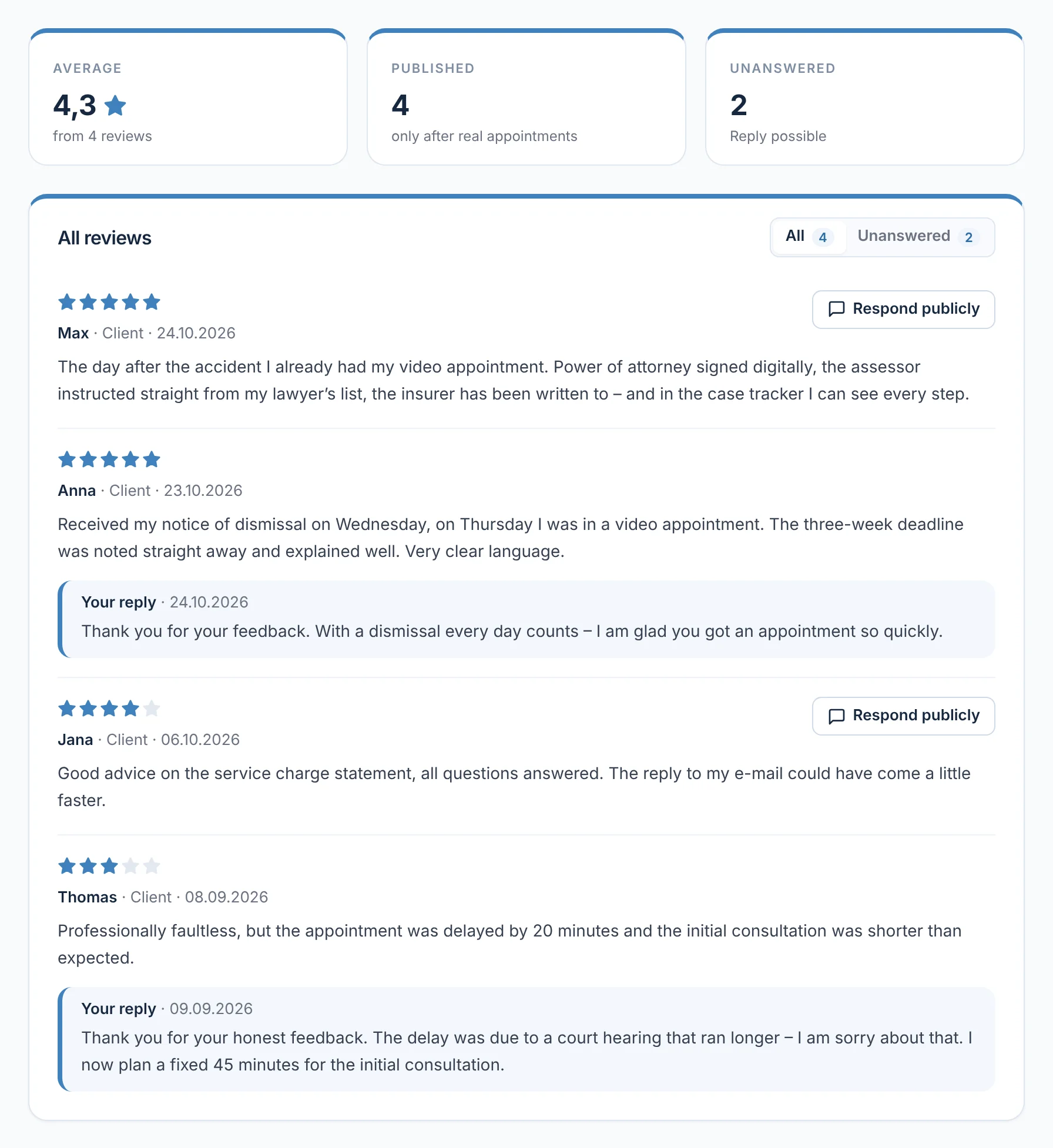
Only someone who has attended an appointment with you via Rechtigo can leave a review – once per appointment. The client gives stars, chooses at least two keywords from their area of law and, if they wish, writes a text; the review is checked before publication. The keywords appear in your profile as ‘Experience according to clients’.

  • Under ‘Profile → Reviews’: average, published and unanswered reviews
From everyday practice

On 23.10.2026, client Anna Schulz gives five stars: the three-week deadline was noted straight away and explained well. Lawyer Max Meier replied publicly the following day.

rechtigo.de/anwalt/bewertungen
Screenshot from Rechtigo, view for lawyers: Reviews only from real appointments
Pictured: View for lawyers: your reviews – at the top the average, published and unanswered; below, each review with role, date and your reply.
Replies

Reply publicly – factually and once

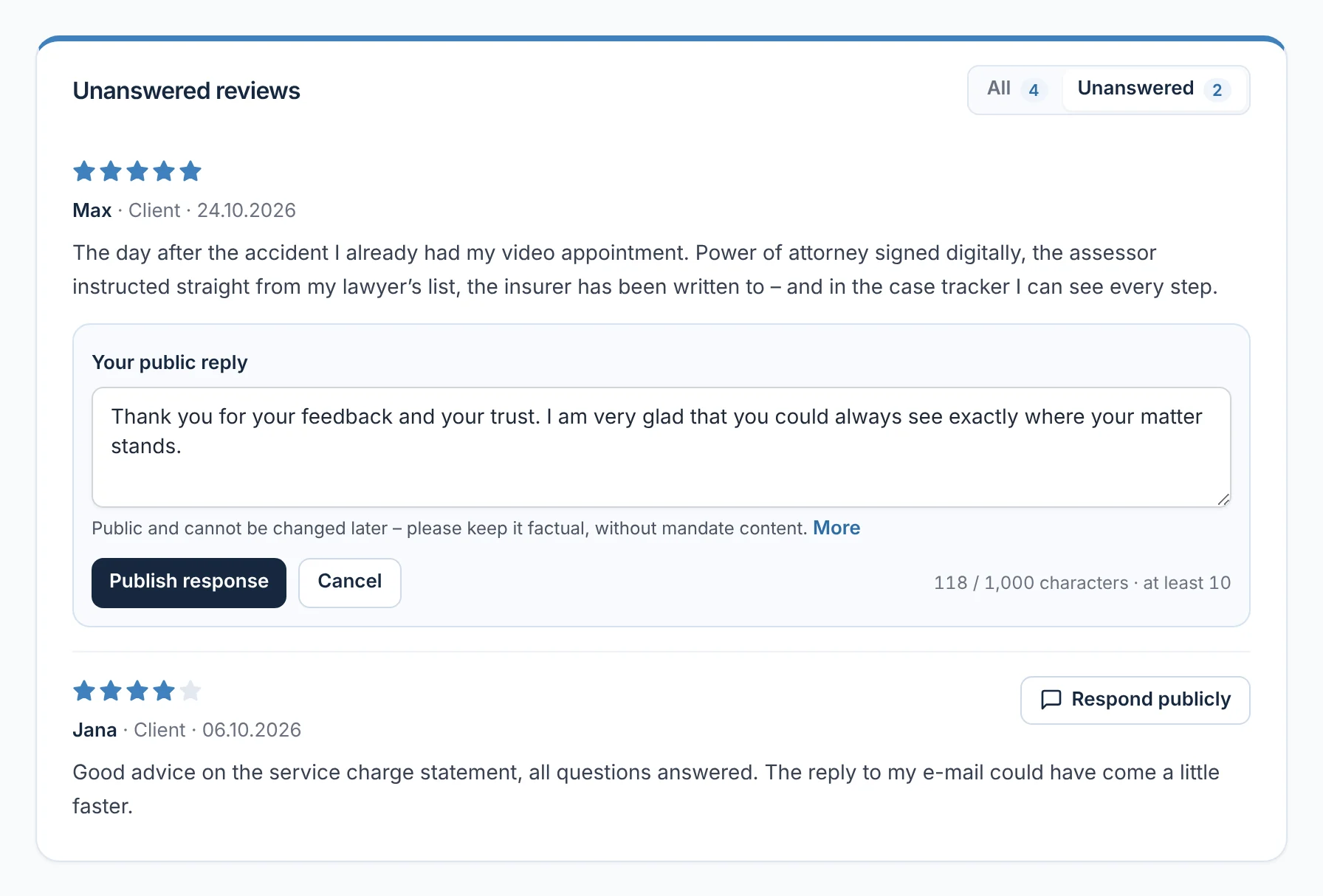
You can reply publicly to each review exactly once. The page reminds you to stay factual (§ 43b BRAO) and not to disclose anything about the mandate (§ 43a(2) BRAO); after that, the reply can no longer be edited. Reviews cannot be removed for payment; you report unlawful ones via ‘Report content’.

From everyday practice

A client praises being able to see every step in the case tracker. Lawyer Max Meier replies publicly: ‘Glad you could always see where your matter stood.’ – short, factual and without details of the mandate.

rechtigo.de/anwalt/bewertungen
Screenshot from Rechtigo, view for lawyers: Reply publicly – factually and once
Pictured: View for lawyers: the unanswered reviews – under the first one your public reply, below it the reminder to reply factually and without details of the mandate.
Guides

Guide articles with your author box

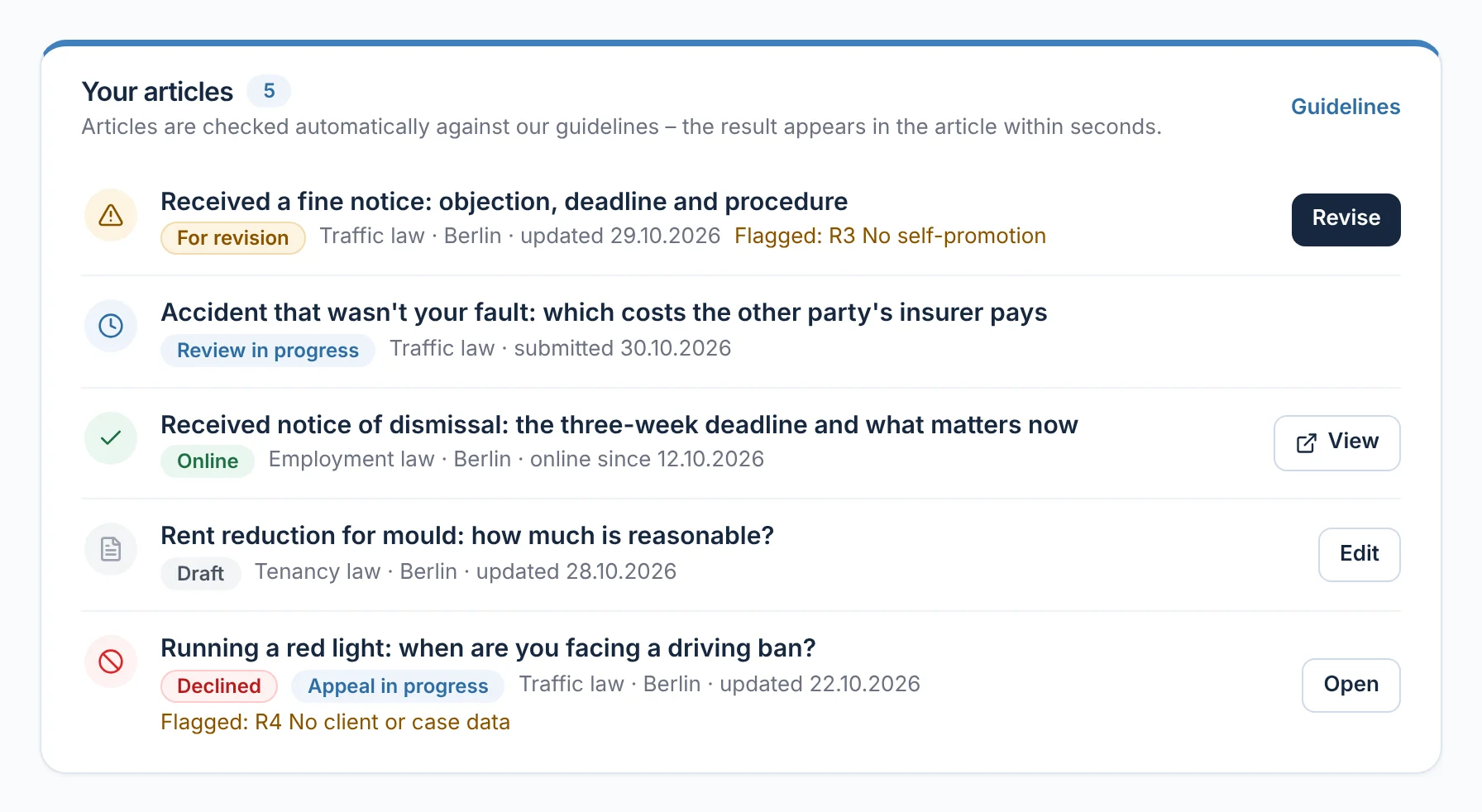
With ‘New article’ you write a guide text: title, summary, area of law, legal status date and text with subheadings and lists. Contact details and links don't belong in it – under every article is your author box with ‘Book appointment’. The list shows each article with its status, for example ‘Under review’, ‘Online’ or ‘Needs revision’.

From everyday practice

The article ‘Received notice of dismissal: the three-week deadline and what matters now’ by lawyer Max Meier has been online since 12.10.2026. ‘Rent reduction for mould’ is still waiting as a draft; another article is set to ‘Needs revision’.

rechtigo.de/anwalt/ratgeber
Screenshot from Rechtigo, view for lawyers: Guide articles with your author box
Pictured: View for lawyers: your guide articles – each with its status, for example ‘Needs revision’, ‘Under review’ or ‘Online’.
Review

Reviewed before it appears – appeals go to a person

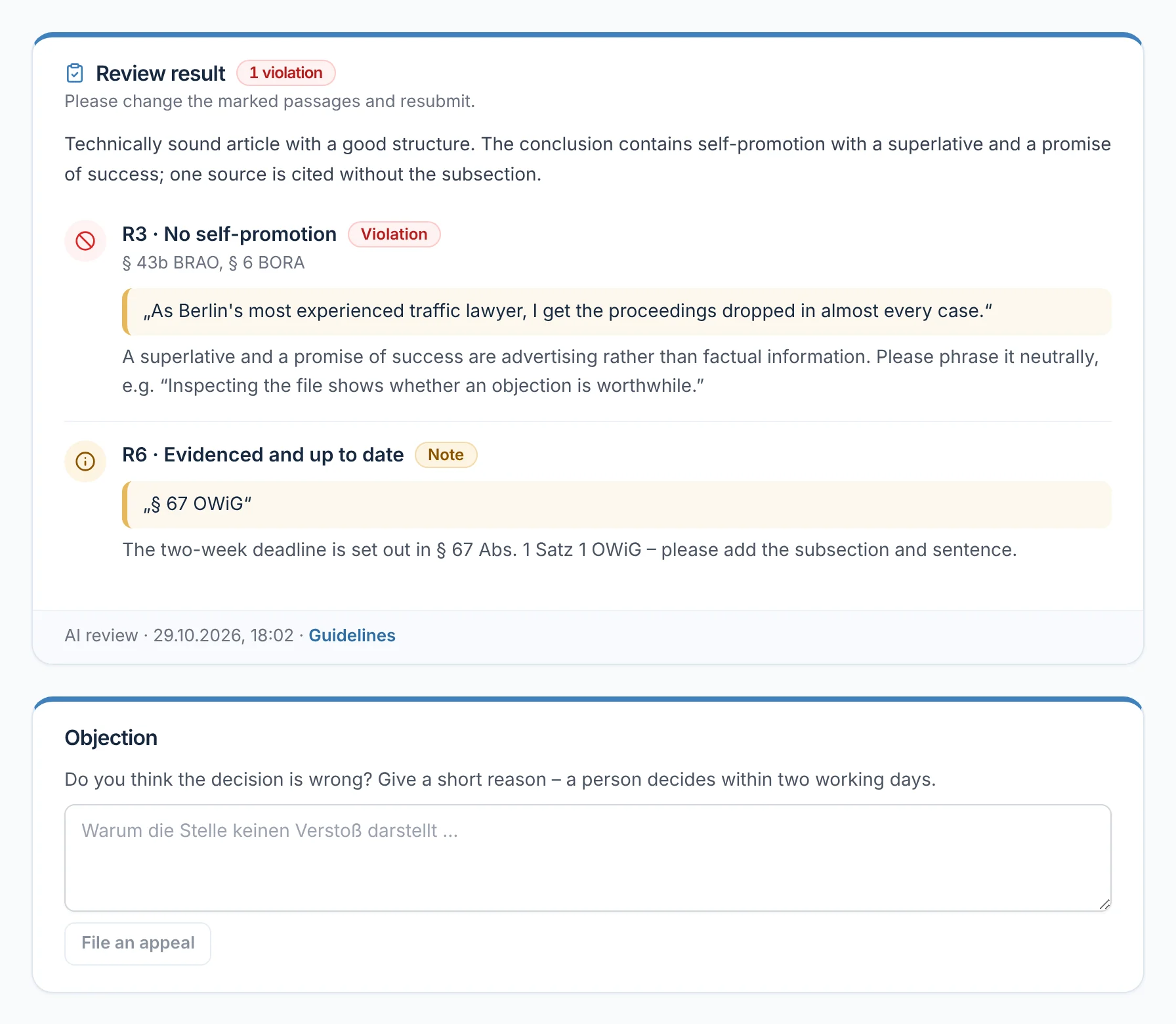
Before submitting, you confirm that you wrote the article yourself. The review runs in two stages: first fixed rules, then the AI against guidelines R1 to R10 – for example no individual legal advice, no self-promotion, no client data. Each finding appears in the review result with its location and reasoning. If you think it is wrong, you lodge an appeal; then a person decides.

From everyday practice

In the article ‘Received a fine notice’, the review flags self-promotion in the conclusion as a breach of R3 and gives a note on R6: add subsection and sentence for § 67 OWiG. Lawyer Max Meier rewords it factually and resubmits.

rechtigo.de/anwalt/ratgeber
Screenshot from Rechtigo, view for lawyers: Reviewed before it appears – appeals go to a person
Pictured: View for lawyers: the review result for an article – the flagged passage on R3, a note on R6, below it the field for the appeal.
More

Also included

Specialisms

For each area of law you choose specialisms; they determine which cases you are a fit for.

Available now

Suggested with priority for two or four hours.

Appointments and case requests

City pages

Public pages for each city and area of law show the same verified lawyers.

Short introduction

From two or three keywords, the AI makes a suggestion – you review and save it yourself.

For businesses

With ‘I advise businesses’ you are suggested with priority for business cases.

Initial consultation

Your rule for the first appointment appears on your profile, for example a fixed fee; the ranking is not based on it.

Client view

How your client sees the suggestions

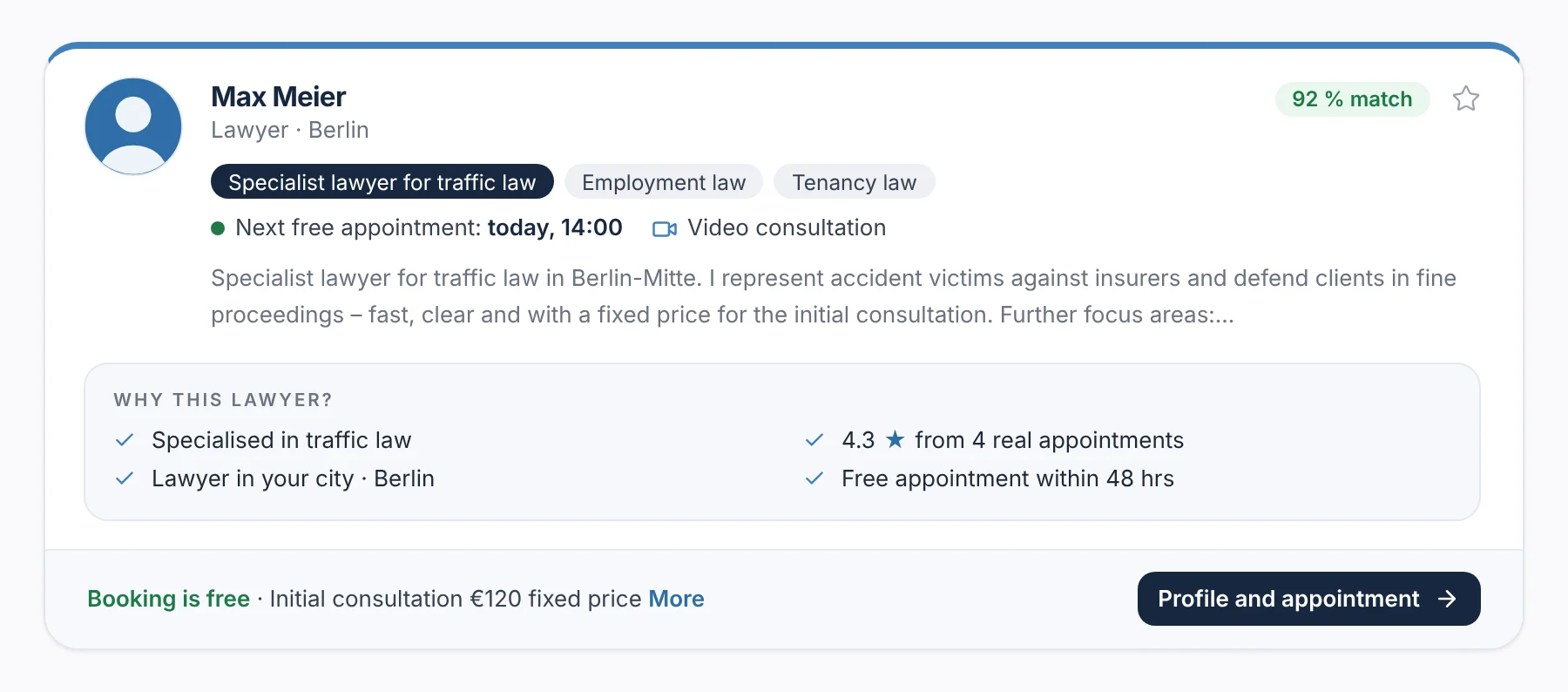
After the case description, your client sees suitable lawyers with match, areas of law, next available appointment and the reason ‘Why this lawyer?’ – for example ‘Specialised in traffic law’ or ‘Available appointment within 48 hrs’. They can sort by match or rating.

  • Saved lawyers and their regular lawyer appear at the top – because they chose them themselves
  • A verified specialist lawyer title appears as a separate label
rechtigo.de/fall/neu
Screenshot from Rechtigo, view for clients: Lawyer card after the case description with match and ‘Why this lawyer?’
Pictured: View for clients: a lawyer card after the case description – match, areas of law, next available appointment and ‘Why this lawyer?’.
Questions

Frequently asked questions

Your question isn't here? Write to us at support@rechtigo.de.

What do clients see on my profile?

Your areas of law and specialisms, your reviews including replies, your measured response time, how you advise, and your available appointments for booking. From the practice cockpit, ‘How clients see you’ opens exactly this view.

Am I suggested even without available appointments?

Only if you accept case requests. Anyone who has neither an available appointment in the next 14 days nor accepts requests appears neither in the search nor in the suggestions. The practice cockpit tells you when this is the case, and why.

Do I have to ask clients for a review myself?

No. 30 minutes after the end of every appointment, Rechtigo invites your client by e-mail to leave a review – except for cancelled or missed appointments.

Does a sponsored placement renew automatically?

Yes, each time by the booked term: one week, two weeks or one month. With ‘Do not renew’ it ends after the current term; you cancel a placement that has not yet started.

Can I still change a published guide article?

Yes. After every change you resubmit it; until it has passed the review again, it is not publicly visible.

Founding programme

Join the waitlist now

Rechtigo costs from €99 a month, €0 per mandate; the first 50 lawyers per city start in the Founding programme with three months free.

Rechtigo launches on 15 January 2027 – we will let you know as soon as registration opens.