Skip to content
RECHTIGO
All features for lawyers
Deadlines and follow-ups

Deadline register with entry check

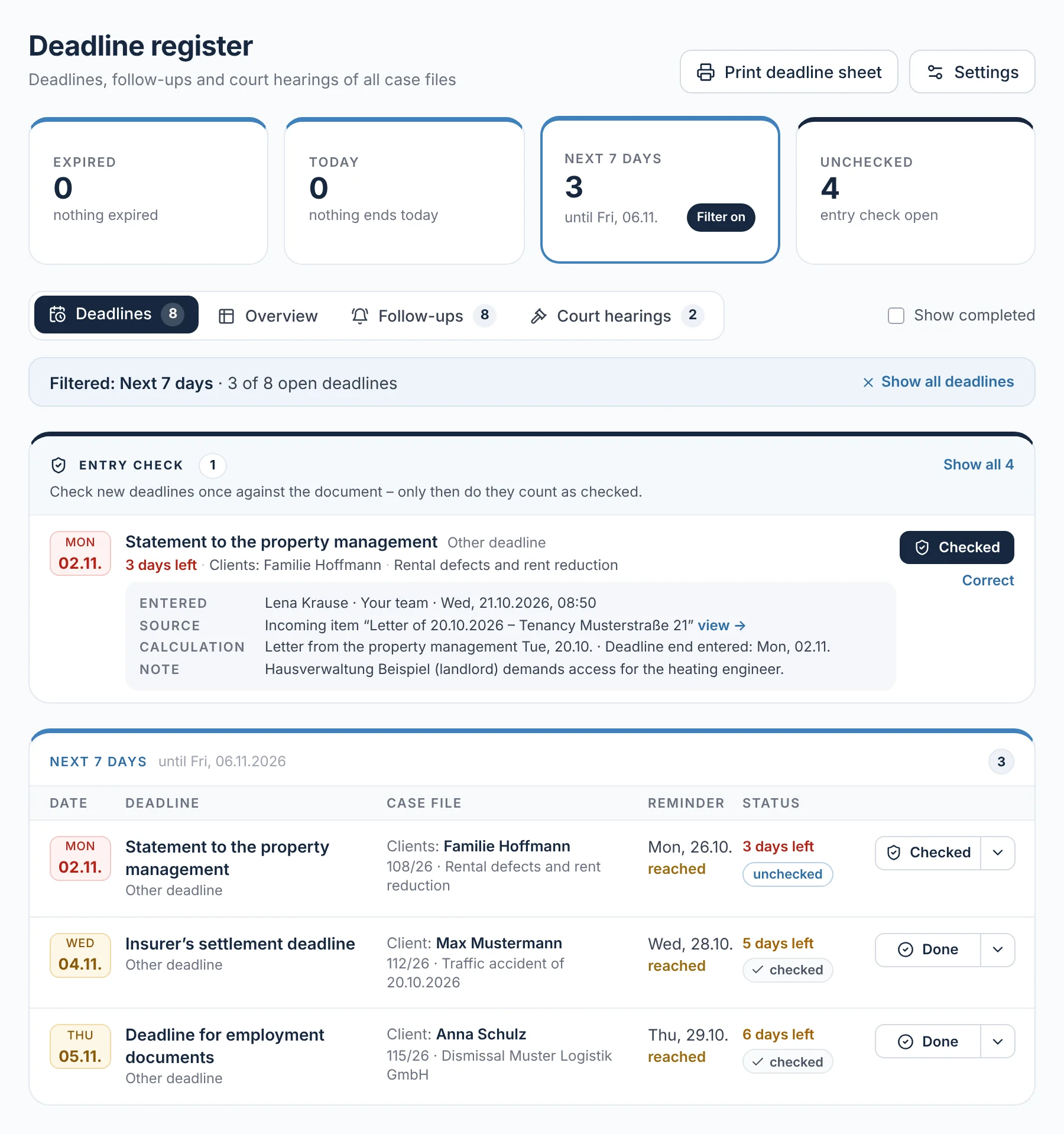
At the top, the deadline register counts what has expired, ends today, ends in the next seven days or is still unchecked – one click shows only those deadlines. Anything nobody has yet checked against the document sits in its own section at the very top. Deadlines are only marked as done with a note.

rechtigo.de/anwalt/fristen
Screenshot from Rechtigo, lawyer view: Deadline register with entry check
In the picture: Lawyer view: the deadline register for all case files – at the top the four counters as filters, with ‘Next 7 days’ selected; below, the entry check and the three deadlines in these seven days in fixed columns.

Counters as filters

Expired, Today, Next 7 days, Unchecked – one click shows only those deadlines.

Entry check

Its own section at the very top: who entered what and when, with ‘Checked’ and ‘Correct’.

Deadline end and advance deadline

Calculated under §§ 187 ff. BGB and § 222 ZPO, taking weekends and public holidays into account.

Deadline sheet

On working days at 6:45 by e-mail or for printing – with tick boxes.

Entry check

‘Unchecked’ until you have checked it against the document

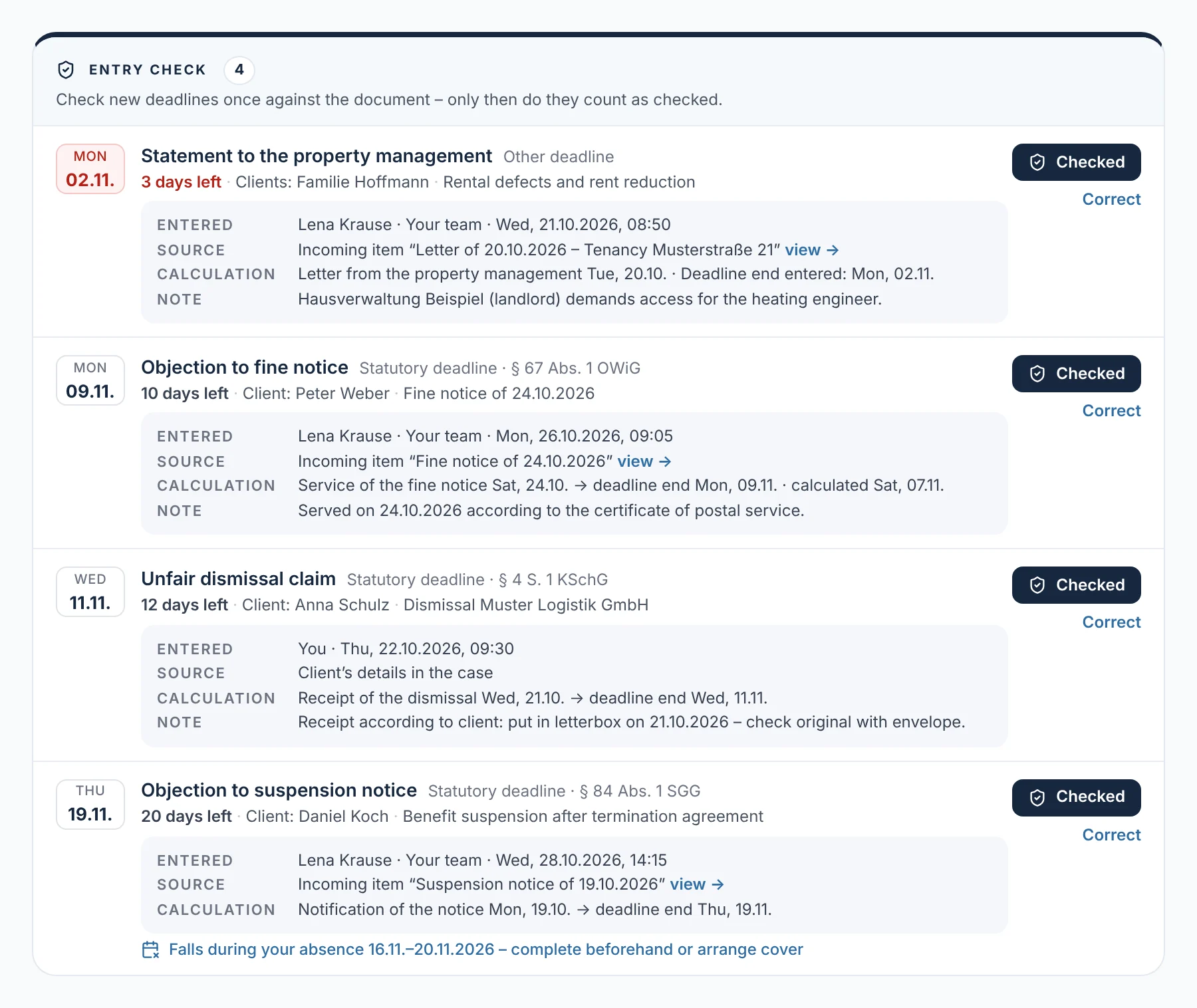
Anything nobody has yet checked against the document sits in its own section at the very top: the deadline, who entered it and when, where it comes from and how it was calculated. ‘Checked’ confirms it, ‘Correct’ opens it for editing. Until then it counts as ‘unchecked’ and also appears in its time group and on the deadline sheet.

  • Only the lawyer can check; the history records who checked and when
From everyday practice

Four deadlines are waiting for the check. Staff member Lena Krause noted the statement for clients the Hoffmann family from an incoming item; the unfair dismissal claim for client Anna Schulz comes from her details. Lawyer Max Meier checks both against the document.
rechtigo.de/anwalt/fristen
Screenshot from Rechtigo, lawyer view: ‘Unchecked’ until you have checked it against the document
In the picture: Lawyer view: the entry check in the deadline register – four unchecked deadlines, each with case file, who entered it and when, source and calculation, on the right ‘Checked’ and ‘Correct’.
Note deadline

Choose the deadline type, enter the event – Rechtigo does the calculation

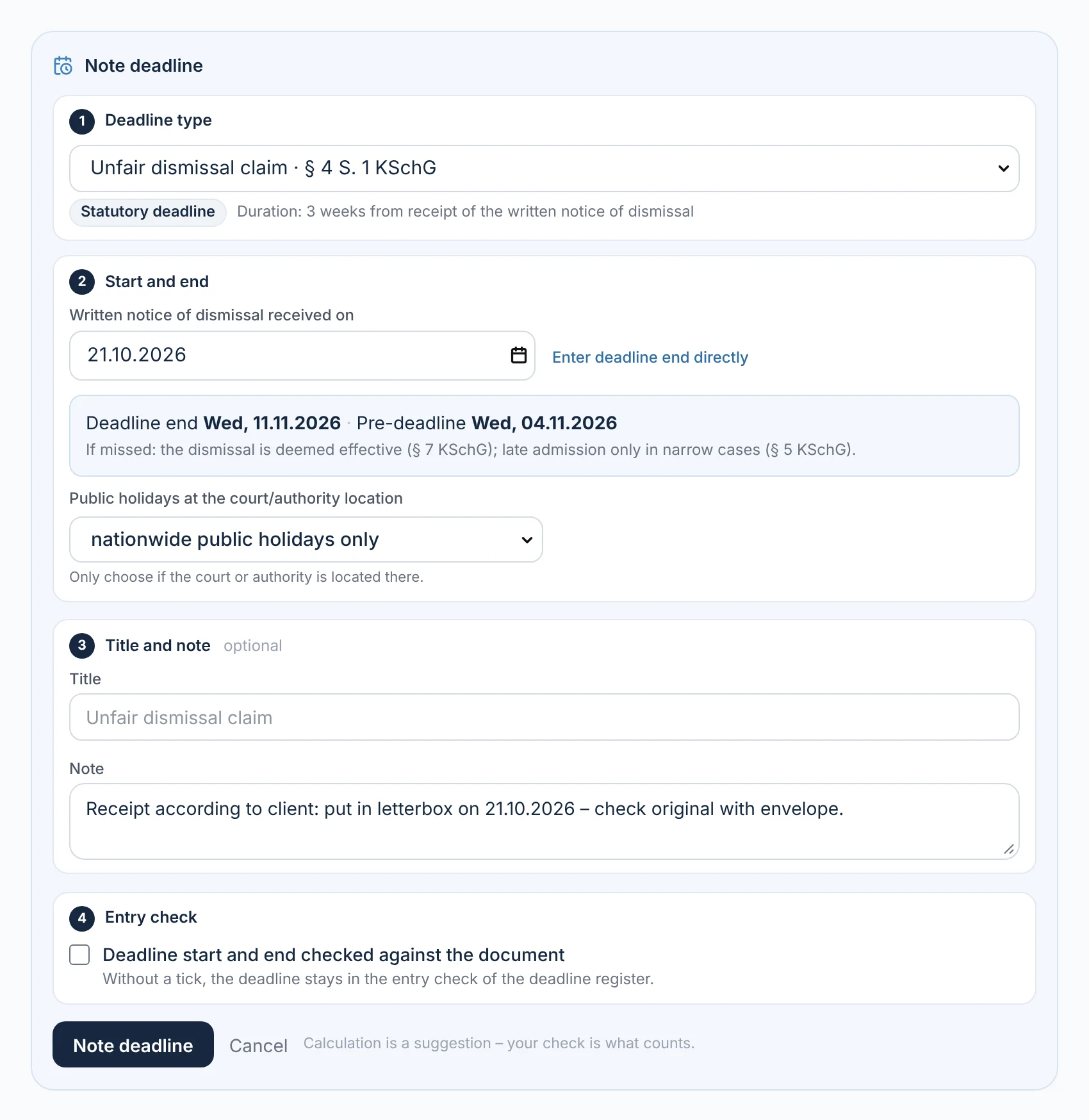
‘Note deadline’ takes you through four steps: deadline type, start and end, title and note, entry check. The deadline types are pre-sorted by area of law and state the type and length. As soon as the event is entered, you see the deadline end, the advance deadline and the consequence of missing it; if the end falls on a weekend or public holiday, the next working day applies.

  • From an incoming item, the deadline type is already selected; you take the date of service from the acknowledgement of receipt, the certificate of service or the receipt stamp
From everyday practice

For client Anna Schulz, lawyer Max Meier selects ‘Unfair dismissal claim’ and enters receipt on 21 October 2026: deadline end Wednesday, 11 November 2026, advance deadline 4 November 2026. He only ticks the entry check once he has seen the original with its envelope.

Deadlines from the post
rechtigo.de/anwalt/akte
Screenshot from Rechtigo, lawyer view: Choose the deadline type, enter the event – Rechtigo does the calculation
In the picture: Lawyer view: ‘Note deadline’ in the case file of client Anna Schulz – four steps: deadline type unfair dismissal claim, receipt on 21 October 2026 with deadline end and advance deadline, note, entry check.
Complete

Done only with a note and dispatch check

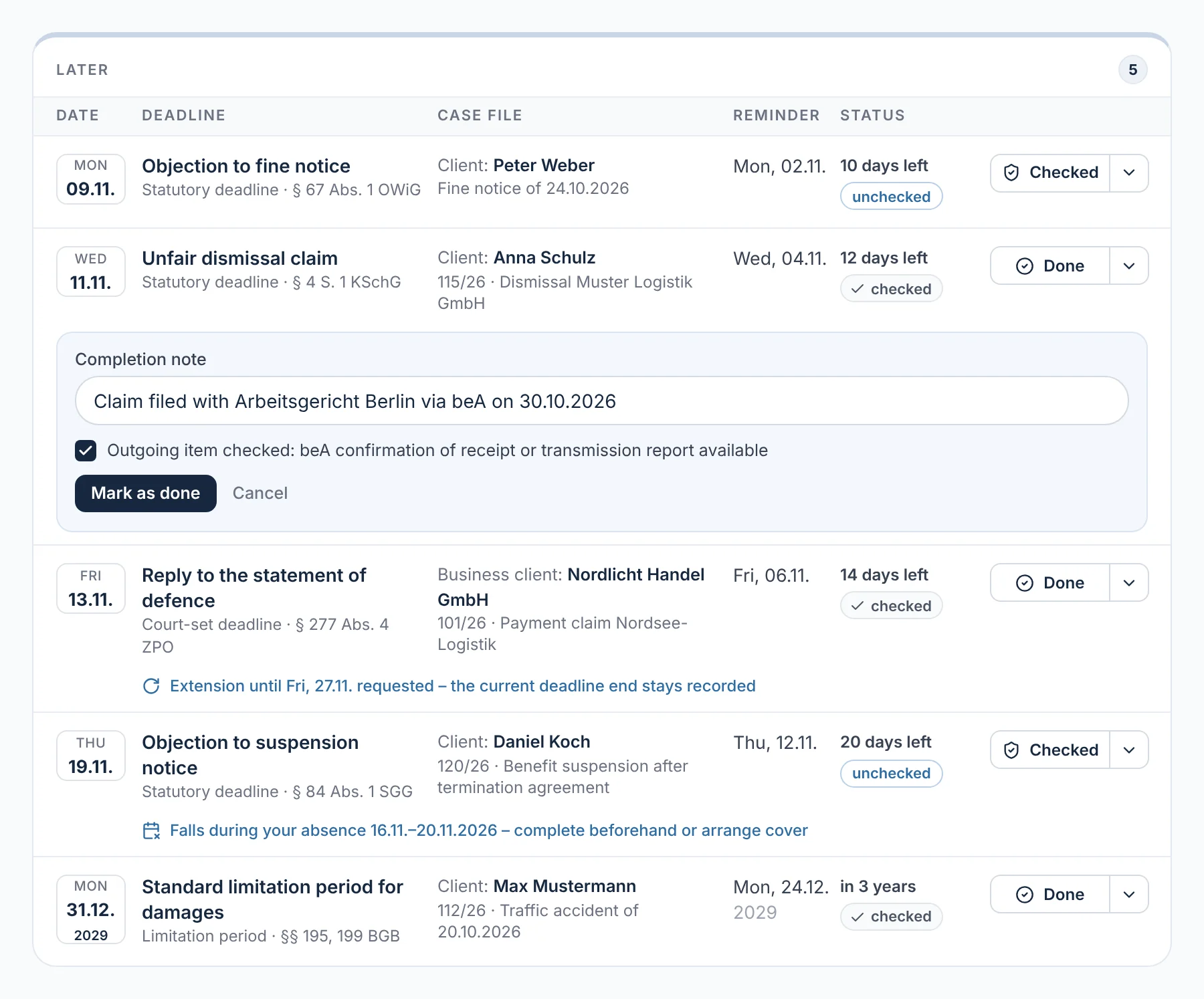
A deadline cannot simply be ticked off. ‘Done’ requires a completion note; for statutory (non-extendable) deadlines, statutory deadlines and court-set deadlines, you also tick to confirm that dispatch has been checked – for example via the beA receipt confirmation. Completed deadlines stay visible with their note and can be reopened. Deadlines are only cancelled with a reason – nothing is deleted.

  • Extension applied for? The old deadline end stays noted until it is granted
From everyday practice

The unfair dismissal claim for client Anna Schulz goes to the Berlin Labour Court via beA on 30 October 2026. Lawyer Max Meier notes this, ticks ‘Dispatch checked’ and clicks ‘Mark as done’.

rechtigo.de/anwalt/fristen
Screenshot from Rechtigo, lawyer view: Done only with a note and dispatch check
In the picture: Lawyer view: deadlines under ‘Later’ – the unfair dismissal claim of client Anna Schulz being completed, with completion note and the ‘Dispatch checked’ tick; below it, an extension that has been applied for.
Follow-ups

Follow-ups and tasks in their own tab

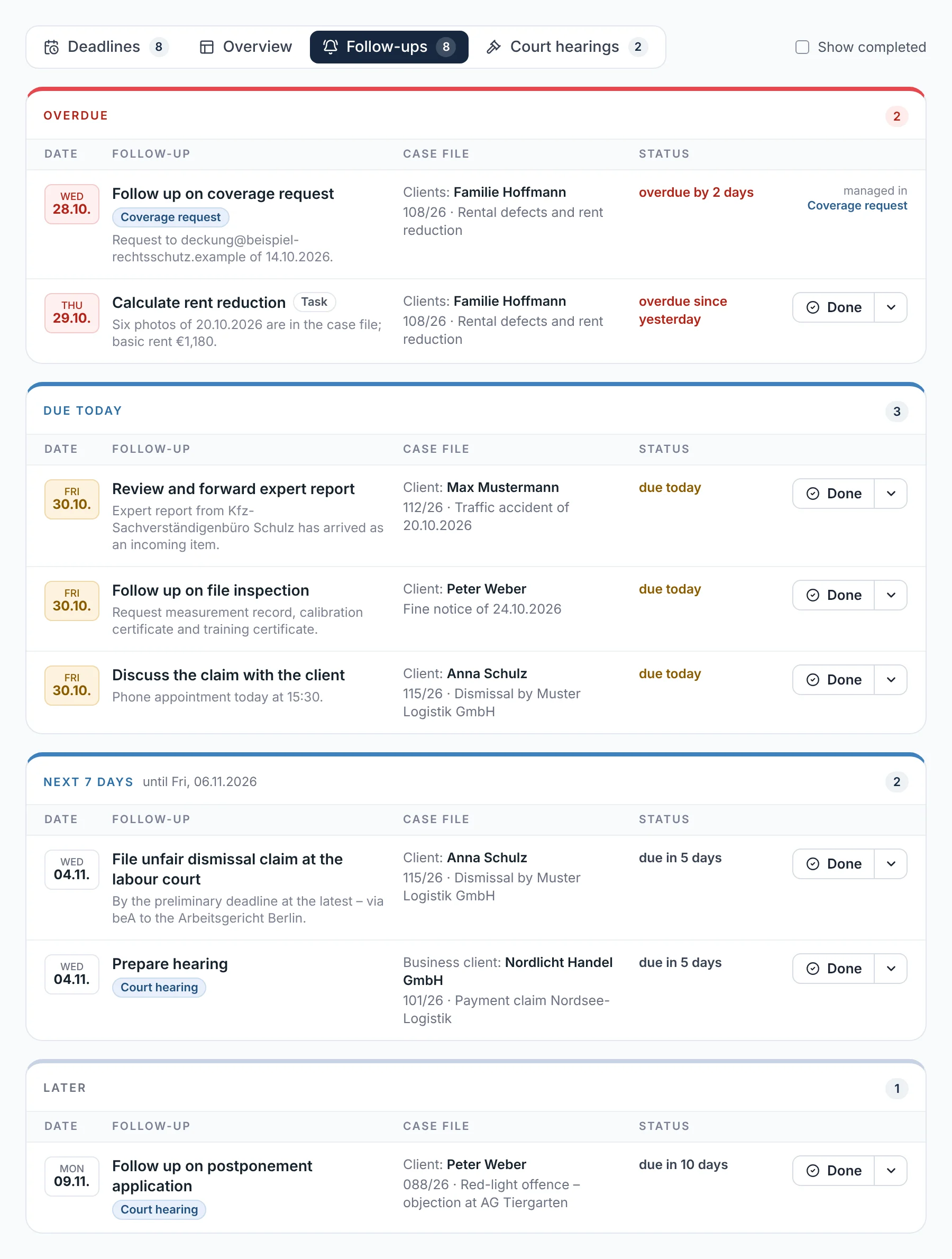
With ‘Add’ you create a follow-up or task in any case file – with suggestions such as ‘Chase reply from opposing party’ and the quick picks ‘tomorrow’, ‘1 week’, ‘2 weeks’ or ‘1 month’. In the deadline register, all follow-ups are in their own tab, separate from the deadlines, overdue ones first – ticked off with ‘Done’.

  • The source stays visible; anything that comes from the coverage request, you complete there
From everyday practice

For clients the Hoffmann family, ‘Chase coverage request’ is overdue – it comes from the case file's coverage request. In the next seven days, ‘File unfair dismissal claim with the Labour Court’ follows for client Anna Schulz.

rechtigo.de/anwalt/wiedervorlagen
Screenshot from Rechtigo, lawyer view: Follow-ups and tasks in their own tab
In the picture: Lawyer view: the ‘Follow-ups’ tab in the deadline register – ‘Overdue’ in red at the top, below it ‘Due today’, ‘Next 7 days’ and ‘Later’, each row with case file and status.
Court hearings

Court hearings with conflict check and application to reschedule

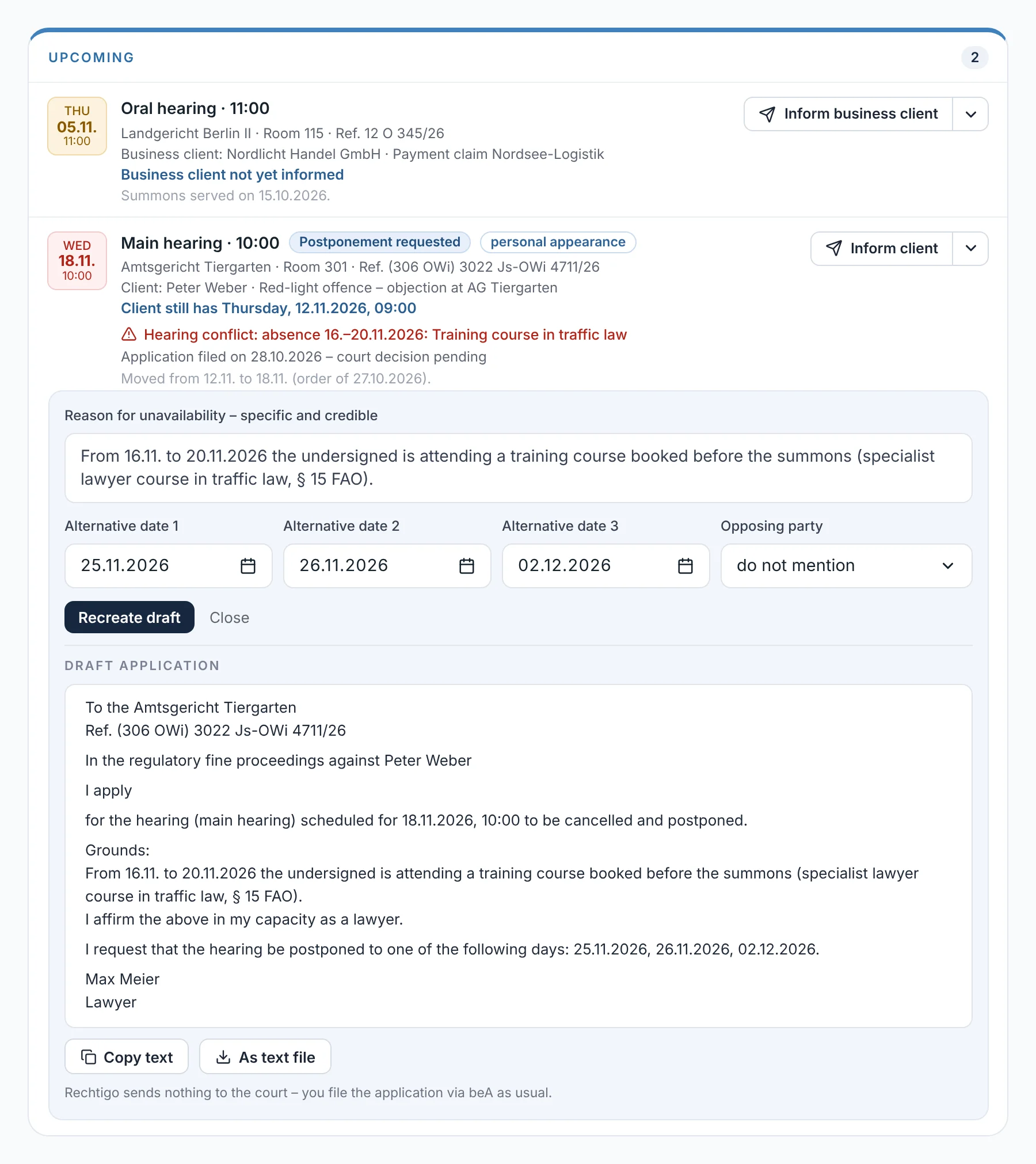
You enter court hearings with ‘Add’; from a summons in your incoming items, Rechtigo takes the date, court and file reference. If a hearing clashes with an absence, the card offers ‘Apply to reschedule’: you give the reason and alternative dates, and Rechtigo drafts the application. Rechtigo sends nothing to the court – you file the application yourself via beA.

  • A court hearing blocks your consultation hours, including travel time
  • ‘Inform client’ with a prepared text
From everyday practice

The main hearing of client Peter Weber is moved from 12 November to 18 November 2026 – right in the middle of lawyer Max Meier's training course. The card reports the clash; he filed the application to reschedule on 28 October 2026, and the court's decision is pending.

rechtigo.de/anwalt/gerichtstermine
Screenshot from Rechtigo, lawyer view: Court hearings with conflict check and application to reschedule
In the picture: Lawyer view: the court hearings – the main hearing of client Peter Weber clashes with your training course; below it, the draft application to reschedule.
Deadline sheet

The daily control printout

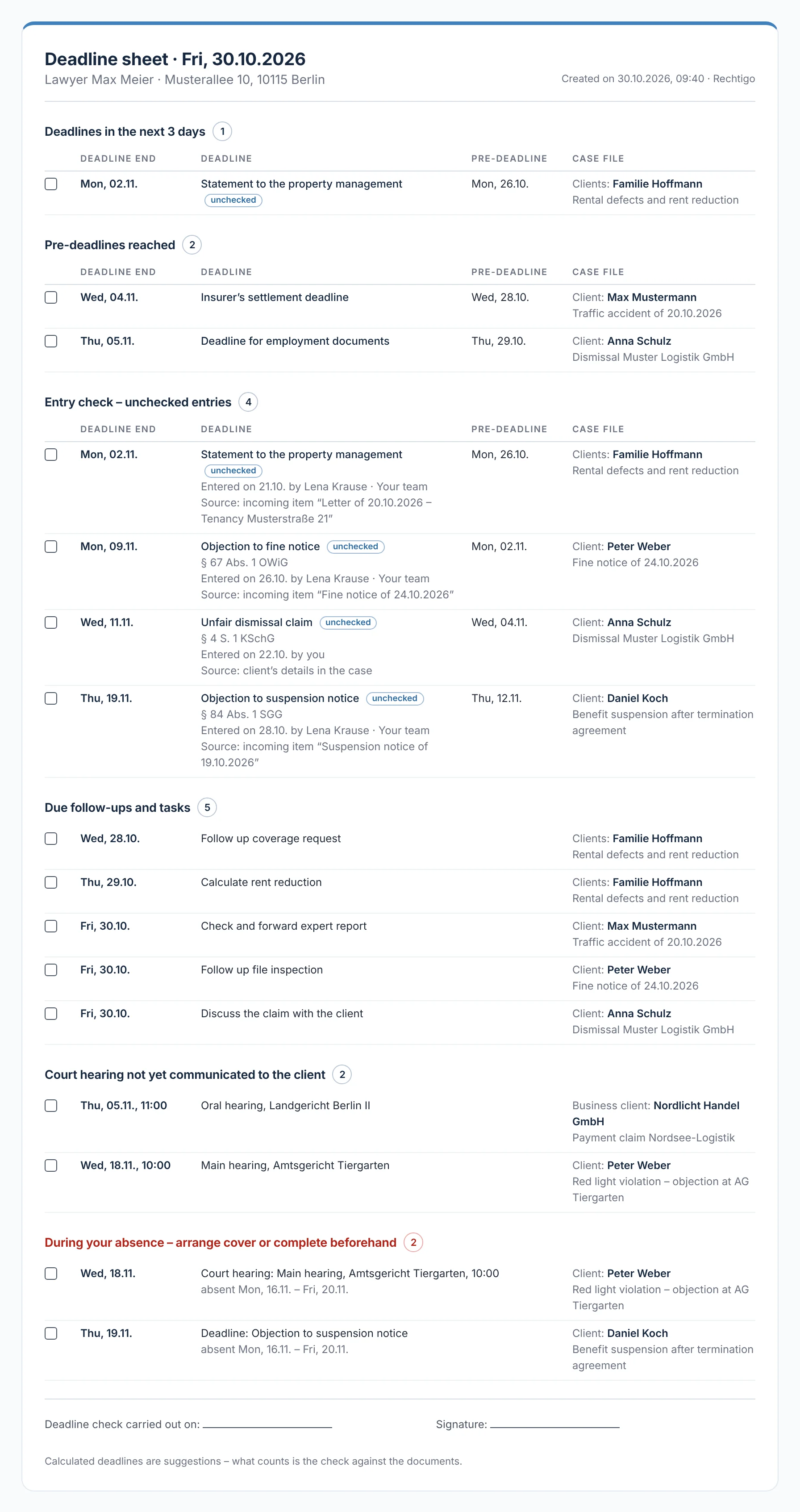
‘Print deadline sheet’ creates the day's control printout, each entry with a tick box: deadlines that have expired or end today or in the next three days, advance deadlines reached, unchecked entries, follow-ups due, court hearings today and tomorrow, court hearings not yet communicated and anything that falls during your absence. At the bottom are ‘Deadline check carried out on’ and ‘Signature’. If you wish, the sheet arrives by e-mail on working days at 6:45.

From everyday practice

The sheet for 30 October 2026 shows four unchecked entries and two that fall during the training course from 16 to 20 November. Staff member Lena Krause presents it; lawyer Max Meier ticks off every entry and signs.

rechtigo.de/anwalt/fristen/zettel
Screenshot from Rechtigo, lawyer view: The daily control printout
In the picture: Lawyer view: the deadline sheet for 30 October 2026, ready to print – each entry with a tick box, at the bottom the line for the check and signature.
More

Also included

Overview as a table

All deadlines with file reference, client v. opposing party, deadline end and status.

Advance deadline

Seven days before the deadline end by default – changeable in the settings.

Absence

If a deadline end falls during an absence you have entered, the deadline register flags it (§ 53 BRAO).

History per deadline

Extension, correction and cancellation – every step with a timestamp.

Expired deadlines

They appear in red at the top, with a prompt to check reinstatement.

Daily list

What is due today also appears in the daily list in the practice cockpit.

Case and case file
Client view

What your client sees of this

Your client does not see the deadline register. They learn about a court hearing through your message: the text from ‘Inform client’ appears as a message in their case file, along with an e-mail giving the date and time.

  • If the hearing changes, the card shows which version your client still knows
Questions

Frequently asked questions

Your question isn't here? Write to us at support@rechtigo.de.

Are Rechtigo's deadline calculations binding?

No. The calculation is a suggestion under §§ 187 ff. BGB and § 222 ZPO, with the working-day and public-holiday rule. What counts is your own check against the document – hence the entry check and the daily deadline sheet.

Which public holidays are taken into account?

By default, only nationwide ones. If the court or authority is in a federal state with its own public holidays, you select the state when noting the deadline; the preview shows whether this moves the deadline end.

Do deadlines and court hearings also appear in my calendar?

Yes, via the calendar subscription: open deadlines and advance deadlines as all-day entries, court hearings with the time. Your client only appears there with their first name and the initial of their surname – court, file reference and case title stay in the case file.

Can I also enter a deadline end manually?

Yes, with ‘Enter deadline end directly’. Rechtigo accepts an earlier end than calculated with a notice, but not a later one – in that case, check the date of service or choose ‘Custom deadline’.

What happens to deadlines if my client revokes the power of attorney?

They stay in your deadline register and on the deadline sheet until you complete or cancel them – even if you can no longer open the case file.

Founding programme

Join the waitlist now

Rechtigo costs from €99 a month, €0 per mandate; the first 50 lawyers per city start in the Founding programme with three months free.

Rechtigo launches on 15 January 2027 – we will let you know as soon as registration opens.