Skip to content
RECHTIGO
All features for lawyers
Case file from an incoming expert reportTraffic law workflow

New case file from the expert report

Expert reports from your partner assessors arrive via your Rechtigo address. If one matches one of your case files, it lands there. If it belongs to a new accident, Rechtigo prepares the case file, including letters – it is only created once you or your team confirm the mandate.

rechtigo.de/anwalt/akte/entwurf
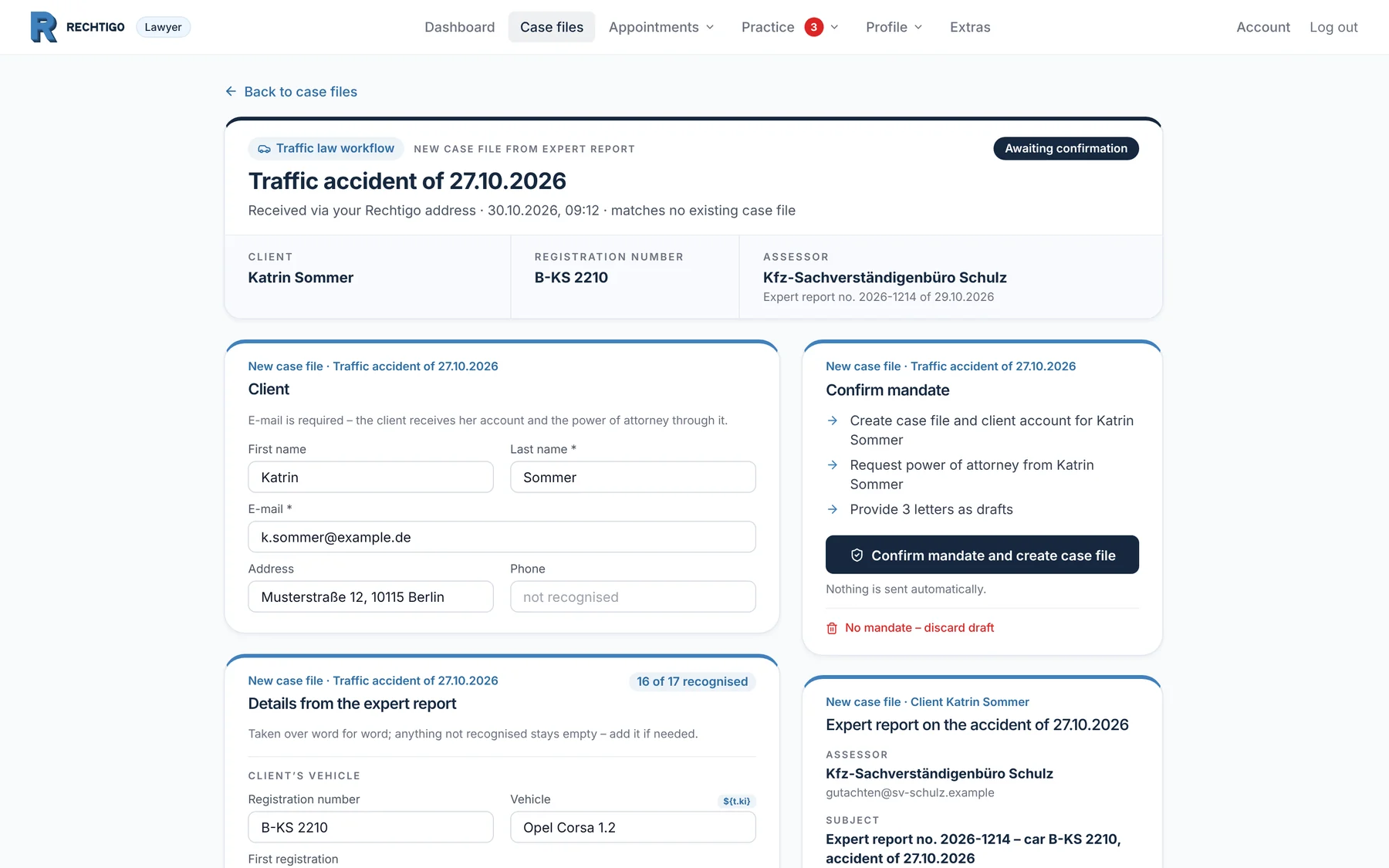
Screenshot from Rechtigo, lawyer view: New case file from the expert report
In the picture: Lawyer view: the prepared case file for the traffic accident of 27.10.2026 – at the top the new client Katrin Sommer, registration number and assessor; below, on the left her details, on the right ‘Confirm mandate’ and the expert report.
Process

From expert report to case file in four steps

  1. Step 1Assessor

    Send expert report

    Partner assessor Kfz-Sachverständigenbüro Schulz sends his expert report to your Rechtigo address.

    One address for all expert reports – not a separate one per case file

    Case and case file
  2. Step 2Rechtigo

    Compare with your case files

    Rechtigo reads the registration number, accident date and opposing party and compares them with all your case files.

    If registration number and accident date match: incoming item in that case file

    What it looks like
  3. Step 3Rechtigo

    Prepare new case file

    If the expert report brings new details, Rechtigo prepares a new case file as a draft.

    Draft with expert report and the letters from your work cycle, still locked

    What it looks like
  4. Step 4You

    Confirm mandate

    You or your team check the details and click ‘Confirm mandate and create case file’.

    Case file created, power of attorney requested – nothing is sent automatically

    What it looks like
Ongoing case file

If the expert report matches a case file, it lands there

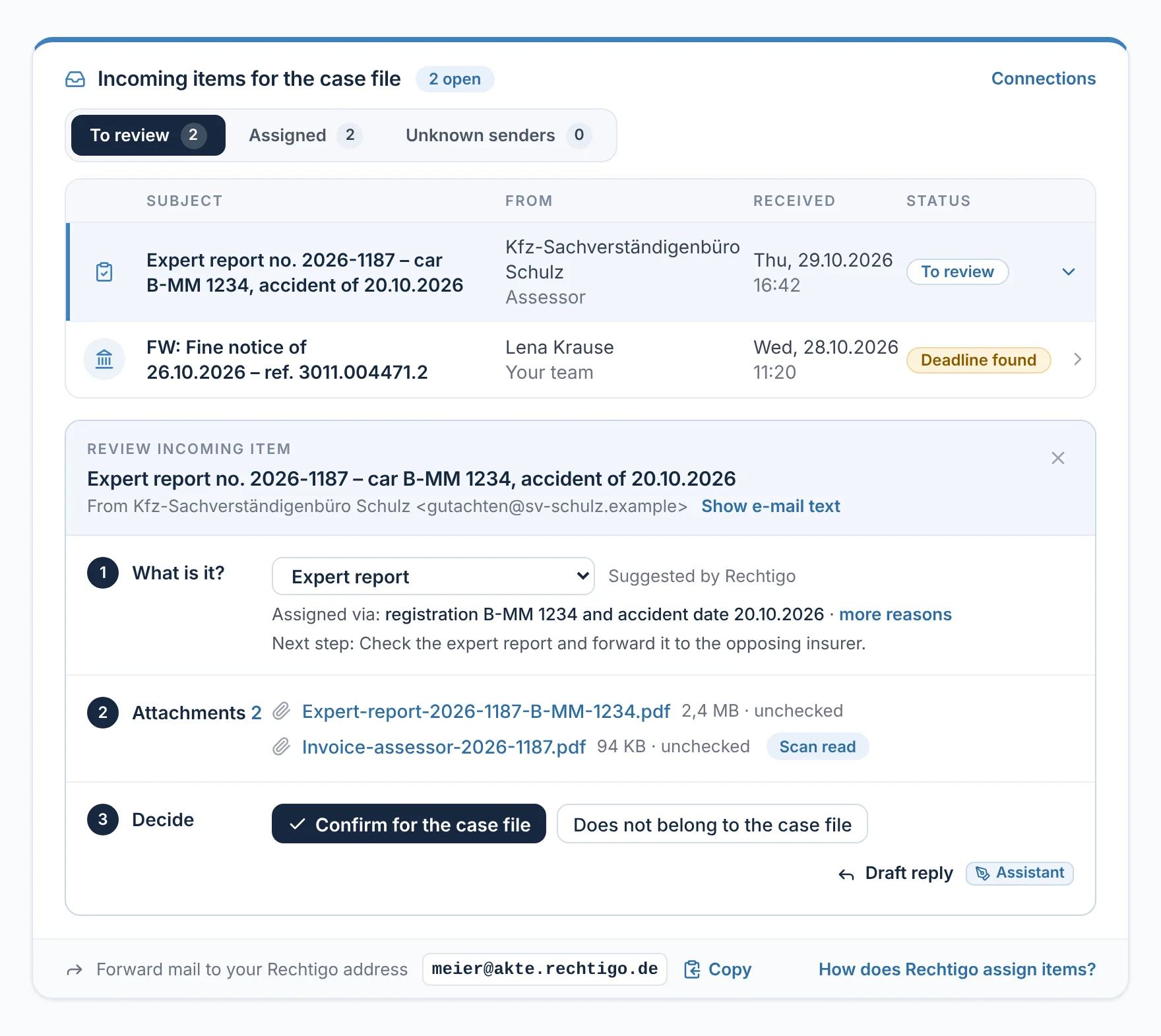
If registration number and accident date match exactly one case file, the expert report appears there under ‘To review’ – with the suggested type and the reason for the assignment. You check it like any incoming item and confirm with ‘Confirm for case file’.

  • No duplicate case files for the same accident
From everyday practice

Expert report no. 2026-1187 arrives on 29.10.2026 at 16:42. ‘Assigned via: registration number B-MM 1234 and accident date 20.10.2026’ – it is in the case file of the client Max Mustermann awaiting confirmation.
How to check an incoming item
rechtigo.de/anwalt/akte
Screenshot from Rechtigo, lawyer view: If the expert report matches a case file, it lands there
In the picture: Lawyer view: the incoming items for the case file of the client Max Mustermann – the expert report on his accident of 20.10.2026, opened: assigned via registration number and accident date, at the bottom ‘Confirm for case file’.
A new accident

The expert report on the traffic accident of 27.10.2026

Partner assessor Kfz-Sachverständigenbüro Schulz sends an expert report on an accident that none of your case files knows about: registration number B-KS 2210, accident date 27.10.2026. Step by step, this becomes the case file of the new client Katrin Sommer – from the case file list to the created case file.

Case file list

Two new case files are waiting – we open the one for 27.10.2026

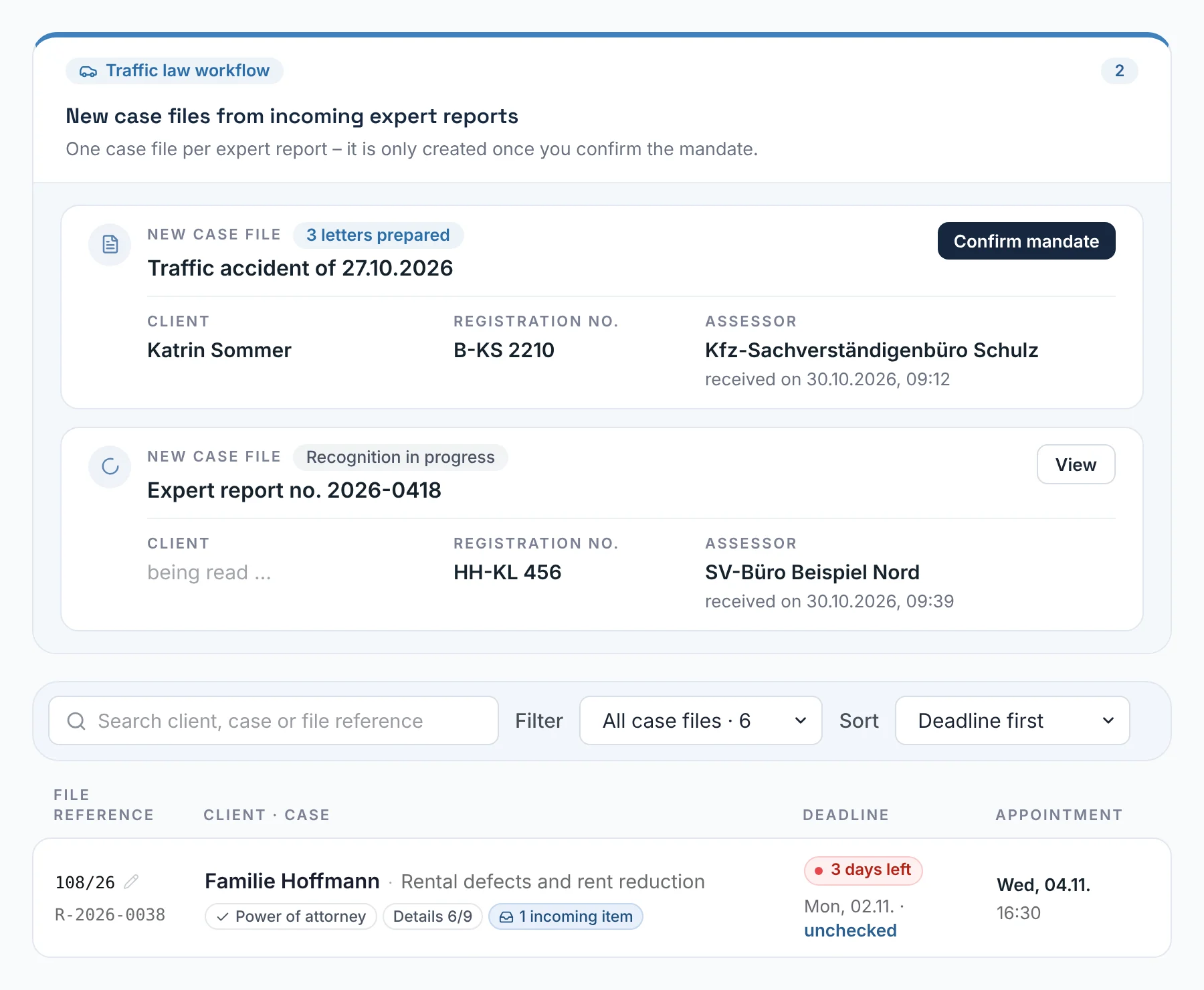
While a new case file is waiting for confirmation, ‘New case files from incoming expert reports’ appears above your case file list, labelled ‘Traffic law workflow’. Each expert report gets its own card with accident, client, registration number, assessor and status, such as ‘3 letters prepared’. In addition, you receive an e-mail: ‘New case file from expert report: … – please confirm mandate’.

  • Your staff also see the notice in their case file list
From everyday practice

Above the case file list there are two new case files: at the top the traffic accident of 27.10.2026 of the new client Katrin Sommer with ‘3 letters prepared’, below it an expert report on the vehicle HH-KL 456 that is still being recognised. Lawyer Max Meier opens the first one.

rechtigo.de/anwalt/akten
Screenshot from Rechtigo, lawyer view: Two new case files are waiting – we open the one for 27.10.2026
In the picture: Lawyer view: above the case file list, two new case files from expert reports are waiting, each in its own card – at the top the traffic accident of 27.10.2026, which is what the rest of this page is about.
The expert report

The expert report belongs to the new case file

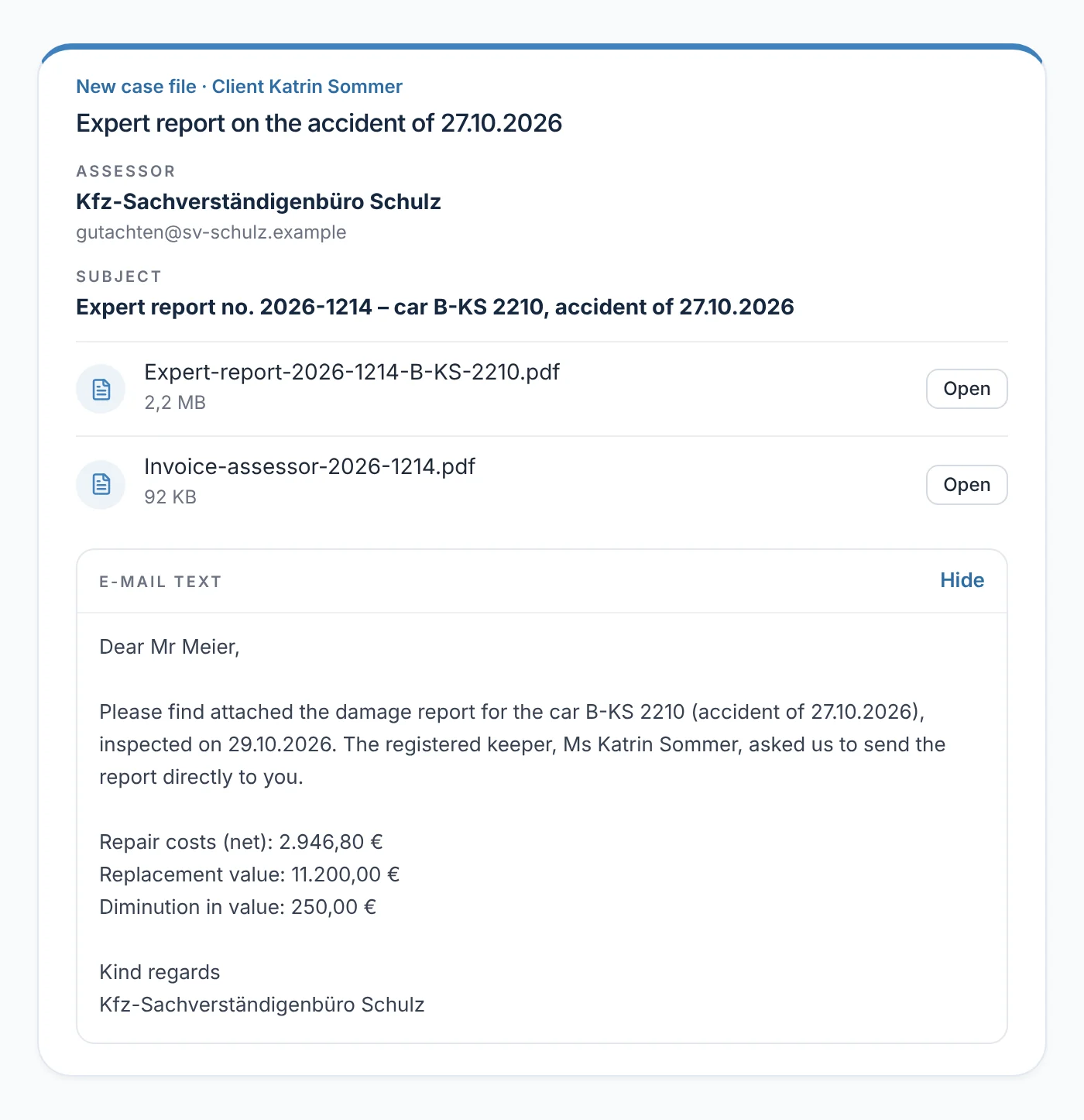
The expert report sits in the prepared case file, not in an existing one: as a separate section ‘Expert report on the accident of 27.10.2026’ with assessor, subject, the attachments and the e-mail text. Each section of the page names at the top the accident it belongs to. On confirmation, the expert report appears as an incoming item in the new case file.

From everyday practice

Partner assessor Kfz-Sachverständigenbüro Schulz sends expert report no. 2026-1214 on the car B-KS 2210 with an invoice. The e-mail text says that the new client Katrin Sommer asked for it to be sent to lawyer Max Meier.

rechtigo.de/anwalt/akte/entwurf
Screenshot from Rechtigo, lawyer view: The expert report belongs to the new case file
In the picture: Lawyer view: the prepared case file for the traffic accident of 27.10.2026 – containing ‘Expert report on the accident of 27.10.2026’ with assessor, subject, both attachments and the e-mail text.
Details from the expert report

New details? Rechtigo prepares the case file

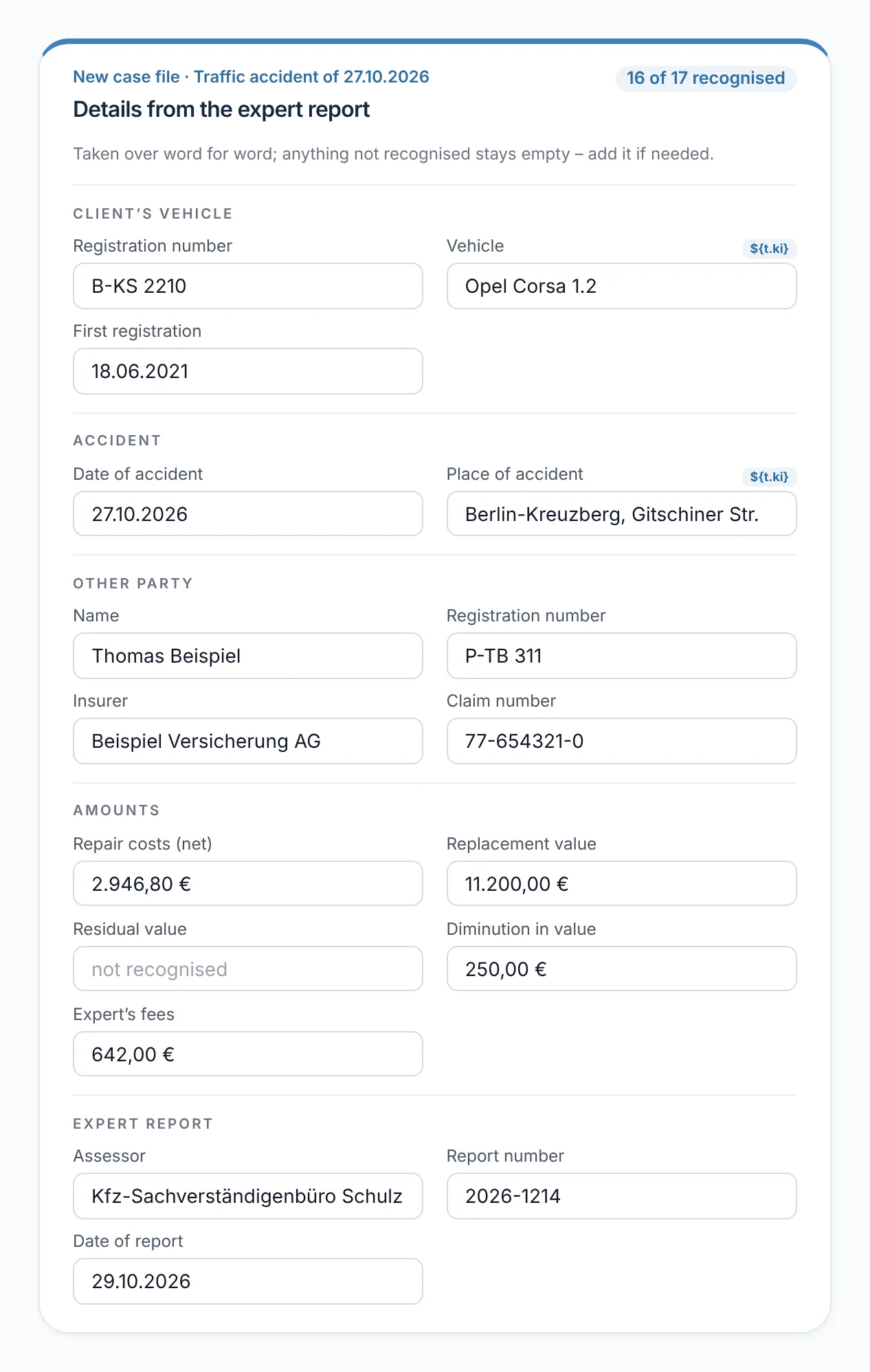
A different registration number, a different accident date or a different opposing party means: a new case. Rechtigo reads the details for it from the e-mail text and PDF, using fixed patterns and AI; every value from the AI must appear word for word in the expert report. The client is pre-filled too; her e-mail address is mandatory.

  • AI values labelled – AI only with a data centre in the EU
From everyday practice

The expert report gives the registration number B-KS 2210 and the accident date 27.10.2026. No case file matches – Rechtigo prepares the case file for the new client Katrin Sommer and recognises 16 of 17 details; only the residual value is missing.

rechtigo.de/anwalt/akte/entwurf
Screenshot from Rechtigo, lawyer view: New details? Rechtigo prepares the case file
In the picture: Lawyer view: the prepared case file for the traffic accident of 27.10.2026 – ‘Details from the expert report’: 16 of 17 recognised, the AI values labelled.
Prepared letters

Letters prepared – locked until confirmation

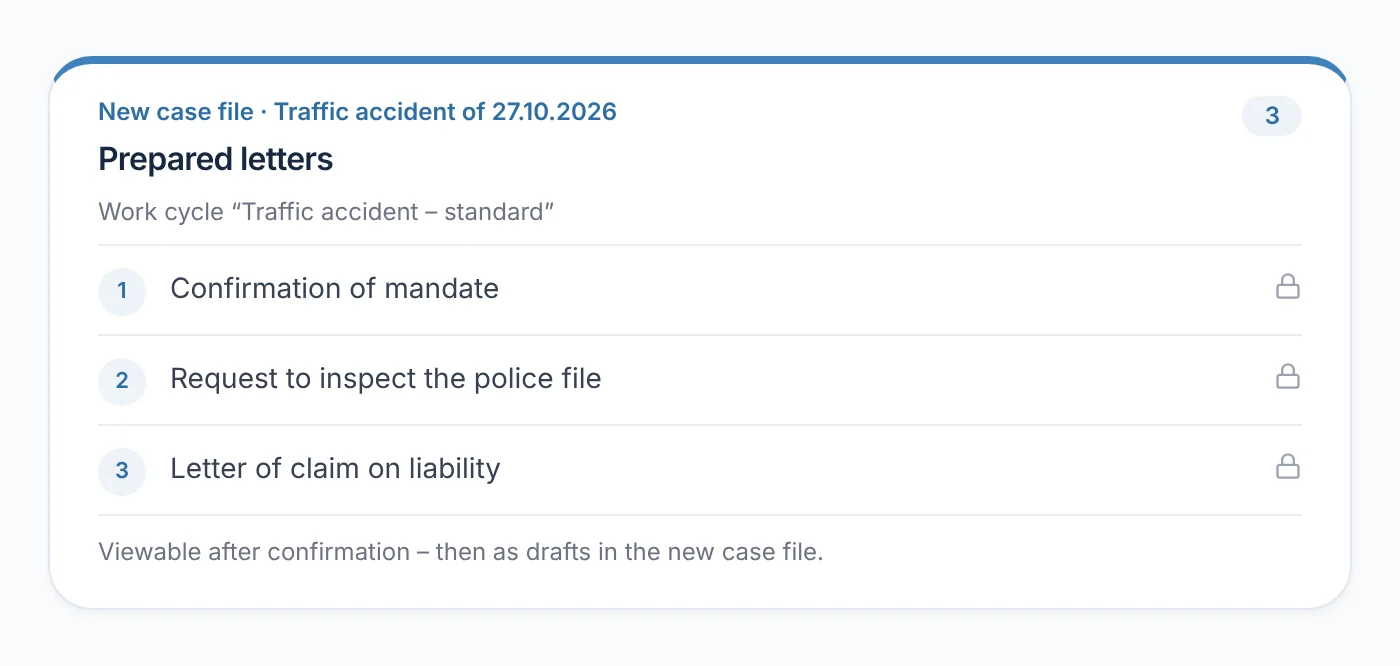
If your work cycle for traffic law has templates, Rechtigo prepares the letters in advance – with values only where they are supported word for word. Until confirmation they carry a lock: ‘Viewable after confirmation – then as drafts in the new case file.’ Without a work cycle, the case file is created without letters.

From everyday practice

From the work cycle ‘Traffic accident – standard’, three letters are ready for the new client Katrin Sommer: confirmation of mandate, request to inspect the file (police) and letter of claim on liability in principle – each with a lock.

More about work cycles and the Rechtigo Assistant
rechtigo.de/anwalt/akte/entwurf
Screenshot from Rechtigo, lawyer view: Letters prepared – locked until confirmation
In the picture: Lawyer view: the prepared case file for the traffic accident of 27.10.2026 – three letters from the work cycle ‘Traffic accident – standard’, each with a lock.
Confirm mandate

One click creates the case file

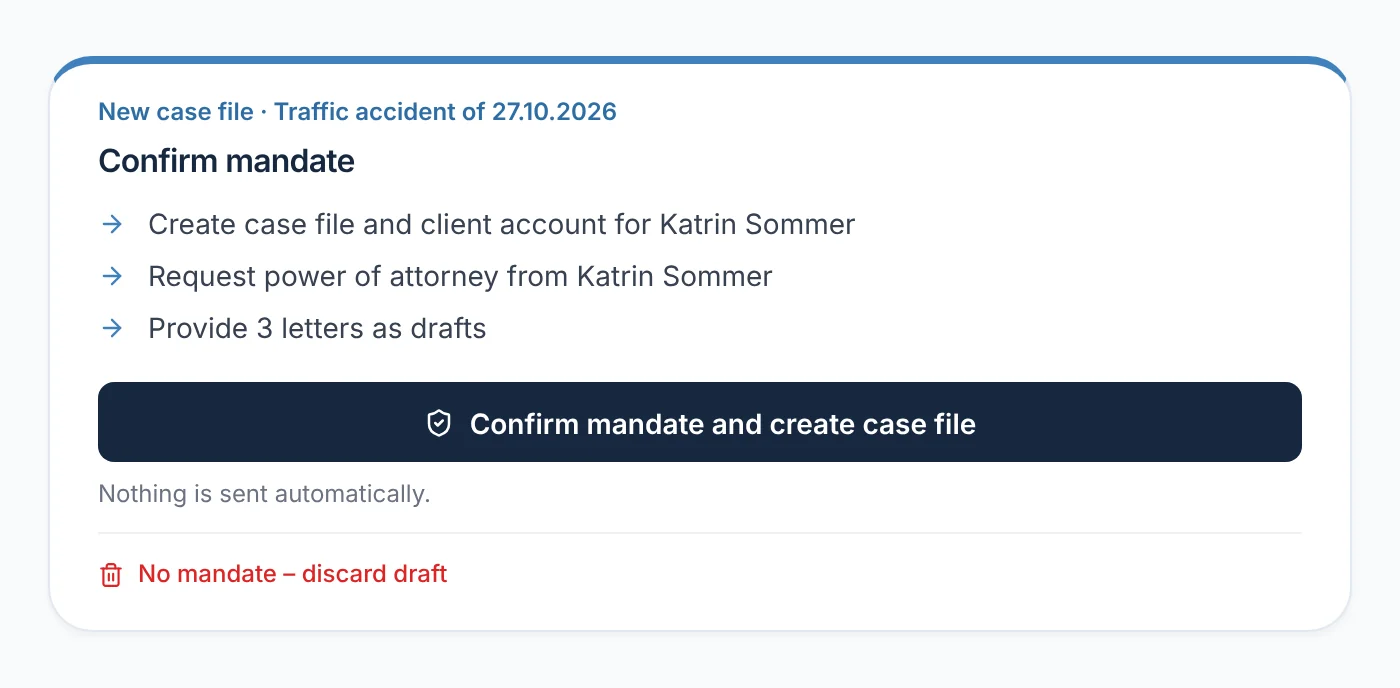
‘Confirm mandate and create case file’ becomes active as soon as the client's surname and e-mail address have been entered. The click creates the case file and client account, requests the power of attorney from the client and provides the letters as drafts. Nothing is sent automatically. You, the lawyers in your team and your staff may confirm – the case file always belongs to you.

  • No mandate? ‘No mandate – discard draft’, with a reason if you wish
From everyday practice

For the new client Katrin Sommer, staff member Lena Krause clicks ‘Confirm mandate and create case file’ while lawyer Max Meier is in court. The case file still belongs to him.

rechtigo.de/anwalt/akte/entwurf
Screenshot from Rechtigo, lawyer view: One click creates the case file
In the picture: Lawyer view: the prepared case file for the traffic accident of 27.10.2026 – ‘Confirm mandate’ with the three effects of the click, below it ‘No mandate – discard draft’.
Accident automation

After the power of attorney, your accident templates fill themselves

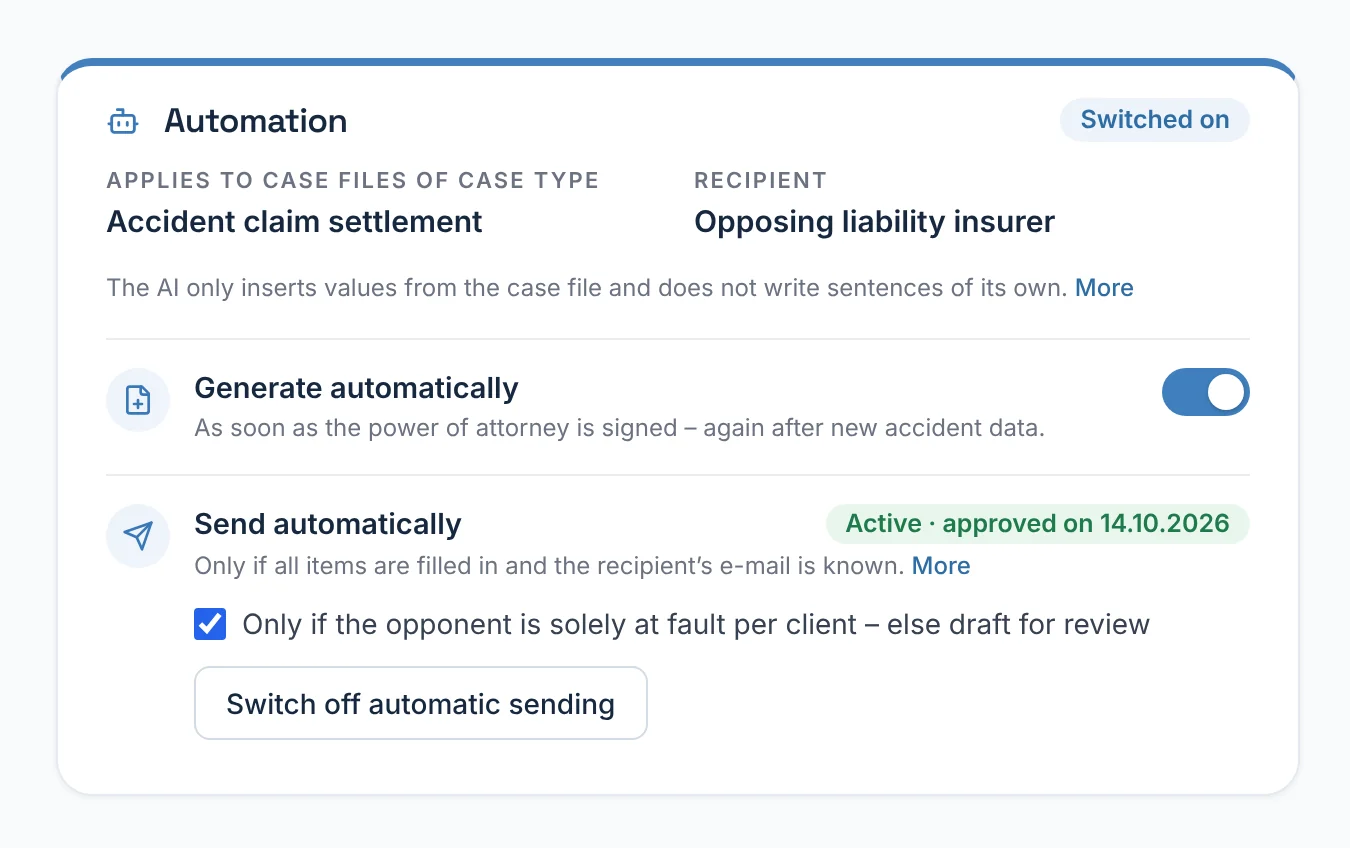
Every template has the ‘Automation’ card. ‘Generate automatically’ fills it as soon as the power of attorney for a case file with a matching case type has been signed. The AI only inserts values that appear word for word in the case file, and writes no sentences. You approve ‘Send automatically’ separately – for exactly this template text, with a log.

  • Only a letter without gaps goes out, and only to a known e-mail address
  • The approval lapses whenever the template is changed
From everyday practice

For case files with the case type accident claims settlement, lawyer Max Meier approved sending to the opposing party's liability insurer on 14.10.2026 – only where, according to the client, the opposing party is solely at fault; otherwise it remains a draft for review.

More about the Rechtigo Assistant
rechtigo.de/anwalt/vorlagen
Screenshot from Rechtigo, lawyer view: After the power of attorney, your accident templates fill themselves
In the picture: Lawyer view: the ‘Automation’ card of a template – generate automatically and send automatically, approved on 14.10.2026.
More

Also in the traffic law workflow

Accident data

Registration number, opposing party, insurance, claim number and police in one card in the case file – with help identifying the opposing party's insurer.

Payment recognised

If the insurer reports a payment, the amount appears on the incoming item – with ‘Check reduction’ and a task for you if there are deductions.

Client's assessor

The case file shows which assessor your client has chosen; you note there when the accident details have been passed on.

Client view

How your client experiences it

Before confirmation, your client learns nothing. Afterwards, they receive an invitation by e-mail, activate their account and sign the power of attorney on screen – after being able to read it in full.

  • The message history shows that you created the case file from the expert report and are asking for their signature
  • The invitation link is valid for 14 days
Questions

Frequently asked questions

Your question isn't here? Write to us at support@rechtigo.de.

Does my partner assessor have to use Rechtigo?

No. They send their expert report by e-mail as usual, just to your Rechtigo address; they don't need their own account for this.

And assessors who aren't set up in Rechtigo?

Their e-mails wait under ‘Unassigned incoming items’ until you assign them. If you forward an expert report to your Rechtigo address yourself, Rechtigo checks it in the same way.

What happens to a value the AI has misread?

A value that does not appear word for word in the expert report is discarded and flagged as a notice. You check and change all fields before confirmation.

What if my client already has a Rechtigo account?

Then the new case file goes into their existing account, recognised by the e-mail address. They log in and sign the power of attorney – they don't need a second account.

What happens if I discard a draft?

Then neither a case file nor a client account is created, and your client receives no e-mail. Rechtigo deletes the prepared letters; the draft remains recorded as discarded, with your reason.

Founding programme

Join the waitlist now

Rechtigo costs from €99 a month, €0 per mandate; the first 50 lawyers per city start in the Founding programme with three months free.

Rechtigo launches on 15 January 2027 – we will let you know as soon as registration opens.